Home Marmoset
The BRAWL² Tournament Challenge has been announced!

It starts May 12, and ends Oct 17. Let's see what you got!

https://polycount.com/discussion/237047/the-brawl²-tournament

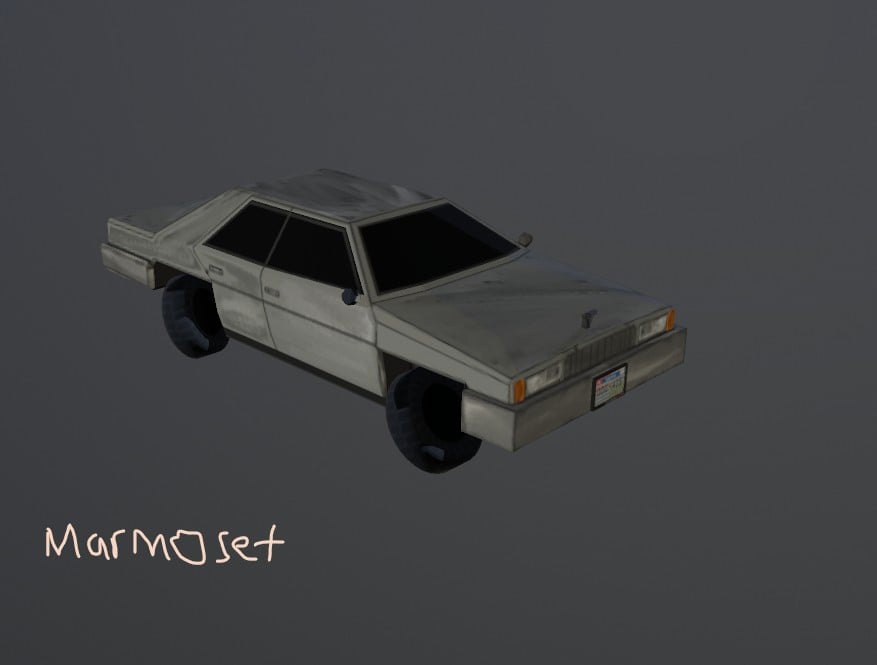
Why does my model look like this?

SeanWink
polycounter lvl 8
Offline / Send Message
SeanWink polycounter lvl 8
I tried recalculating the Normals in Blender but it still won't change. I took the Right wheel duplicated it and flipped it in order to get the left wheel which is "messed up". In Blender I don't have this issue, but in Marmoset I do.
 

Replies

  • Celosia
    Offline / Send Message
    Celosia greentooth
    - The quickest way to make sure normals are pointing the right way is to turn "Face Orientation" on in the Geometry > Show Overlays menu of the viewport in Blender. It'll highlight anything flipped in red. I'm under the impression the original tires have flipped normals, so when you flip the mirrored tires to match them then all of them get flipped the wrong way instead that in the correct way.

    - If you created anything using modifiers you can try to apply them manually before exporting because sometimes a few might not apply correctly when using the auto apply option in the exporter.

    - Also check if Blender and Marmoset are using the same Y direction. I don't remember for sure and am too lazy to check, but I think they use different Y directions. In that case you have to flip the green channel of any normal textures.

    - For something like tires I'd probably use a mirror modifier, arrays or geometry nodes to mirror them instead of doing a negative scaling by hand. They're non-destructive and save you from the hassle unflipping normals.
  • SeanWink
    Offline / Send Message
    SeanWink polycounter lvl 8
    I had to turn off "cull backfaces" in Marmoset. Seeing you say they don't have the same Y direction made me remember this. Idk if that has to do with Y direction.
  • Fabi_G
    Offline / Send Message
    Fabi_G godlike master sticky
    Hi! If that 'fixed' the issue, I think it points to inverted normals. I would check the way Celosia suggested (enable Face Orientation in Blenders Viewport Overlay).
  • Eric Chadwick
    Y direction is about the overall world axes, which way the XYZ axes are pointed in the 3d application. You can read a bit more about that here http://wiki.polycount.com/wiki/Coordinate

    Blender by default has the Z axis facing up, if I'm not mistaken. 
Sign In or Register to comment.