Search
-
Re: Maya jTools
 Well, I've suspected something like that - they're a bit confusing from the beginning, and i probably need to make some more informal introduction into these tools. Let me then introduce myself first: my name is Alexander "Joss" Khalyavin, i'm Maya tech artist/developer with ~16 years of Maya experience. Autodesk Maya…
 -
Re: Maya Script for custom editing vertex normal
 I got you buddy :smile: Select any number of face vertices, the first being that which you want to copy from. Run the MEL script below. This will copy the normal direction from the first face vertex to all other selected. Code is commented so you can see what I'm doing to get there. Hope this works for you :) //Enables…
 -
Re: The Bi-Monthly Environment Art Challenge | January - February (100)
 @elfennani Cool update! I think the render is currently a bit too dark and low contrast. To counter that, you could try increasing the light's intensity and make sure that the values of the albedo textures are not too dark (use values of processed PBR scans as a reference?). Additionally, light could come from offscreen…
 -
Re: Can I get some 3ds max to Modo tips?
 Re: tools most tools are by default click to activate. You can change tools to auto-activate though, so simply selecting the tool will make it active. This can be done from the tool pipeline, which by default layout is on the right hand side under the "lists" tab. That's also a good way to check what tools / constraints…
 -
Re: Discussion: Increasing your speed with highpoly hard-surface modeling
 For those that use Maya, here's a script I wrote a while back that does the same thing: //name: QuadConnect//by: PolyhertzstartQuadConnect;global proc startQuadConnect (){global string $curObj[], $vrts2Tweak[];string $origList[];$origList = `ls -sl -fl`;$edjList = `filterExpand -ex 1 -sm 32`;polySplitRing -stp 2 -div…
 -
Re: Normal Tools for Max Released

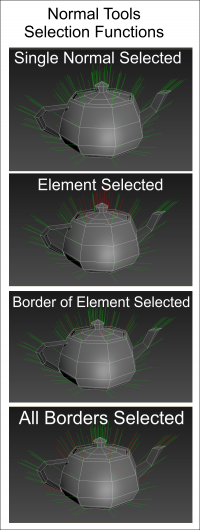 Eric asked me to load some images for Normal Tools. Here are some of the graphics that explain some of the tools. Clicking the image should load a larger version. Selection Functions: you can select all Border Normals. You can also force a sub-selection of currently selected normals to filter out non-border normals. There…
 -
Re: Learned Maya, Learning Max...
 I'm the one who learned Max and now learning Maya for my job too~ Maybe I can help you something, my job is focus the modeling path~ So I only tell about the different between modeling path and some basics~ And I'm using 3dsMax 2011 & Maya 2008 to telling the difference~ So maybe some of my advices are already outdated due…
 -
Re: turboTools v1
 I hope you don't mind but here are some code snippets for tools I use frequently and collected or wrote over the years. * single click turbo smooth swap (on \ off)function switch_turbosmooth obj=( for o in obj do if superclassof o == geometryClass do ( for mod in o.modifiers where classof mod == turbosmooth do( if…
 -
Re: symmetric poly work
 --globaleqazxsw2_symmetry_undo = "MySim"qazxsw2_symmetry_auto_axa = undefinedstruct sym_vert(index,simetric )fn baga_index_de_mesa_scoate_index_de_uv mesa index canal =( vertecsi_de_pe_fete =#() fete_cu_vertexu = (polyop.GetFacesUsingVert mesa index) unde_pe_fete_cu_vertexu =#() indecsi_mapare = #() rezultat = #() for f in…
 -
3D Animated Explainer Videos for Product and Services | Studio [For Hire]

 Blender Head Studios – a 3D Animation & Asset Creation Studio. I’m a 3D Generalist running Blender Head Studios, a small studio focused on real-time friendly, production-ready work. What I do * 3D product & service explainer animations * 3D education & training videos * 3D asset creation for games, VR/XR, and real-time…
>15386 results