Search
-
Re: We Need Beta Testers for iPisoft Kinect Studio.
 Ive used Unity, SO I can help you. Put all yo ur animations in one folder called TrollANimations The Name one of the FBX files "Troll.Fbx" inside that folder. From then on use this naming. Troll1@Troll.FBX naming conventions. So your Troll folder would look like Troll.Fbx Troll1@Troll.FBX Troll2@Troll.FBX Troll3@Troll.FBX…
 -
Re: GameTextures.com - It's like CGTextures, but for video games!
 Rome wasn't built in a day Seaseme, and I think it's impossible to know what is right until you've got it wrong. I'd just spend 5 minutes going through a few PSD's each, maybe have a round of comments if anyone has some major issues with anything, then put them up for download with a clear 'comments' section on the page…
 -
Re: Bake groups in Marmoset Toolbag
-
Re: Solved: DDO - Material Browser, Extremely slow!
 Did you clean all folder structures manually, after deinstallation? Some settings in files are corrupted can cause this. Personal folder, like appdata and soon.
 -
Re: Marmoset Toolbag 2 output?
Oh wow, that was simple. Is there a way to select a folder and set it as default? Because right now I'm selecting that folder each time I open the software -
Baking Problem in SP (Modelled in Max)

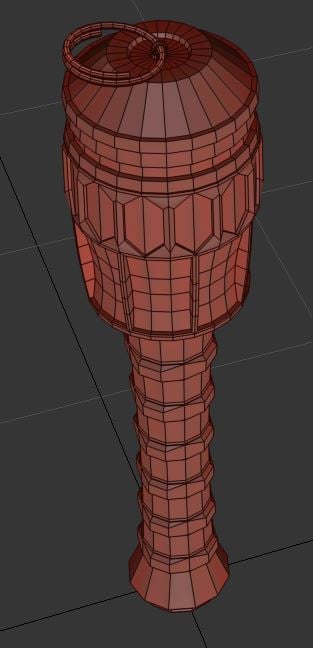 Hi guys. I have a problem. Experienced Max user here, and I was making a little stick grenade, just as a portfolio piece. Trouble is, I cannot for the life of me ge it to bake properly. Shown below are the low poly and high poly, along with the object names. The head section of the high poly has been split into multiple…
 -
World Machine for High Quality Alphas
 Hi Guys, Since using World Machine for the past year, I've discovered how powerful it can be for generating alphas. Not for terrain, but for environmental surface details. Typically it's thought of for terrain generation. Indeed, it does a good job at that. But digging deeper you'll find it's a powerful procedural noise…
 -
Re: Created a Custom Texture with height info How Can I Export this as a Material? (Substance Painter)
 If you just wanted to make a smart material, throw all the layers/folders into one Parent folder and right click it. Theres an option called Create Smart Material
 -
Re: ZBrush Custom UI Showcase
Thanks Cryrid. That was the problem I think. I just copied all the custom materials into both the Materials folder and the Zstartup Materials folder. Seems to work ok now. -
Re: Windows 7: Thumbnails won't show
 scourgewarper This setting are not in folder options (actually this is may bad, sorry for this) them are available in explorer options. Press Alt and will appear explorer menu then select Tools -> Folder options...

>11633 results