Search
-
Re: Normal map baking artifacts
 There are a couple of threads on normal mapping on the technical talk forum that helped me a great deal in understanding what is going on. This is a huge topic, and a lot to take in. It will take time to figure out how things work, why you should do things in certain ways, and how they relate to Blender.…
 -
Re: Trying Blender
 Messing with this some more today, have a few questions: -Is there any way to cull or change the shading of backfaces in the viewport? -Paint/Raycast select, how's it done? Everywhere I look says press "B" twice, but that doesn't do anything. -Is there a normal "select only" mode? Not a fan of the always on…
 -
Re: Charmed House (Halliwell Manor)
 Hey Brent, Nice work with the scene, it's definitely coming along really well. There's a couple of critiques I'd like to put out for you that will hopefully improve the scene. - Chamfer the edges of the wall corners, there's a really sharp edge between a lot of them and it's kinda telling that it's still CG and you could…
 -
Re: Medieval Scabbard Model Questions
 Usually when making that kind of belts and straps i use single sided polygon/quad detached from orytinal mesh as a copy. Then going into the edge subobject mode and extruding selected edge using move tool while holding shift. It require some time to complete depending on the complexity of the belt. Using also rotate and…
 -
Re: My attempt at Phillip K's Tutorial.
 damn opening attachments eats my post... again. I like the detailing on the edges, I like that the spec cuts through the grime on the edge, that's always a nice effect. Be careful of converting the diffuse to a spec map. The orange is going to be less glossy than the rest of the piece, which could be on purpose, might be a…
 -
Re: UDK modular seam problem
This is super important right now. The normals on the edges of your tiles aren't matching. You can fix that by changing the smoothing, unwrap the object so the UV seams are the tile seams. Typically you wouldn't have depth in your tiles they would be more or less flat planes, why create depth if you're going to cover it… -
Re: Galactic Warfare assets (CoD4 MOD)
 thanks for all c&cs. lol, i really was relaxed when i did this one:) Me I am usually all about optimizations since i mostly work with handheld, but this time i definitely should have been chilling hehe. rasmus - it actually has most of edges with normals that give smoothed edge effect which works well, but probably the…
 -
Box to Sphere chamfer in shader - how to Normal Map?

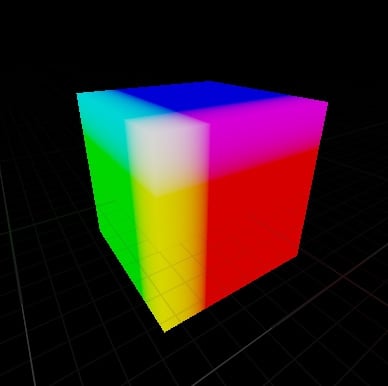 I can chamfer any mesh inside the shader by using world position, this world position can then also be used for the normal simply by transforming it from world to tangent space. But the problem is how can I make use of the normal map texture without it being completely wrong and is that even possible? Here is how it works,…
 -
Autodesk 3ds Max Maxscript: Convert Object Position To Proper Bytes For Hex
 Hello. I'm deciphering the model structure for an old video game so I can see how my models look in the engine's hardware. The structure uses 6 bytes for a single vertex. Each vertex has 2 bytes for each axis. The vertices are as follows: the first byte takes a value of 255 to make a whole number of the second unit, while…
 -
Correcting Normals and Smoothing Groups in Quixel
 Hey there I am currently learning to use Quixel Suite 2.0 and am hitting a little snag when it comes to Normals and Smoothing groups. I was working on a model sword and its textures in 3ds Max Design before importing them into Quixel Suite 2.0. After import I noticed a little splotch on my sword in the 3do previewer. (Can…
>27985 results