Search
-
Re: Junk Air Tugboat - WIP
 ^ That's good advice. I think the metal panels are looking too similar. Like you extruded sets of polygons all at the same distance and bevel. I would also have most of the metal panels as separate meshes (as they would be separate metal panels in real life).
 -
Re: old damged safe prop
 First of all, you should remove all "hair" like Scratches from your normal map, right now it reads like Fibber glass with sand on it, how many polygons you used on it? and i would dearly recommend that you make a proper UVmap for it ;)
 -
Re: Bioshock Inspired Lounge
 Hmm.. I'm a bit confused. Do you know what triangles and polygons are? And the difference between them. Cause it still looks like you just toke the edges away from that door leaving a bing ngon. Did you split the two meshes up?
 -
Re: My Very First 3d Game Character
 Thank you for you feedback Shyralon, that's a really good advice! Do you suggest to add more polygons to the eyelids to define more that area or I am actually missing something I'm not able to see because of my unexperience? Thanks again for your help!
 -
Re: Reallusion's 3D Character Design - Space_3D

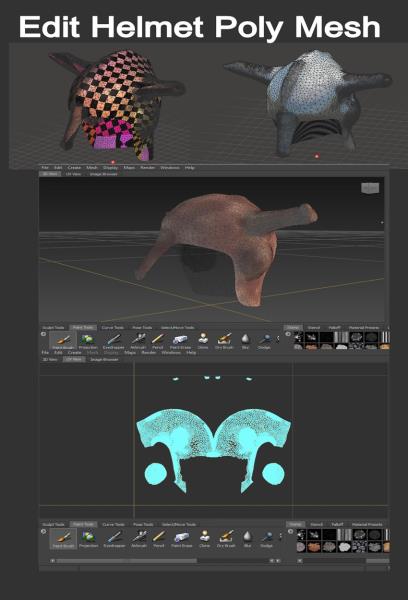 Reply by Space_3D · · Home› Contests & Challenges Archives› Reallusion's 3D Character Design Contest 2016Then , i see helmet carefully . So .... need evaluated on polygon mesh. Now , i need software for edit " Helmet Lady Warrior " in this case ---------> repair model sculpt ( i use Meshmixer from Autodesk ) then bring to Autodesk Mudbox for more detail. This look on progress
 -
Re: Aerotrooper - Zbrush Experiment (WIP)
 @michaelmilette Actually, this model doesn't have UVs. I'm using Polypaint, which assigns a color and material value per polygon, versus pulling from a map. My next step is to retopologize it for the low poly and bake the poly paint info into the diffuse and spec maps.
 -
Re: Freelance 3D modeler
Thanks guys for your contact. Very talented you are and excellent work I saw. Good job. I have selected some of those and some I kept contact for some other jobs. Now looking for some Indian or Pakistani for polygon and sculpting modelers. Thanks. -
Re: Maya subdivisions
 @throttlekitty Hey, One more question when I use smooth preview I have my vertex boundary set to sharp edges and when I click on smooth mesh preview to polygons it uses the vertex boundary sharp edges and corners anyway to fix this?
 -
Re: what is the difference between game and film for an 3D Artist?
 in movies There is no such thing as too many polygons!* You get to use displacement maps in place of normal maps No compensating for rendertime* in terms of software, Mari in place of Substance painter Vray in place of Marmoset Toolbag * - within reason. DON'T make 10 iterations of Turbosmooth on a spoon
 -
Re: Need help, model not texturing correctly (Maya)
 I agree; In your UV Texture Editor select your mesh and check under UV Sets if you have more than one entry. If you do, in your UV Texture Editor go to Polygons>Copy UVs to UV Set and choose map1.
>10648 results