Search
-
Re: How to make good lowpoly UV?
 Yeah the Blender UV editor is robust and easy to work with. @Onmioji, when you press 'w' in the Uv editor, you'll get a pop up menu with options to 'Align' the UVs on either the X or Y axis. When you select a row of verts you'll be able to use those commands to line them up perfectly straight vertically or horizontally,…
 -
Re: [WIP] Forklift - Critique
 This reminds me of Shenmue, one of my favorite games as a kid. About posing the Unreal mannequin, just select his joints and move/rotate them. If you cannot see the joints, go to shading > xray joints. By defualt joints have higher selection priority than surface objects, so just click or drag select and they'll get…
 -
Re: On making panels on hard surfaces workflow

 If I want to separate the mesh into more objects, I usually Chamfer the edges in Edit Poly and then ad the reinforced edges. And depending on the model, I decide how many Chamfer segments to ad. There shouldn't be any gap, since the vertices in the middle are snapped together, and the reinforced edges keep them in place.…
 -
Re: vertex colors vs bitmap texture - cost/performance considerations?

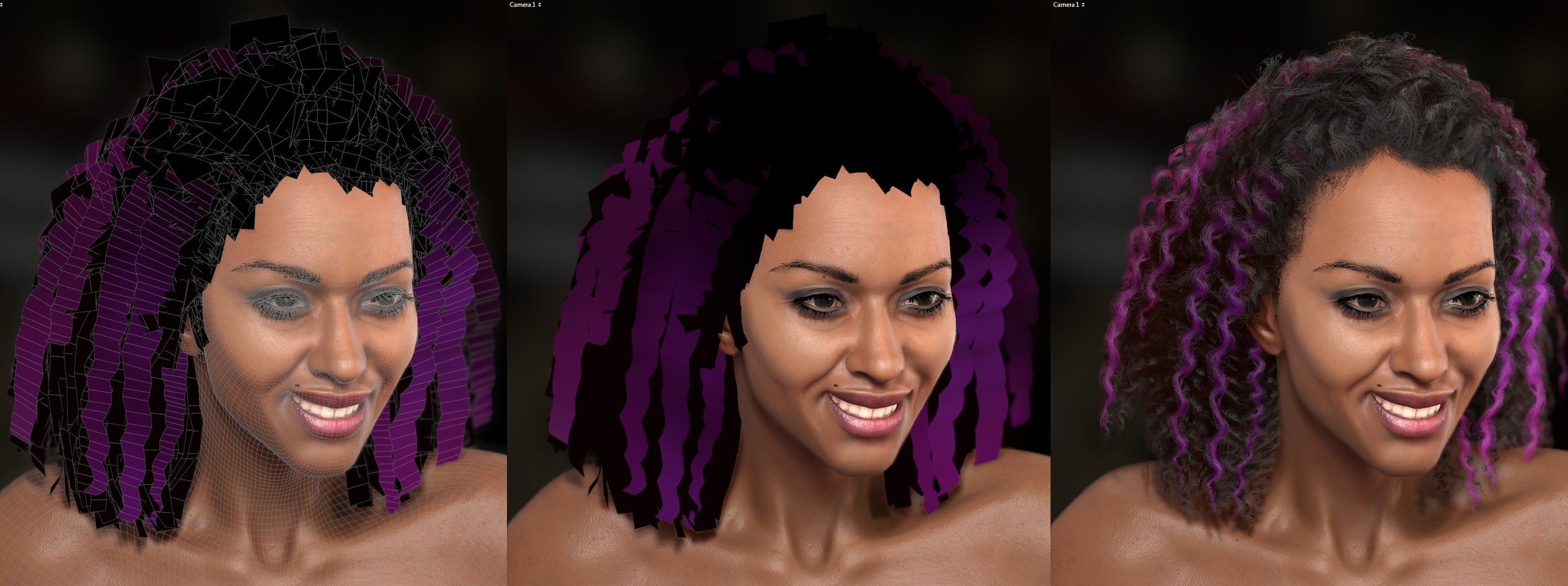 some points that were mentioned to me that would aid in discouraging the use of this method are cases where the vertex color channel is already blocked for masking effects like strand movement or in the event where the mesh needs to be reused on different characters in the same scene but you want to have unique haircolors…
 -
Re: (UE4) Desert Planet Environment - "First Contact"
 Looking really nice, love the atmosphere. The mid-ground cliff is still looking a little dark/over saturated to me, seems like there would be more bounced lighting from the directly lit sand under it, or maybe the albedo itself is a little too dark? It may be nice to break up some of the verticality of the composition…
 -
Re: The M I R A G E effect [Help]
 Take the for product of the blue channel of the camera vector and the vertex normals. This should give you a fresnel that only works vertically. From here, you want a road normalmap that has the waves. To make it happening only in the distance, you can use pixel depth. Then lerp between 0 and 1 metallic based on the mask…
 -
Re: "Unknown, Secret Laboratory" from Street Fighter IV Reinterpretation
 Great start on this man. Minor gripe- those wires look a bit odd to me, as wires that go vertically tend not to have as many kinks and bends in them due to gravity, unless they're stiff and bent out of shape. Also can't help but feel that there's more potential for detail, I know the source material is fairly simple so…
 -
Re: Dissection of a M107A1
 It depends on the surface I'm working on really. Sometimes I use a cylinder and invert it then build around it. Other times I use a cylinder, if I need a visibly perfect circle, as the shape of reference and add edge loops to the base mesh; alining it with the edges of the cylinders. I tend to use the latter on angled…
 -
Re: Dual-paraboloid environment map to/from cubemap
 The lat/long parametrization is the same thing you do when you draw a map of earth with the latitudes being horizontal even spaced lines and the longitudes being vertical even spaced lines. It's convenient to use for storage and editing but it's not often used directly in shaders because it has very high distortion around…
 -
Re: Editing UV after Mudbox in pipeline :(
 pinkbox, thank you so much! That worked wonderfully. Now for another question. I doubt this is possible but I thought I'd ask anyway. I tweaked some of the vertices' positions in the low poly mesh... mainly fixing the mouth (again) to change the silhouette a little. Is it possible for me to bring this changed mesh over in…
>7638 results