Search
-
Re: New model need some crit please ^^
 Sorry for being unclear, I didn't mean to imply that the amount of detail in high poly will make a difference, just the amount of sampled normals that you get on the normal map, in other words, how colorful your map is. Here's the example: If you look at the example B - the low poly model that has mostly flat blue normal…
 -
Bazooka the Monkey and Friends
 Even though I've got some final-looking presentation pics, I'm open to critiques and general feedback for this character. I'm going to complete a character every week or two for the next two or three months (pretty ambitious for me) in my free time, and Bazooka is the first one. Brief explanation of my process: -ZBrush:…
 -
Does anyone know a good modern vector 2d soft ?
 Where I could composite vector shapes with feathered edges and bitmap fill of albedo textures , then easily replace the fill with normal map or spec for export . Doing pixel grid snap , no sub-pixel blurring. And a spline/brush based scattering those bitmap filled shapes or deforming alternating stripes along the spline.…
 -
Re: poops substance fiddling thread
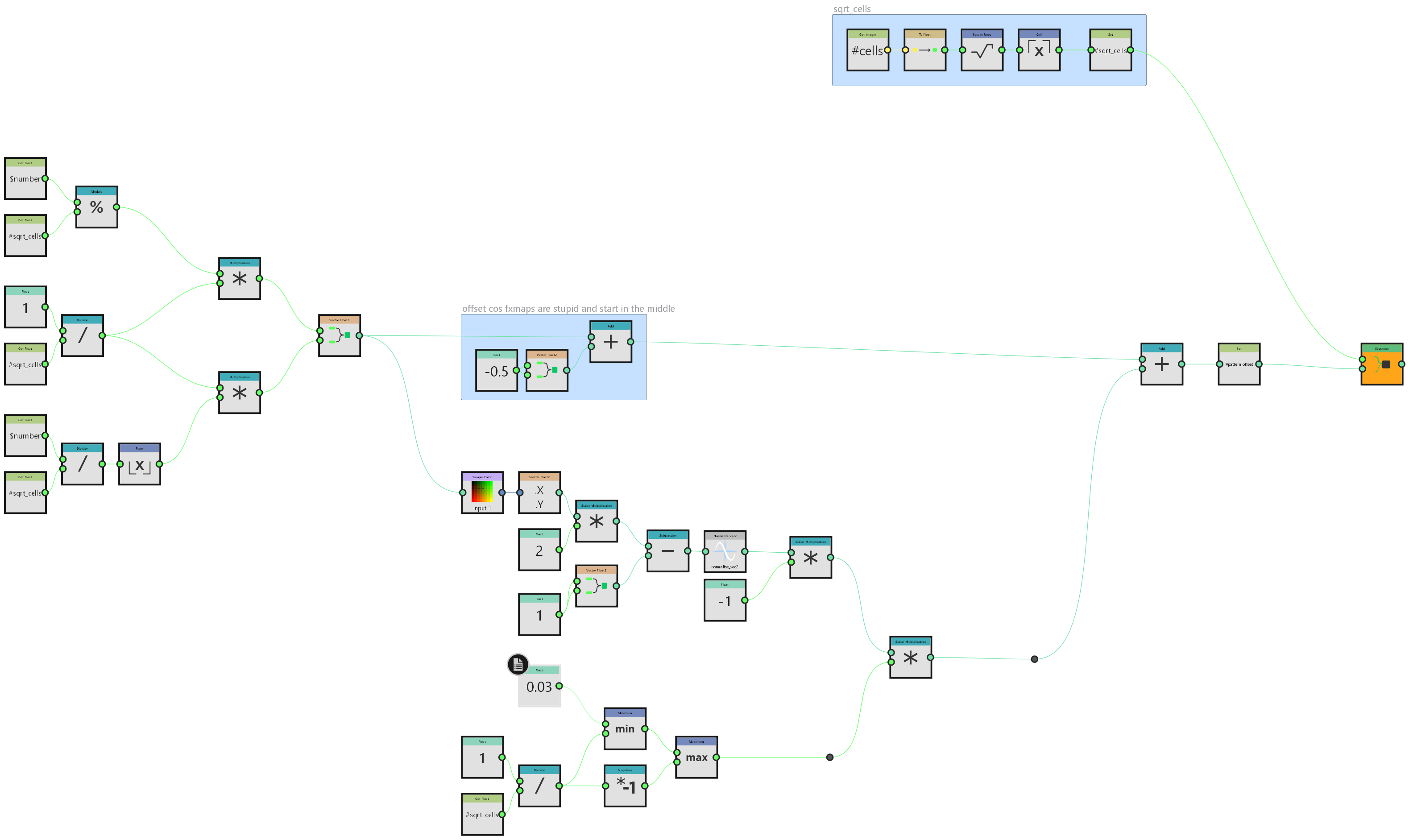 i did this primarily because I'm going to need it at work on monday but it's a neat enough trick that it's worth sharing here generally speaking I don't do a lot with fx-maps. most things can be done better in pixel processors if you apply enough maths but in this instance I will need to take advantage of their inherent…
 -
Re: Ork Trukk for UT3 (image heavy?)
 @Predator - Hey, no worries man, the bolts are floating geometry, mostly duplicated at element level. (they're only extruded on the wheels because I was worried about the curvature of the tires, although in hindsight could have just done the same with them). The model itself is about 50 or so different objects, and a lot…
 -
Re: maya2025: What is causing these two large faces to pinch?
 Looks like a problem with normals. You can see the indentation at the upper part also shading weirdly. You need to reset your normals, don't know how this tool/option is called in Maya.
 -
Re: Issues with displacent map distortion
 Is that a bake from multires? I don't tend to bake displacement from it, but I've seen some fair amount of weird banding on Bake from Multires Normal when you don't use "Apply Base" first.
 -
Re: The Bi-Monthly Environment Art Challenge | January - February (94)
I started with 16-bit normal maps in PNG format, but noticed the same issue while texturing. Later, I baked the normal map in PSD format, which solved the problem. For the logo, I felt using a floating plane helps achieve better texel density and makes customization easier (though it’s not strictly necessary). The UV… -
Triangles in Height map-Xnormal??
 I keep getting triangles/ wireframe like lines in my height map rendered out from xnormal. I have the low poly mesh smoothed out and subdivided a few times to eliminate the lines but the result is still the same or is the mesh corrupt? Any ideas? Thanks.
 -
3D Artist Looking for Work
Hello my name is Michael Cabezas, I have experience in AAA quality video game production. I am interested in all aspects of 3D design, and video game design. I am actively seeking freelance or full-time opportunities. Michael Cabezas https://www.artstation.com/artist/cmcabezas…
>37663 results