Search
-
Re: The Quarterly CHARACTER ART Challenge | October - December

 I haven't updated this in quite a while! I need to finish, and move to another project ASAP to improve further. But here is where I am at with him! Note: I took the time with this project to sort of do a "full body" anatomy study of all the main muscles, and this is my first sculpt of a "full" humanoid character. I hope…
 -
Re: [Demastered Movie Diorama Challenge] Spirited Away [ FINISHED ]
 I think you can do more to pop Chihiro and No face more. Darkening the background would help a lot. Having those bright white windows sucks up way too much attention. I would darken it quite a bit and almost gradient down the corridor. I might even darken the foreground as well...almost spotlighting Chihiro. Chihiro feels…
 -
Re: How to create low poly of hair and unwrap it???
 Turns high poly to low poly Sort of automatic retopology. From the website: Polygon Cruncher general features 3ds Max modifierPolygon Cruncher is very fast and can handle million of polygons It reduces clerverly the number of faces of your model up to 80% keeping all details Once optimization has been computed, you can…
 -
Re: HK UMP45 WIP
Sometimes when you reset x form, normals flip, so faces are facing inwards instead of outwards and that would be my first assumption based on your yellow/ green normal map. By default, 3D Max renders both sides of polygons so right click, object properties and check "backface cull." I imagine your model will looks all… -
Re: What's the Best Way to to make Filigree and Ornamental 3D Objects?
 I think you might be mixing up what support loops [in-line edges/control loops] actually are. They pertain to sub-divisional modeling(your high-res mesh) and how the smoothing algorithm interprets the surface based on the topology of the polygonal mesh. They are generally used to control how soft/hard an internal/external…
 -
Re: Lightwave10 or Modo ?
 Heh smoothing groups are just like Max but without the GUI... which makes them a bit harder to work with. You just assign faces an "id" and any faces that have the same "id" have a smooth transition between them. Faces can have multiple "id"s for more complex scenarios. Maya smoothing via hard/soft edges would be a bit…
 -
Re: What normal maps work seamless with SP1?
I have to get my end result to workd in Cryengine. The only method of getting a normal map bake to work seamlessly in Cryengine is by first creating a worldspace normalmap and then dragging it through a Cryengine tool to create a tangent space normal map for cryengine without seams. I'm not sure if the worlspace map HAS to… -
Re: [Free Maya Script] Pattern Selection

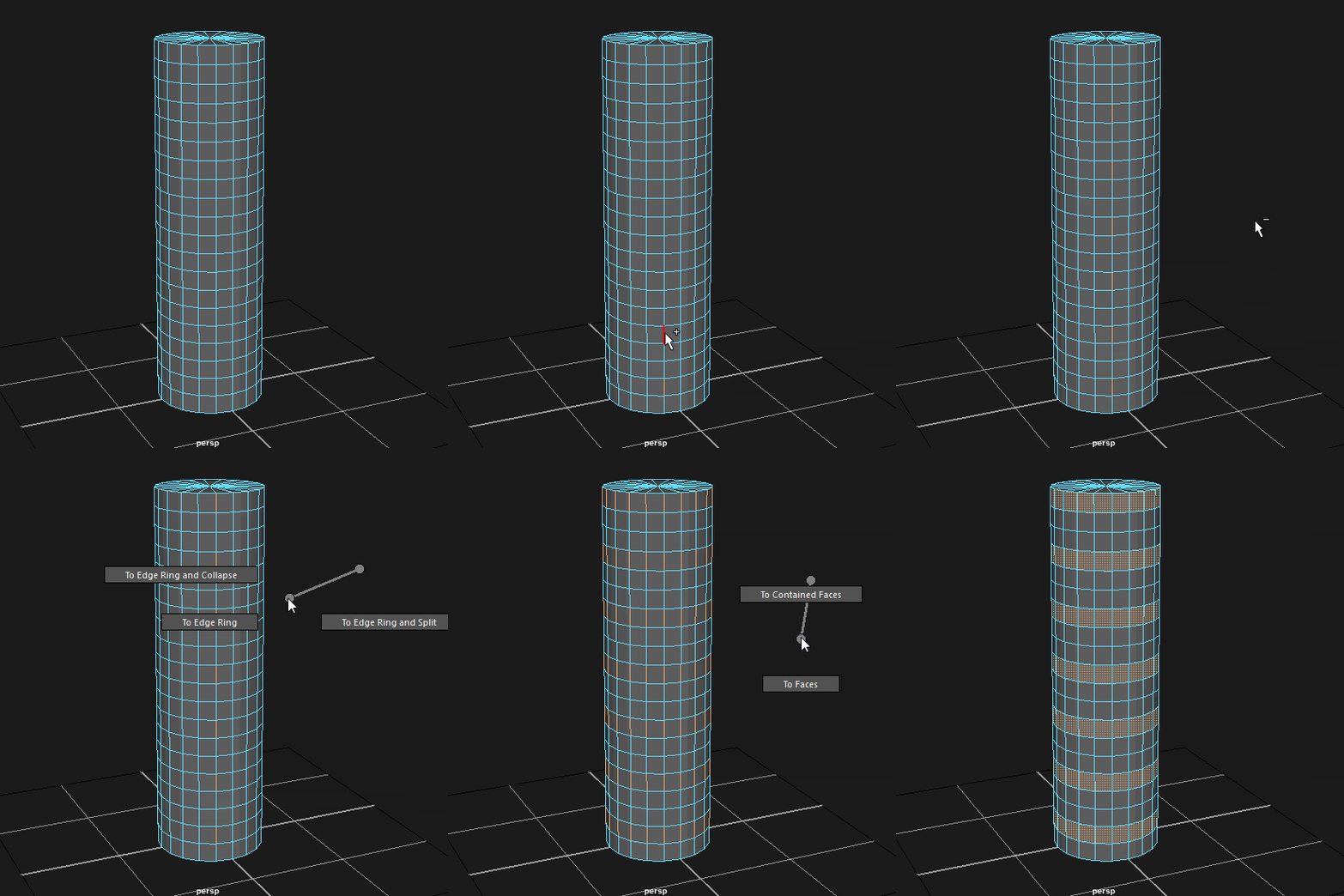 @ilyaivanovart @JDyer Thanksio! @Kert To achieve the selection you're going for I'd first select a few edges along a loop with this script, convert the selection to edge rings ([Ctrl+RMB] Edge Ring Utilities --> To Edge Ring) and then to faces ([Ctrl+RMB] To Faces --> To Faces). Like this: That's pretty unintuitive and…
 -
Re: Unreal Vehicle WIP - Tachikoma
 Perhaps these research images might help: I haven't added some of the finer detail, seeming at the moment I would find it easier to do in zbrush, so sorry if that caused a little confusion. As for the mechanics of movement; I agree the wheels look a bit too small to provide any meaningful traction, the chances are I may…
 -
Re: The SoulEater
 @dGreenberg thx a lot for all the advice ^^ i will definitly try some other design for the horns to see what's the most interesting and i really loved the explanation you made for the 3 choices ^^. I will definitly add more details to his face and the neck area i haven't done it yet because i wasn't sure of which face to…
>40187 results