Search
-
Re: Mudbox 2012 wierd UV issues...
 I think i have seen something like that, but i´m not sure what exactly was the solution. Possible things to try would be: - Look for overlapped and flipped uv shells - make sure all verts are welded correctly - reset xforms before exporting - import it in max into a fresh scene and export it again - more suggestions to…
 -
Re: Shiro From Voltron

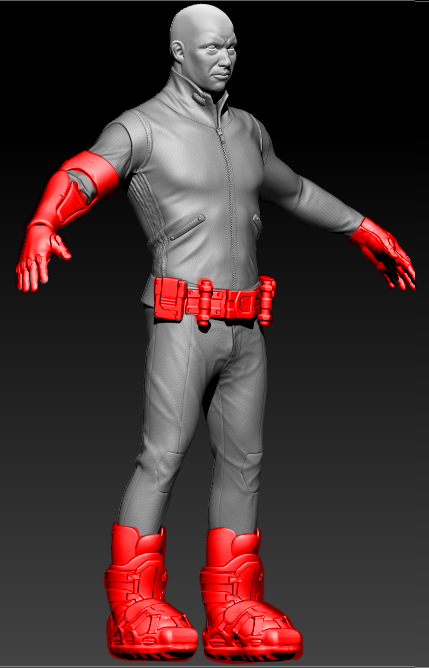 The pieces in red were created entirely inside zbrush, they have no UV's. Im getting ready to export my mesh that I will be using as my High Poly for when I bake down to the low poly. What is the normal workflow for UV'ing the meshes made entirely in zbrush, so I can export to use as my high poly?
 -
Re: Transfer an animtion to a different rig (maya)
 Same rig? You can user the animation export/import in Maya. File>Export>animExport You may need to load animImportExport through the plug-in manager. You can do it other ways such as creating clips/trax, but this is straight forward and I've used it quite a bit in the past to transfer single animations from one file to…
 -
Re: New Wall Worm Video
 Here is a new video on exporting Model materials and textures with the latest versions of WW. I updated the way WW handles materials many months ago but most of the videos on the subject still show the old ways. So here is the updated info. [ame=" https://www.youtube.com/watch?v=ab2pX4KrCzU"]Model Material Export 2013 -…
 -
Re: xNormal: disaster strikes!
 Sure you don't use the max2obj exporter which is used in old versions of 3dsmax. It's SUPER bugged. Use the gw::Obj one or the xNormal's SBM native format instead. Also sure your UV's are well welded and, if possible, pixel-snapped. Also, collapse it to Edit Mesh, then apply a ResetXForm and re-collapse again before…
 -
Re: HELP! Trying to get the MayaCryExport 2013 to work in Maya!
 Just a warning that might be unrelated to your problem but still relevant until Crytek will release the next update: current (3.5.3) SDK release shipped with a partially broken rc.exe (resourse compiler), rendering exports with collidable geometry impossible. It might be a good idea to postpone the exports to the engine…
 -
Re: Which programs are used for basic 2D animations?
 I haven't used it yet, but looking at the documentation one workflow looks like you sketch out your animation on a bitmap layer(s). Then go back and trace it all on vector layer(s), and finally export the vector layers as an animation. Though you could forgo that and export a bitmap based PNG sequence or Quicktime movie…
 -
Re: Issues with retopo in maya / extreme lag
 I know it's a old post, but I found a solution for that problem. To fix lagging while using quad draw all you need is export high poly mesh as GPU cache. Cache > GPU Cache > Export. And that import it back - Cache > GPU Cache > Import. After that just use imported mesh as usual. Lag should be gone.
 -
Re: 3ds Max vertex re-ordering... script?
 Vertex colors are intact after exporting a test cube in fbx from Blender and importing it again so I guess that should work just fine. Obj in the other hand does break vertex color. Be careful with fbx though, it has to be exported in binary mode from your app. Blender cannot open ascii fbx yet.
 -
Re: half life 2 dm character ( self portrait ) update
 polycount is 4800 i used praalls excelent smd export script and the standart h2 source sdk that comes with steam here is the smd export script: http://mitglied.lycos.de/prallvamp/ and than there is a list with useful thirdparty hl2 editing tools here:…
>17872 results