Search
-
Re: Normalizing uv pieces in Modo
 Well I just read in the Modo forum that you have to relax the uv's adaptively rather than default to get the exact same ratio. Here. http://forums.luxology.com/discussion/topic.aspx?id=20655&show=space%20scale%20uv
 -
Re: I'm back and I have a video.
 Sorry kid, but your first mistake was choosing a song which has Christopher Walken dancing in the original music video... you just can't top Christopher Walken dancing, anything you try is going to pale in comparison by default.
 -
Re: Quick question on giving more relief no my texture in SD
 Hey! Sorry for the lack of information! Yes, I have a normal map, and I'm using the default PBR Metallic Roughness material. Here are some pics of the graph. If you need more information please ask for it. Thanks for your time!
 -
Re: maya rotation gizmo problem
 yeah i tried everything, even deleting my prefs entirely and letting maya generate the default ones.. we are about to roll over to 2009 so i am going to install that and see if the problem still exists thanks
 -
Re: Diver girl
 This is amazing, is there any chance you could go into more detail about the substance painter portion? Did you create your own materials in designer to get this stylized look? Or just used the default materials with lots of layers and modifications?
 -
Re: Multi-sub object (Maya)?
Yer, you just select face tool then select the faces you want to have another mat on then apply the material (not the default lambert) and then export it. UDK will pick it up as a multi-sub object and you can assign multiple materials to it. -
Re: Bodypaint
 Go to Edit>Prefs On the default options screen("common")go down to the checkbox that says "Graphic Tablet" which should be checked. Right next to it is something that says "Hi def Coordinates" or something like that. uncheck that. should be better now.
 -
Re: psd tga, etc. preview in vista 64-bit
 Running Vista64 and tried both versions of the Mystic Installer. x86 installed fine, but didn't do anything to my thumbs. Uninstalled, and did the x64, got the same error as everyone else. It's pretty ridiculous that Vista doesn't have this by default. ><
 -
Re: How can I tile with precision mappig?

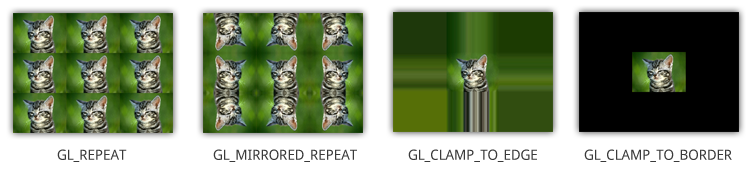 Clamp is different from Solidify. Clamp is what happens outside the UV square, not within the texture. Repeat is the default mode, which tiles the texture. What is the final output for your model? Realtime in a game engine or viewer, or rendered in an offline renderer?
 -
Re: Hair planes
 Ah, you want to turn off self-shadowing while retaining the ability to cast on to other objects and receive from other objects. I don't think that's possible in Maxs viewport by default, but there might be some custom shaders out there that support it.
>10219 results