Search
-
Re: Deadpool Movement set In-Engine
 I agree the animations arent too bad. They could definitely be pushed a lot more in terms of stronger posing and by adding more personality into them as they feel a little safe right now. Transitions from runs to idles are a great place to showcase personality as it doesn't really matter how long they take giving you time…
 -
Re: Anatomy WIP - Critique Welcome

 Maybe you have too much references , lets try something different here , work only on legs[everything below ASIS]I suggest to start with : Analysis of the reference -find where bony land marks are-then curvature of the inside and outside[front and back] silhouette => rhythm -contrast line [line connecting high/low point on…
 -
Re: Problematic baking of hard edges (how to do it without adding supporting loops?)
 Yes, before conversion of course. The only matter is to set right axis order , Y or Z up etc and directions. Xnormal , SD,Mari etc assume it differently For Cycles in Blender 2.7 and Xnormal I set +X +Z -Y for example. SD seems does it just same way as any Y up kind of soft. In fact for such a simple geometry OP sowed you…
 -
Re: flip skinned character by X
 yeah but how about skeleton? all the axis will be inverted or...?
 -
Re: Z06 Stingray Vehicle.

 Hey, thanks for the detailed reply. I didn't pick up the caliper issue at all; forgot to turn on the mirror modifier. Also, never noticed the tire axis on the references, I'm a fool. Thanks!
 -
Re: Applying textures to large terrain made in World Machine, then rendering it?
 Oh, those aren't the textures. Those are the maps. I was using 256x256 textures, so I also tried just tiling them into 8192x8192 textures, but the stretching is still there. Viewport texture resolution is directly connected to Quicksilver? That's just bad. Let me change it. Alright, even after increasing the resolution of…
 -
Re: Substance Designer - Latest Build - 2018.3.3
 SD 2018.3.1 - SD 2018.3.3 Lots of fixes! 2018.3.3 Fixed: * [Content] PBR Base Material outputs does not have the right group name 2018.3.2 Changed: * [Bakers] Add a label indicating the current suffix setting for "Match By Name" Fixed: * [Graph] Crash while manipulating split points * [Graph] Invalidation issue when input…
 -
Re: What direction should a model face?
 seems like most programs I deal with start you facing down the z-axis, y is up, and negative x is left. And when new objects are created their local axis copies that. So pretty esay to jusut stick with that unless you are invidually placing unique objects in a composed scene, or you have a boss telling you to do something…
 -
Re: [3DS Max] Translate step snapping, and moving selection pivot

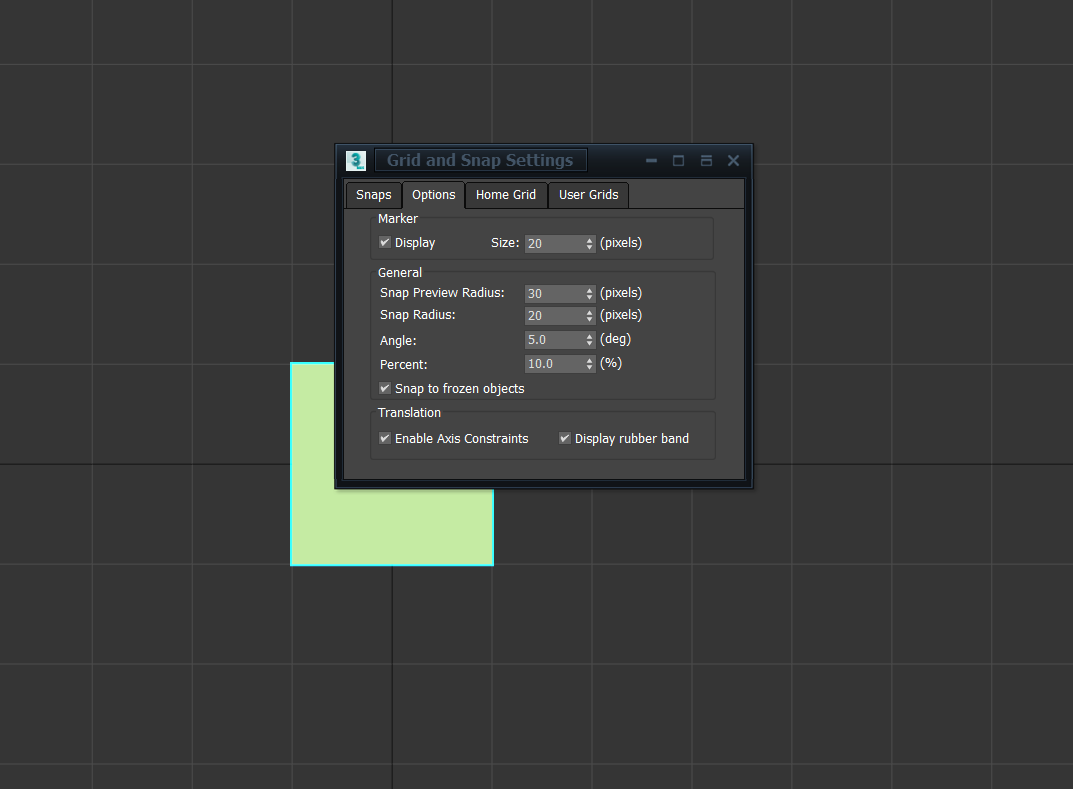 So 3DS Max those tools work kind of behind the scenes with snapping rather than an explicit tool or function for them. First thing I suggest is right clicking the snapping options at the top with all of the magnets and turning on axis constraints. Second make sure your grid is set up appropriately with the units you want…
 -
Re: Octopus - Pie / Radial Menu for 3dsmax

 Almost a year has passed from the release of Octopus and here is a bunch of gif animations showing you, what you can do with it. The list is not full at all just the fraction of the thing which you can do with it. Most of the menus are using a Hold and Release behavior. This means the menu is active only when you hold down…
>5462 results