Search
-
Re: ShaderFX 3dsMax : LightDir seems to be inverted
 @shaderfx pinging Kees! Inane question, but is the shader interpreting it as a point light? If nothing else, you could invert the light vector. Also, could it be axis handedness difference between Maya and Max?
 -
Re: Arnold for 3Ds Max - Render to texture - Light refraction
No unfortunately it won't brighten up the edges. That's a view-dependent effect like you said, but in RTT the view angle is orthagonal along the W axis in UV space. In other words, straight out from the surface, at every point. So, the baked texture will look like the middle part of the glass there. The way to replicate… -
Re: Maya viewport render issue
 tnx for your respond but i don't think its uv problem / i seperate one of the stripes and its normaly show good but when i rotate axis of look when the overlap each other problems show up / i think its something in showing option of viewport
 -
Re: (Texturing) - How to keep a 'straight' texture on a curved mesh (see pictures)
I'd map it using cylindrical or spherical projection and work from there.that way you only have to adjust in one axis -
Re: Modeling Help Needed Please
 When modeling anything - just as with sculpting and drawing - always study the overall silhouette and break it down into primitive shapes. Ever wondered why every single 3D program has basic primitives? :) In this case it's a sphere. Then ask yourself: what's more suitable, a pole sphere or a quad sphere?. In this case…
 -
Re: The Heart Game
 Next update is done! I went ahead and did new game builds as well found here: http://www.artoflightandmotion.com/downloads One of the biggest things this update is I finally finished the explanation of how to recreate the seasonal changes that are inside of the artwork/game! That can be found…
 -
Re: How to minimize modular pieces for an elliptical colosseum?
 an ellipse can be mirrored across two axis, right? So essentially you can build one corner of it only, I'd think.
 -
Re: London Polycount Meetups!

 London/UK/EU Polycounters! It's been almost a year since we last had a meet, so I thought I had better get off my ass and get one booked! I thought it would be best to book it for the same weekend as EGX Rezzed again as it worked out pretty well last year with almost 50 people turning up in the end. We will be meeting at…
 -
Re: What makes this scene obviously miniatures?

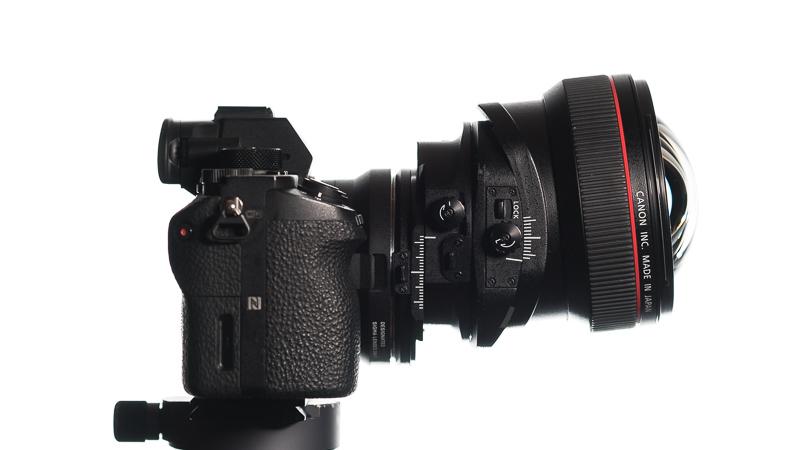 There are two components to a tilt shift photography, and it's important to separate them and understand that they do entirely different things. The above image shows a tilt/shift lens with both tilt (rotation, the guide lines on the right) and shift (the guide lines on the left) engaged. What you're talking about in this…
 -
Re: Implementation of Blender in Video Game Industry
 @RyanB : I feel I need to jump in to attempt to clarify this. Yes, it makes UE-compatible structures confusing to *look* at, as the visual representation of the main joint axis will make them appear as going sideways. No, this doesn't prevent in any way a Blender>UE4 workflow. It is a pain if someone wants to create…
>5462 results