Search
-
Re: Sin City. anyone else check it out?
 I loved it, really a fun movie and beautiful too. I wish I hadn't read the comics as it spoiled the entire movie for me. Oh yeah, I got carded going in. I said, wouldn't I have to be 16 to not be allowed in? And the girl was like, Yes.... So apparently it was questionable whether I was 16 or not. hehehe
 -
Re: n/a
 Try converting the 16 bit image to 8bit to dither it. If this is in Marmoset Toolbag, and you're using 16 bit tiff, you'll get some issues, try PSD instead or again, converting to 8bit. Also make sure you have your tangent space set up correctly in the mesh properties.
 -
Re: Answered: Faceted normal after using photoshop
 xNormal bakes 16-bit .tif files. When you import them to PS, go to Image -> Mode -> change to 8-bit. It converts the image to 8-bit with a very slight noise dithering. But I'm not sure how Quixel Suite handles 16-bit textures, or does it support it either.
 -
Re: File types and Normal Maps
 This is probably because png can use 16 bit per component. 8-bit per component normals are always grainy especially when kept normalized within texture, CryTek wrote about that. TGA cannot handle 16-bit-per-component, only TIFF and PNG can (and DDS of course).
 -
Re: Can not get the right padding
 I think 16 means the total width between the shells. And around 16 between shells should be more than enough for a 2048. It's not really an exact science anyhow. Test and see in your target hardware. Different games will filter the textures differently, so you may never see any problems.
 -
Re: Photoshop - too many adjustment layers?
That's why I have to work in 16bit. And Photoshop is slow as hell in 16 bit , even with compression off. I have a good hope on Affinity Photo and Design. They work in 16 bit a lot quicker, it's layer structure is more advanced imo, but still lacks a lot of basic necessary tools for texture composing , like layers… -
Re: [WIP] [UE4] Modular Vehicle Vol. 2
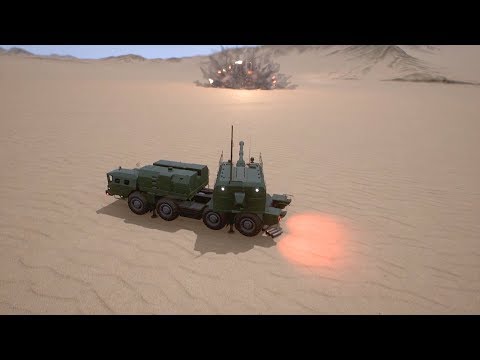 Day 16. I didn't work on this project for one week due to various reasons and resumed work only yesterday, so it's a 16 day of work on it. These two days I worked on various modules, so yes, the vehicle now operatable, but still not impressive. Lot's of work ahead. Turret test #1: https://www.youtube.com/watch?v=ArJx7MxrSlA
 -
Re: Marmoset Viewer creates square artifacts in my model?!
 I had this issue. As Earthquake said, it's an artifact from going to an 8bit normal from a 16 bit normal file. When you Export Textures from Substance Painter, either choose 16-bit or check the Dithering box in the top right. I'm sure there's better ways to do it too, probably manually.
 -
Re: Curved arches
 Hope this makes sense... I don't have all the correct numbers memorized, so you may need to mess around a bit. -Start out by making a cylinder with the number segments equal to the number of arches you want. (like 16 sides, for example). Make it the size of the curve you want, but keep it about 1 unit high. Keep everything…
 -
Re: Photoshop Colour Problems
Just tried it with grayscale 16 bit depth psd from Zbrush. Nothing like that. Pixel values stay same. But it seems turn 32 bit floating point depth exr to 16 bit one when saving it from Photoshop so something weird is still happening. Affinity Photo doesn't change a bit in comparision
>7628 results