Search
-
SBSAR not working Properly in Unity

 Hi all, My material maps from substance designer wont update in unity even though it updates in substance painter & Unreal Engine. It always uses the old maps. The first picture is what it looks like in unity and the seconds is in Designer. It works Fine in Unreal Engine. Any input is very much appreciated. Height Map in…
 -
portfolio upgrade and comicon
 i am in the process of upgrading my portfolio so i thought i would make a thread here as well to show some wip and stuff. kingpin update - 10/05/09 kingpin update - 09/29/09 also, here is my comicon entry: and here is the wip of Iblis, my DW3 entry which i decided to finish now lol.
 -
Re: Early 20th century explorer

 I think I managed to improve the face slightly. :) I will practice more with my next models. Here are some updated screenshots and I also updated the ones in my Artstation. Thanks! Comparison of skin materials below Below pic of him without his hood and hat on.
 -
Re: Quad Chamfer
 Great update! Now that the realtime mode is usable, it would be great if edge selection change would update the script. Now I have to cancel the script and make it run again manually. Should be easy enough to detect a selection change and making it rerun with previously set setting right?
 -
Re: Deus Ex Human Revolution Lab
Hey all, it's been a while since I last updated this. I've had to divert my time to work on other projects so this update isn't as big as the last one. I finished the base textures of the robotic arm pieces today. Here are a few screenshots to show it's progress. -
Re: Backing up data, easier than ever
 Yes, that's basic source control usage. Go inside the folder you want to update, right-click, get latest. It won't get any files in any other folders. If you want to get ev erything updated for the whole project, then you go to the root folder instead.
 -
Re: Dwarven Character Critique Please
Hi guys Just a quick update. I took everybody's comments and made some changes to the main image. Main points were englarging the hand and arm sizes of the main character, altering the specular maps and tinkered with the lighting. Any comments on the updated image would be appreciated. Thanks! -
Re: An Investigation into Modular Environment (Victorian) - Dissertation progress thread

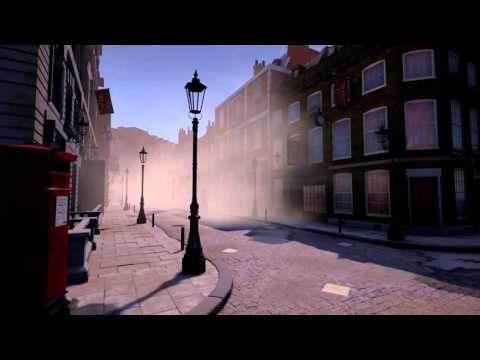 FINAL UPDATE :D Video: https://www.youtube.com/watch?v=JZoJpBAZDk0[/youtube] https://www.youtube.com/watch?v=JZoJpBAZDk0 Some screenshots With this update, this thread is already done and new stuff like breakdowns and more will be added to the new one! Thanks again to all of you for your feedback!
 -
Re: Monthly Community Noob Challenge November 2014 (25)
 New update, liking the updates everybody is posting. Keep it up. Did a test shot to check it out so far. @lloydj14 I think you got to many edges running close to each other in your main body of the generator which is causing some hard edges
 -
Re: [UE4] Need Character + Environment Artists
We have since brought on two concept artists, two environment artists and one character artist. The previous posts have been updated to reflect our updated needs (one more character artist). We should have some art to showcase soon. Thanks for reading!
>32412 results