Search
-
Re: The Bi-Monthly Environment Art Challenge | September - October (80)
 @Fabi_G Great progress and planned changes. One thing that comes to mind is the panels on the side, the patterns aren't clear to me what they are due to how dark they are appearing. At first, they look like they are carved out then I see the light bouncing off the extrusion. The reference looks like they are wood but it…
 -
Re: AK74
 You might want to double check references for the muzzle brake, magazine (specifically the thin extrusions) and stock (the indent should be shallow with a constant curve, no straight edges. The ends should also be more spherical)
 -
Re: Evironment #2 new lighting attempts
 Cody, great point. I definitely like the idea of them looking more like a deposit of crystal rather than this odd extrusion. It'll help make the caves look more organic too.
 -
Re: Scifi Syndicate Pistol Stream
 A lot of that detail is not going to bake to well. You have a lot of sharp edges, and subtle extrusion detail that doesn't have any angle to it. The picture quack posted and this one show the problems. http://wiki.polycount.com/NormalMap?action=AttachFile&do=get&target=normal_slopes_hatred.jpg
 -
Re: tips for furry animals?
 btw I started uvmapping and texturing the LP befoure zbrushing fur , because I tought to instead of zbrushing fur out to use a real skin texturing of a furry animal then use a displacement extrusion and some brushing in zbrush ... nevertired that so is just an idea ...
 -
Re: Learning Substance Designer
 Everything here is is either on just a sphere or a plane. All of the extrusions are done using displacement and tessellation and a height map. When I first started learning about Designer I honestly thought it was black magic.
 -
Re: zrmesh or retopo by hand ?
 The spirals are what get me every time. Eugrgh. 3D Coat is so good for retopo. Much faster than my old Maya workflow, which was extrusion of planes along the surface of my character.
 -
Re: Super Soaker
 I really like how the texture has turned out so far. I second the adding of a serial number, if I may suggest on the forward most box on the extrusion. Keep up the great work!
 -
Re: [WIP] Abandoned Hotel Bar - UE4 Modular Environment

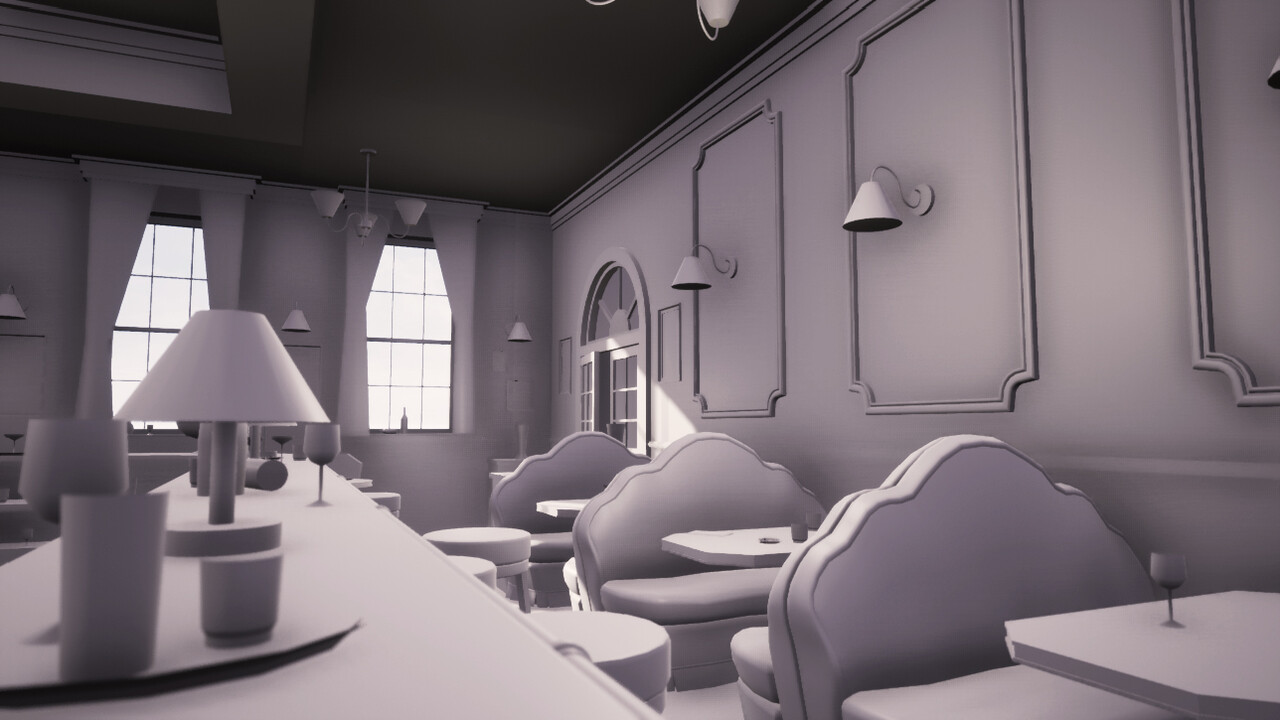 WIP#2 - Basic setup in UE4, trim sheet and unique texture Hello everyone! Welcome back to my second update of the project :) Blockout Set Up in UE4: During the past week, I've imported all my blockout pieces in UE4 using grid system, setup the basic lighting and working environment, have everything proper named and…
 -
Hexagon for modeling
Does anyone here every use Hexagon for 3d modeling? I find it to be very intuitive even though I'm not much of a 3d artist. It's still fun to play around with. I've seen some pretty neat tutorial videos of modeling characters using edge extrusion and the bridge tool. http://www.daz3d.com/i.x/software/hexagon/-/?
>3548 results