Search
-
Re: .
 I was actually going to post that too, but I forgot. Never heard that term, and google doesn't return any results on it either. He seems to be referring to a unique uv layout in 0-1 space...
 -
Re: Simple quick way to make trees
 Thank you! I plan on adding a second tutorial about correct texture layout and texturing in general for trees as most people here are character artists and we environment artists need love too!
 -
Re: Tutorial: Speed modeling tips for 3dsmax
 Yes, you can save out all your layouts, hotkeys etc and back them up and load them again at any time. They even usually carry across multiple Max versions.
 -
Re: New portfolio-design: Help it not to suck so much.
I think the layout looks great! Do you have somthing other than a crate to feature in the 3D environment section? Looks like a nice crate but a more complex object might be better. -
Re: Low Poly Boat
 Lookin awesome! The uv layout could have been much more low poly-esk. A lot more mirroring and use of solid blocks of color. All in all it looks great nice work =)
 -
Re: WIP_UDK Environment_Prison
 I_think_With_underscores always a mistake to start building props befor at least blocking out the env...wheres the block/layout propping a scene out should come between second and third pass IMO owen_shepherd.bmp
 -
Re: MINECRAFT
 How do you view the generated map images from the PC server? I wanna see how the current layout looks, also point out the outpost that's being built for community use.
 -
Re: Stylized Solider
I am assuming your using max, how deep is your question? do you know where to start or your just curious about the uvw layout? http://www.poopinmymouth.com/tutorial/tutorial.htm -
Re: SHOGUNATE character wip
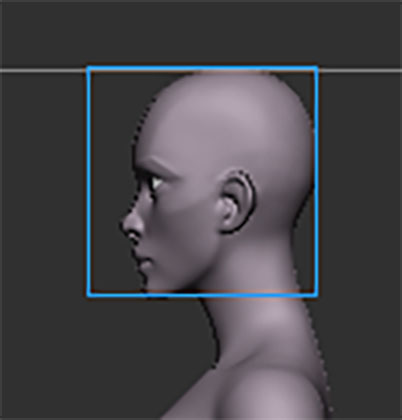 No "not too big " problem is with depth, z axes, front to back so that's not long enough You can make a simple test if the head fit in a square or its close to that you are in a good shape Below you can see how much space there is Note to mod : this new image things is breaking the layout ! Float left/right
 -
Blender - lost component outlines
It's second time it happens. Suddenly Blender looses component outlines, both from object and edit modes. I'm still able to transform the mesh, but blindfolded. When I change from Layout menu to another, is everything normal. Does someone know what is happening?
>8526 results