Search
-
Re: Starting with hand painted textures
 You should copy the plane lots of times, move it around, rotate it a bit. Maybe adds some loops to the plane and move some of the vertices. Just add a bit more shape and randomness to it :) You are definitely getting better at hand painted textures.
 -
Re: Whole scene Radar Effect,how?
 Basically it takes the screen UV in 0>1 space, biases it to -.5>.5 space, scales it using the depth of the scene at that pixel, biases it back (unnecessary) and then scrolls it horizontally and does a crude faded vertical line (using a texture would be much better)
 -
Re: PETROL/BLOOD - Gannon
 Did a couple of sketches, tried to find something industrial/war factory kind of feel. Some plate armor to surround the building. It will have some vents/dirigible balloons to keep it floating in the sky. I really liked the vertical designs a bit more.
 -
Re: how to properly subdivide a mesh imported to zbrush
 thanks for the quick reply. isnt dynamesh supposed to fulfill that? and if thats the case why does it distort the areas aboe? or is it just better practice to do all the high-res stuff in Maya? (ie. add more horizontal/vertical edge loops in the pillars)
 -
Re: Reducing UV Waste Need Help
 Straighten the round tube caps: You're spending an extra two vertices and increasing the distortion, but you're saving a lot of space (By making the shape smaller and easier to pack) and you're reducing aliasing; which is arguably more noticeable than distortion on small pieces.
 -
Re: Straight lines in ZBrush.
 Clip Curve and Trim Curve are two options if you want them to be really straight. Trim will actually cut into and replace the topology of the model, while Clip will just push existing vertices in. Either one should be fine if you're still in a dynameshing stage.
 -
Re: I need smart people to tell me which program I should use to materialize low res polygon models.
Pepakura does what i want to do with a model, but I still need to retrieve the angles of the folding lines leaving all the vertices. I plan on doing this for more than one model, so a successful program or way of retrieving this info is crucial. -
Re: My two newest models
 On the low poly chest, you should get rid of the beveled edges (your normal map will take care of those), and then you could probably get rid of the horizontal and vertical bars and just have a flat chest and let the normals do them.
 -
Re: 3DS Max - Question - Realtime Gizmo
 Also, if you're moving an object by selecting ALL of it's vertices/faces/edes/whatever, then the gizmo stays in place, since the pivot point isn't actually moving. You're just moving the geometry in that case. AKA, get out of sub-object mode. :D
 -
Re: Another normal map issues thread - issues at seams - Maya LT

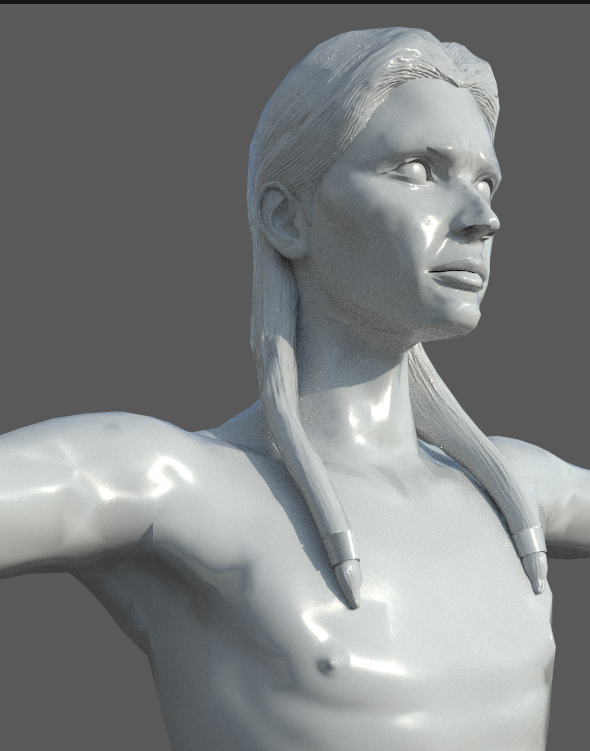 The sharp shadows at the armpit and the brow -- are these the kind of issues you were talking about? (or do I just need to tweak some vertices?) ....because this is what the hi-poly looks like in Zbrush. The game res with the normal map looks all lumpy.
>7637 results