Search
-
Re: Character WIPs
 Fred2303: Thanks man! theslingshot: Cheers. Yea I was trying to get that balance with the pedestal without it being too distracting. garriola83: Thanks. For the turntable GIFs: (Hopefully I didn't miss anything) -In Marmoset, select numbers of frames (I think I went with 36) and output your turntable screenshots. -In…
 -
Re: Sketchbook: Zocky
 Ah right sorry I guess it wasn't clear. You make a new layer (on top of the bg colour), use circle marquee tool (if you're using photoshop it should be next to the lasso tool). Hold shift+alt, drag to create a perfect circle. Then on the layers panel, there should be an option to 'lock' that layer. That will stop you from…
 -
Blender X-Ray to Selection Only

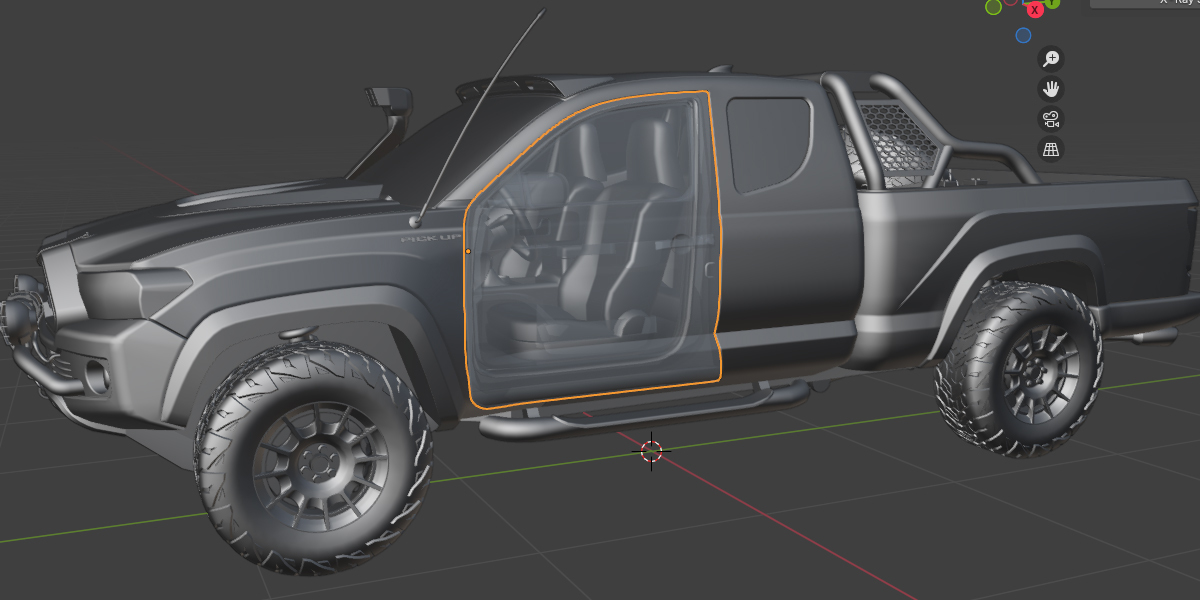 https://www.youtube.com/shorts/hlxCQI7r9sQ https://blendermarket.com/products/x-ray-to-selection Elevate your Blender workflow with the innovative X‑Ray Toggle for Selection addon. Designed for artists and designers who crave precision and efficiency, this powerful tool lets you effortlessly switch your selected objects to…
 -
Re: [DONE] Cannon Haut-Kœnigsbourg
 I like the detail, but I think the material definition could use a little more attention. The cannon barrel in particular doesn't feel like metal but more like stone. The barrel in your ref. is much less rusty and more metallic, polished, and dark in color. I think the material you have on the barrel would look better as a…
 -
Re: Tsuchinoko's Critique Thread
 @Avanthera, thanks for the reply! The sketches are lazy honestly. Working straight in pencil has it's flaw of not seeing the whole form yet. And the blending: It's a pain in the ass to do in photoshop. I've conditioned myself to a layered approach, almost like airbrushing? But, I like your example. I think for the next…
 -
Re: Dota 2 Monthly Community Competition #20 - OCTOBER
 thanks elwing. this time my pipeline was different then on all my other items. the modeler did a polypaint as basetexture. but i was not totaly happy with it. so i used piors whitebake pipeline in photoshop (1. layer ao then on top of it 2. layer green channel of object space normal - for top->down light information - with…
 -
Re: Solutions for sculpting tileable textures (other than bricks) in zbrush 4.
 I've been noodling around with insert multimesh brushes. In this example I created a few rock meshes and inserted them against the ground plane. Unfortunately though, IMM brushes do not support wrap mode, so I've created a macro that will take a layer you have named 'Tile' then duplicate the layer and offsets it + and - on…
 -
Re: criticize my digital paintings!
 I don't know if this will be of much use but I'd definitely recommend studying some colour from masters paintings, look into how when the highlights are warm, the shadows are cool, and how different materials have different levels of value in them. I do agree with studying your values more like Gavin says, the pictures…
 -
Re: ProUV - UV plugin for zbrush
 This is pretty cool. However, I find it's really fast to unwrap your base mesh (even if it's from zspheres) in an external app, since usually base meshes are SUPER low poly by today's in-game standards, it literally takes 15-20 minutes for a good unwrap which you can then use later to bake out polypainting or ZApplink work…
 -
Re: IN PROGRESS: Materials not working (pattern issue perhaps?)
 Also having this issue, using CC 2015, had no isses before on CS6. Posted an example below, 2 has the correct material applied, 1 is the same material just without any detail (the bug). Looked into the patterns overlay issue Panzerdraco mentioned and it does seem to be to do with that. As a temp fix for artist who can't…
>27695 results