Search
-
SA80 British Assault rifle WIP - Too many polygones? C&C Requested!
 Hey guys, I have made a SA80 British rifle and I have ran into many problems. I also think that my workflow is incorrect and I need your help to improve. I will include the 3ds max file and the reference if you want to give it a look. Before I start let take a peek at the model: As you can see, its composed of 12 pieces…
 -
Re: What Are You Working On? (3D) 2023
 I think your character looks great, but the face could be refined a little bit, in my opinion. I think her expression is leaning towards pursed lips and a slightly (very slightly) clenched jaw with a generally wide face. Neither of these are bad things in and of themselves, but I'd say that they don't come across as quite…
 -
Re: Issues with displacent map distortion
 It is a known bug in Blender - it always renders the height tmap faceted. Try baking in Substance Painter.
 -
Re: Best way to handle normals with hollow objects?
 This is Maya? Or 3ds Max? For double-sided models like this, for a game engine, you'll want to manually create the backfaces. You don't want a shader to duplicate the faces automatically, because usually those new faces will inherit either default vertex normals (and thus not work well with your normal map) or else will…
 -
Re: BFA Final - Secret Government Base (UDK)
 The problem with the translucent material - in UDK you must have a separate material for any model that is using grayscale alpha (i.e. a material that has SOME faces that are not completely opaque nor completely translucent). Otherwise the mesh will look all messed up. In 3ds Max you'll need to set 2 material IDs for the…
 -
Re: how to correctly measure pixel density
 I use this pattern: I wouldn't worry about being exact too much, unless you really need it. In either case a script would be the best way to go about doing this. It will be MUCH faster over the long run. EDIT: If you don't have a script another way to do this is find a single face that you can scale precisely (perhaps…
 -
Re: how to change the black side to normal in maya ?

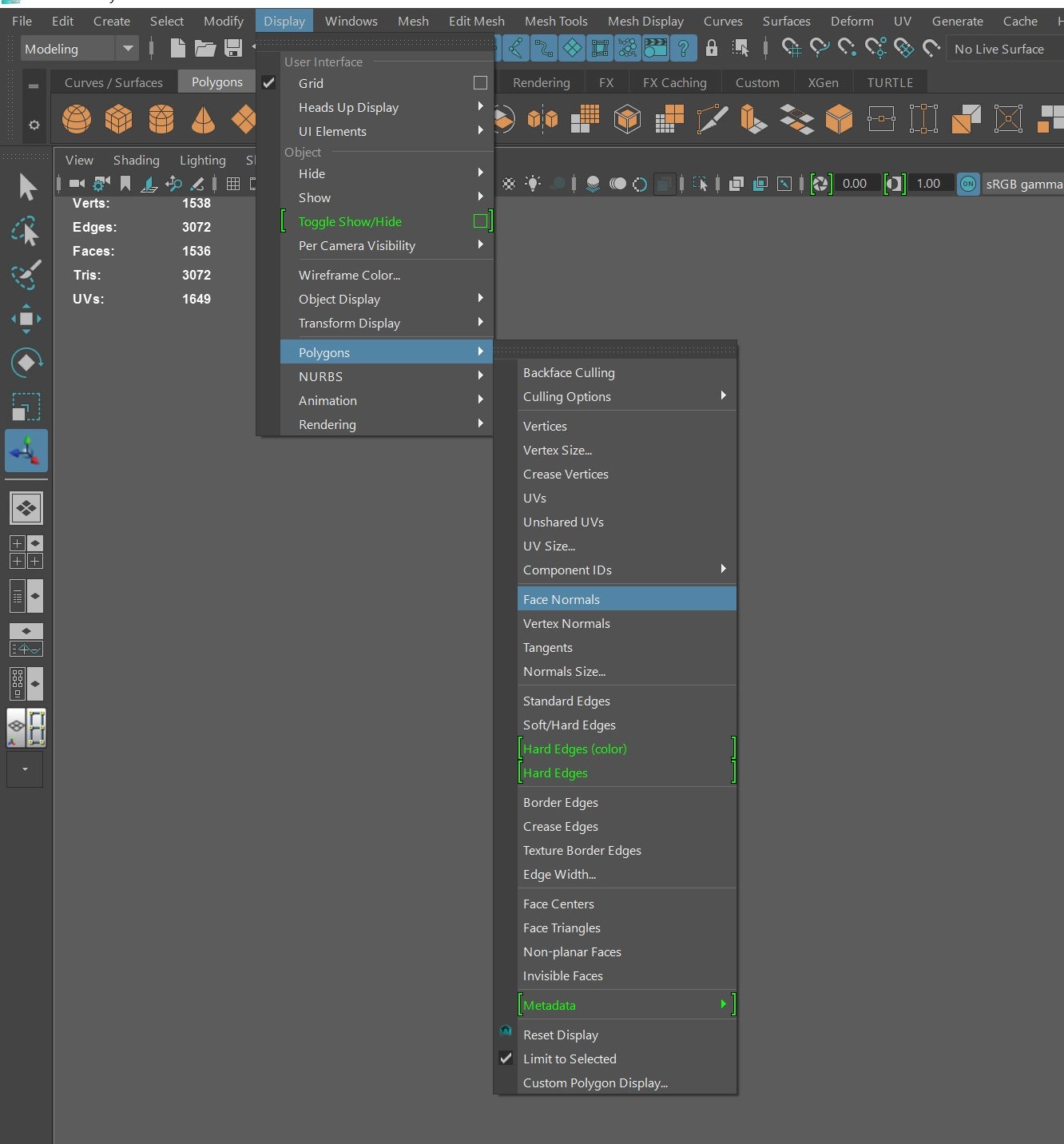 Sorry about the delay. To view your surface normals, go to the Display Menu and under Polygons select Face normals. Your mesh should look like this. Notice how the green hairs extend outwards from the mesh. If you have any inverted normals, the faces may appear black and the hairs will point in the opposite direction.…
 -
Re: Darth Vader low-poly Character
 Joker, tri's and faces typically aren't interchangeable, if you notice in the count read in maya (i think that's what you're in) it will say "faces - " and "tri's - " faces being the count of quad's + visible tri's and tri's being the count of tri's (triangular 3 pointed faces) the model will be once triangulated for…
 -
Re: Looking for normal map help
what happens when you normal bake is that an imaginary light ray is cast out, per pixel, from your low poly to your high poly and then the correct angle of light where it hits the high poly is baked down to the texture on the low poly. because you have hard edges all of the light rays of a face are being fired out parallel… -
Re: Newbie UV symmetry question (overlapping shells)
 If you want to solve it just within that UVunwrap modifier, here is another way by using TexTools: Using the Symmetry tool* you can mirror averge values on booth sides or like in your case select half of the faces you want to mirror and translate them to the other side: * Next select the half of the faces you want to…
>40187 results