Search
-
Re: [Maya] Mesh shimmering/flickering problem
 Have you tinkered with the camera clipping planes? Are these assets VERY far from 000 in these shots (like transforms over 10k)? Failing that, check the meshes for doubled faces or edges maybe.
 -
Re: New game showreel
 How do you do the debris animation @~53sec? custom scripts in Maya? or sections debris grouped together? And the transformation of the boss monster @~33sec? Blendshapes? Joint rig? Custom stuff?
 -
Re: Normal mapping distortions...Pls Help :(

 Looks like it's weighted normals causing issues, try changing to unweighted in the objects shape node (Vertex normal method). It could also be from scaling the object, freezing the transforms will fix that.
 -
Re: Leaf/cloth shader = shadows on back?

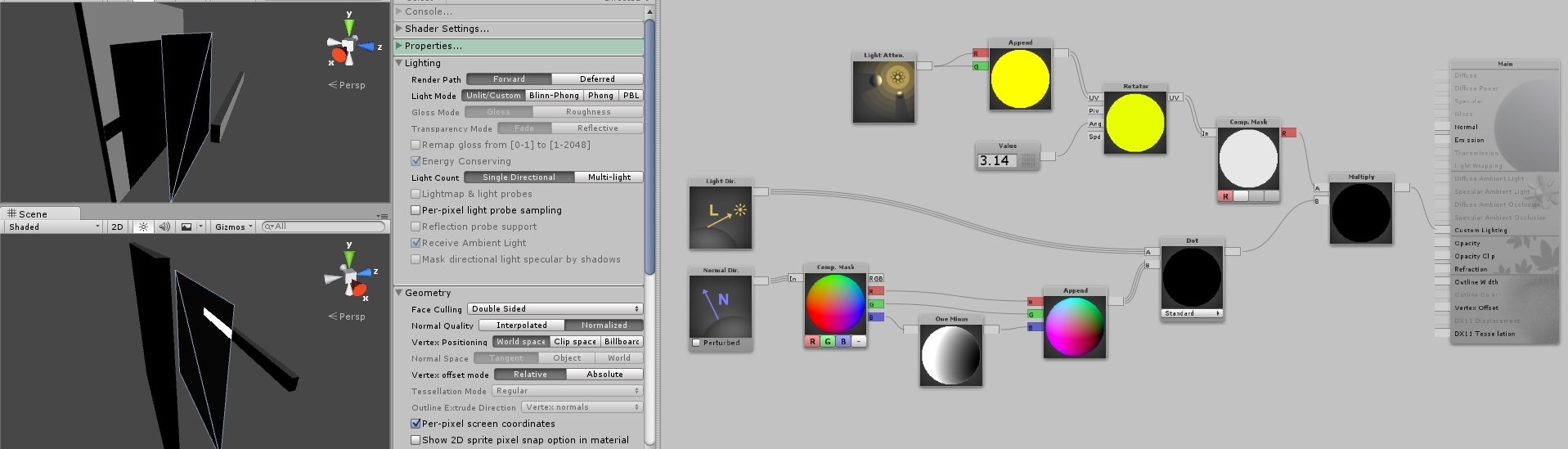 Nope, rotating it via Rotator doesn't seem to transform the shadowing direction, instead it just inverts the values again. I'm probably not using it right though, kind of shooting in the dark here.
 -
Re: How to get a vertex position after the vert has been displaced?
-
Re: Zbrush: Symmetry issue
 Under the Transform menu, where you activate symmetry, there should be a little button with an (R). This is radial symmetry, and dropping the slider to 4 (and setting the appropriate axis) should solve your problem!
 -
Re: Zbrush messing up the scale
 Yes, in ZB I always work in the native scale as it's most predictable but, I will always rescale to real-world and reset the transforms when I get into Max for final asset prep.
 -
Re: SEATTLE POLYCOUNT BEERS @ SHORTYS
 I'm all for another meet up, but I'm having flash backs of Transformers 2 meet up... Fucking other "Imax" in Seattle! If we go for the weekend of the 26th then i'm out.
 -
Re: Whats the verdict?: Zmodeler in production.
 okay, look man i was just giving you an accurate technical restriction as to why there is no true 3d transformation tool. take that whatever way you like, it was a barebones fact, not an opinion.
 -
Re: udk material troubles
 First issue, vertex colors and vector transform does not work at the same time. UDN Quote: Checking "Per Pixel Camera Vector" in the material properties will make both work together.

>9306 results