Search
-
[ZBrush] OVERHANGS WITH SMOOTH GROUP BRUSH/POLISH GROUPS

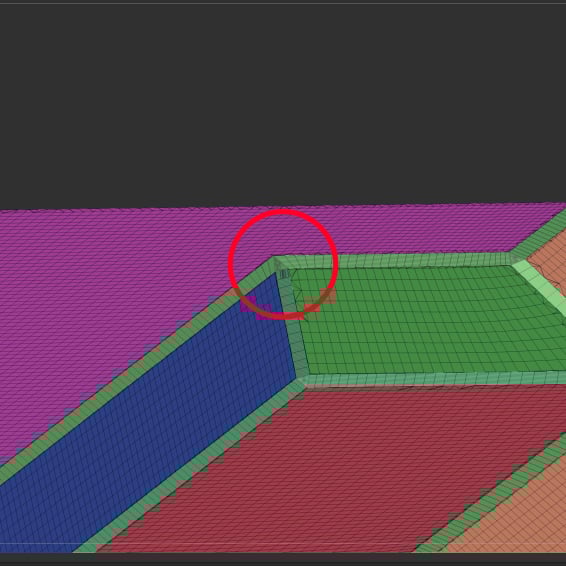 Hello all, I'm trying to soften BevelPro edges using the Smooth Group brush or Polish Groups (open circle) and both are producing geometry overhangs in certain corners. Should I be approaching this differently? I also tried to use the standard smooth brush which does a good job but leaves random artifacts all over the…
 -
HELP! maya 2016 smoothing.

 I'm having trouble msoothing my meshes all of a sudden, when I subD my mesh I creates a rippled lumpy effect. What can cause this? unsmoothed smoothed Help pleease!!!
 -
Re: 3ds max Smoothing groups problem
Just tried X form, was ineffective. Smooth and edit normals modifiers have not solved problem either. Example of my problem: smooothing in 3ds max: smooothing when exported: -
3DS Max smoothing problem on model (3DS Max using materials for smoothing reference?)
 I have a symmetrical human gib model with a non-symmetrical texture/material with custom UVW. In 3DS Max, when I assign a smoothing group to the mesh, it creates this artifact in the middle of the model all around (Using this as an example since have this model currently open). It also causes non-smooth transition between…
 -
Re: Clayform Sculpting App
 @Neox I've only just started learning Blender's sculpting functionality cos can't afford zbrush atm so curious if you tried this method? (found it online) Setting Up ZBrush-style Alt-Smooth in Blender 1. Activate the Smooth brush: Hold Shift to temporarily switch to the Smooth brush. 2. Access Brush Settings: Press Ctrl +…
 -
Cylinder with Holes (Editable with nice smoothing)
 Hi Guys! I got a problem with my holes in a cylinder. I start with a plane with 8 vertices. I chamfer it and have a hole...later on i use a Turbosmooth and then a 360° Bend. I get a nice Cylinder with some holes in it. But i want it to be editable. So i use a Edit Poly modifier on that and i dont know why....this destroys…
 -
Is there a smoothing group+turbo smooth combo function in maya?
i know there is creasing in maya with its crease set editor, but i cant get it to look as nice and precise as how max does it by adding smoothing groups and turbosmoothing it. is this just a limitation of maya? Id like to subdivide my geo without adding a ton of edge loops and make it look as nice as how 3dsmax does it. -
Smoothing Groups
i'm trying to get the same effect this guy did with his coffee mug: Specifically, this is the part i want to achieve: and also this part: I asked him how he achieved it and he was very helpful. He explains it: 'as far as I can tell, you're looking at the smoothing groups, the "ring" in between the 2 bamboo/wood areas looks… -
Re: Smooth group import plugin for Zbrush
The Smooth Group Import plugin for ZBrush helps you import models with smoothing groups from other 3D software like 3ds Max or Maya, making sure the smooth and hard edges are preserved. This keeps your model's surface details intact, saving you time by not having to adjust the smoothing manually in ZBrush, especially… -
How can I bake high poly detail onto a smooth surface and maintain the smoothness?
Hi! I'm a student still learning Max and Substance. For a unit last year I made this however one thing that confused me was how to bake high poly detail onto the wheels whilst maintaining the smoothing group needed to give the wheel it's circular shape? I'm currently working on another model (A Tiger H1) and I've came to…
>17082 results