Search
-
Re: Height Based Brush in Painter?
 Yeah that's basically the general idea of what I was trying to accomplish, but I figured it was worth a shot. If I scrutinize on my painting and layers I might be able to achieve something close to that. But kinda on the same note, is there a way to paint over a layer and not combine the painted info with the other layer's…
 -
Re: DeepPaint... Does it still exist/work?
 In all honesty, I didnt really do much with it after I created this thread. 3DCoats on-mesh painting works great but I didn't like the projection paint. If you have the lighting model set to shaded, it sends an overlay layer to PS with the lighting info on and defaults to that layer, so you have to switch layers and delete…
 -
Re: IN PROGRESS: How to make this tapered cylindrical shape in Ndo?
 Can you tell me what settings you're using and which function? I have tried to convert a similar gradient many different ways. Maybe asking specific questions will be easier: 1. Which function did you use to convert the gradient? Photo-normal? Map conversion? Regular layer? 2. If it was a regular layer, was it set to…
 -
Re: N99 Pistol from Fallout New Vegas (Critique are welcome)
 It is kind of looking better than previous images. Alex i think you are working in 1 layer with many stuff applied on it.Do you know the importance of layers in substance painter? Leave everything as it is now, and make a new fill layer on top of this, apply a very shiny metal material from the shelf, and change color to…
 -
Re: [Maya] Various Mel scripts questions
 Hi everyone.., can any one help me to make a mel script which by clicking on the button does the below all at once.. 1. creates a new layer with the selected objects with a specified name (for ex : dummy layer) . ----> for each and every object in the master layer has its own shader and one alpha map in their shader…
 -
Re: edge padding in photoshop?
Solidify wouldn't work in that case with haircards rendered against black background. It would dilate the black pixels on the translucent edges. So don't forget to do un-premultipled rendering or just divide 32bit exr color output by 32bit alpha in some linear environment like Blender compositing nodes. Could be done in… -
Re: [WIP] MGS3 The Boss Head Bust
 You are welcome , if I may add a few more things for you to check facial feature relations : - green : lateral corners of the eyes to mid bottom lower lip , check line relation (equilateral,isosceles) -bluegreen(teal) lateral corners of the eyes to widest point of the wings ,end of eyebrows should be on or close to this…
 -
Re: Any tutorials reguarding to...
maybe easier if u showed ur progress? anyways, try to hunt down some good metaltexture and then use them as overlays. Throw some noise on the color layer, duplicate layers and play with the layer settings. Add in rust , grime and durt layers to mix things up and uhm.. most important i guess, take a look at for example… -
Re: "Intersecta" by 11th Dan [2.5D Indie Game - Art Showcase]

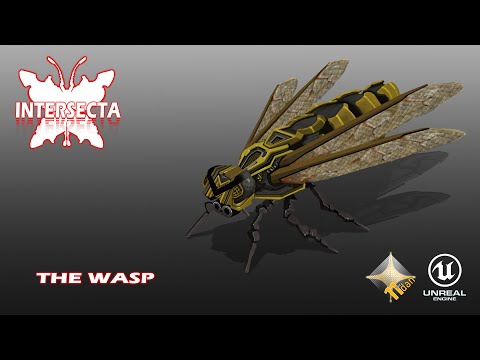 https://www.youtube.com/watch?v=W5ug_CsgxqQ THE WASP This is a technical demo of the wasp. They move in squadrons and always behave differently. Wasps don’t have lasers yet they plot dive attacks so the player has to be ready to evade this as they can be deadly. THE TRAINING ZONE The training zone is a simple feature where…
 -
Pattern Fill vs Pattern CS3
 Hi all, Been making a texture and came across a tutorial by Razer on CGTUTS Hand painting realistic metal. I am confused at the stage where the guy uses pattern fill layer below his paint layer and that pattern just shows up on the above layers, without changing the blend modes. As far as i know if you have one solid color…
>27687 results