Search
-
Re: Maya Smoothing error
 I really don't see what was your problem with smoothing, but perhaps you solved that? If you have a drawing override for a model and can't change it in the attribute editor, it must be because your model is assigned to a layer, so the layer is controlling the override, and it seems like you are having that layer set to…
 -
Re: Answered: Quixel DDO 2.1.5 DynaMask problem :(
 Why 3d painter cannot work as a simple manual layer/mask adder ? This would allow to modify this layer manually into photoshop if needed and to not being "surprised" by a "byebye dynamask..." Actually the only way i've found to work correctly with 3dpainter, is to paint in a duplicated layer of my current material…
 -
Re: Sketchbook: Artofcharly

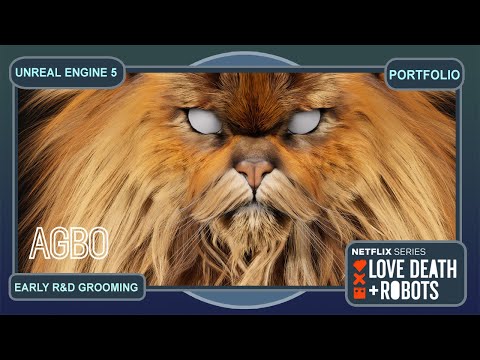 In early 2024, I had the opportunity to contribute to the initial Research & Development phase of the Cat Sanches asset for Love, Death + Robots (Season 4, Episode 5, Studio - Agbo/Visual Creatures) https://www.youtube.com/watch?v=G4UHr5KVcq0 https://www.youtube.com/watch?v=9dVCcA37xi8 ARTSTATION…
 -
Re: Is there a specific rule regarding the length of a wall, or can it be any dimension for modular
 I'd also advise that art is an iterative process. Planning can save some time but if you don't have lots of experience it's hard to predict how a project will go, and that makes planning less useful. For a student project I'd do as Eric suggests and treat it as if it was a one off asset so at least there's art to look at,…
 -
Re: [WIP] 3D Desert-punk Sci-fi Character

 Wanted to follow up and show some progress on this project after a long bout of silence. Found myself having to do a lot of trial and error with the cloak's detail repetition and making sure I can bake the details to the hood properly before pushing it down like the concept through sculpting or simulation later, but my…
 -
Re: selecting by saturation
 stinger- yeah thats usually a pain in the complete ass to do well...and well the info is there so... bad spleen...perfect...cheers final method: -make layer "saturation" -add red layer underneath -in channels select red with ctrl click on thumb -create new layer add selection as mask, fill layer with white - add black…
 -
Re: Answered: Can't paint on model in nDo mode
Just tried this all out and got it to work, thanks again. I really wished that when you created a multinormal layer or even just a new sculpt that it would produce just one layer to paint on, there are so many layers that get generated that I am not even sure which layer is the correct one to paint on. I would assume its… -
Re: Alpha Channel Targa Tutorial
 Hide any layers that you don't want to be a part of your alpha (anything that isn't transparent, like the Background layer) and press Ctrl Shift Alt E. This will make a new layer that has everything visible in it. Ctrl-click the layer thumbnail to make its alpha into a selection, then make a new Alpha channel with it. Just…
 -
Re: Weird normal maps outside Substance Painter & Bake glitch

 Sure, although I didn't change anything, so I assume my Painter settings are vanilla (did change texture resolution after): I would check if you can reproduce the issue with a new file, to exclude the possibility it's related to the layers (like some layer contributing to normal that shouldn't).
 -
Re: Photoshop CS3
[ QUOTE ] Working with instances layers or editing more than one layer at the same time would be a great improvement for game artists. Im missing that feature very much when i want to make changes to my Diffuse and Specular Layers. @ebagg We are simple not enough, they make not enough profit of us! [/ QUOTE ] Editing…
>27702 results