Search
-
Re: UDK, xNormal and tangents : what the hell is wrong ?
 I little time ago I found the origin of the problem. I forgot to write the answer of the problem here. It my fault in the end and how I manage my vertex normal in Maya. So what is the problem ? First I will explain how UDK import FBX : when UDK import any FBX it tries to find any smoothing group. With Maya there is no…
 -
Re: [3ds max] [maxscript] script to export/import explicit normals
 Are smoothing groups lost as well when using the skin modifier? The Edit Normals modifier can be used to unify or split normals per-vertex, but smoothing groups split them per-face, so to keep all potential normals I think to you'd need to use both a Smooth modifier and Edit Normals modifier together.
 -
Re: Quixel SUITE - News
 Hey guys, I've looked the pages on this topic about smoothing mesh problem, but still didn't figured out. So, my mesh has one smoothing group from 3ds max. There it all looks smooth, but in 3DO it's not. Can you help me with this? [IMG]file:///C:/Users/Admin/Desktop/screen01.png[/IMG]
 -
Re: High poly to low poly normal map baking
 thank you so much for the clarifications. one more question, what about smoothing groups? dose my high poly smoothing matters? or its only the low poly one's? I've read somewhere that you put all ur low poly under smoothing group 1 for hard surfaces modeling. Is that a good approach?
 -
Re: Any help with Normals Artifacting - Castle Wall
 Depends what your uv layout looks like. - You could split smoothing groups at the UV shells ( my favorite ) - You could keep it all on one smoothing group ( first option is better imo ) For option 1, you can run a script inside "TexTools" that splits the smoothing groups at UV shells. :)
 -
Re: Exteel Gun (PBR)
 In my experience adjusting smoothing groups after the bake makes it worse. You have to keep the same smoothing groups on your final mesh as the mesh you baked with or you will get wierd smoothing errors. So it really really helps to just use exactly the same mesh to bake as your final in game mesh.
 -
Re: [Technical Talk] - Max Plugins
 I think I asked this in another thread - Is there a MaxScript that will automatically make each UV island a unique smoothing group? Or, alternatively, is there a plug-in/script that will let me render a UV template that has each smoothing group colored uniquely so I can find smoothing group breaks inside my UV islands?
 -
Re: phong shading errors in bakes
 Correct. Smoothing groups are simply a way to control vertex normals. Smoothing groups are meant to simplify editing vertex normals, but I think they actually make vertex normals harder to understand. Vertex normals are a mesh-specific control. Phong is a shader-specific setting. They both control the "smoothness" of the…
 -
Re: Whisper of the Heart's Atelier

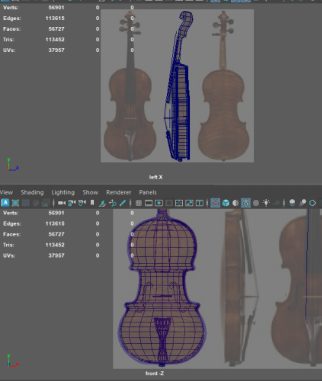 I decided to start with my hero asset so I can use it as a kind of quality bar. This model had me more focused on topology with a lot of surprise ngons or pinching issues. My polycount is at 13k when smoothed and combined though that's without the final details of the scroll and the violin strings. Also need to replace the…
 -
Re: Lost Artist Work Thread
 it just interpolates. it really works like the mesh smooth in max, only thing is if you work with different smoothing groups it might create gaps. so best thing would be to keep everything smoothing group 1 and then bevel edges (or create an extra edge loop around the areas you want to keep sharp).
>17084 results