Search
-
Re: Cagdasx44's Workshop Thread
 I think it was a good decision to focus on the jugg sword at first. Here's some feedback for you: Try using bigger and less scratches. You got some 15-20 scratches right now and that big crack in the middle. You should try to use only 3 scratches and make the big crack more edgy. Just try it and see how it looks! The red…
 -
Re: Baking artifacts ( white and black dots, edge stripes)

 Ok so i took the lower part of the bottle, i did some cuts to the uv islands and i made them straight. The problem is actually solved but Maya is telling me that some of the uv islands are distorted ( red ) and if i unfold them they become curved again, i also tried with the pin tool+unfold but it doesn't change much. So i…
 -
CAD Export Topology issues

 Hey, When the cad model is exported from cad software(most likely autocad) as an stl file. i get the issues you can see in to photo. Especially with cylinder and around the bevels. The Problem is: -Uneven edge distribution -extra edges in between edges. -non quad topology -spiralling edges -weird triangulation(causing…
 -
Re: 3D Generalist Portfolio Critique
 Thanks. The comment on my characters. What is lacking about them? For game ready wireframes is it the polycount, edge flow, just asking for what I need to do to improve.
 -
Re: Light tactical vehical

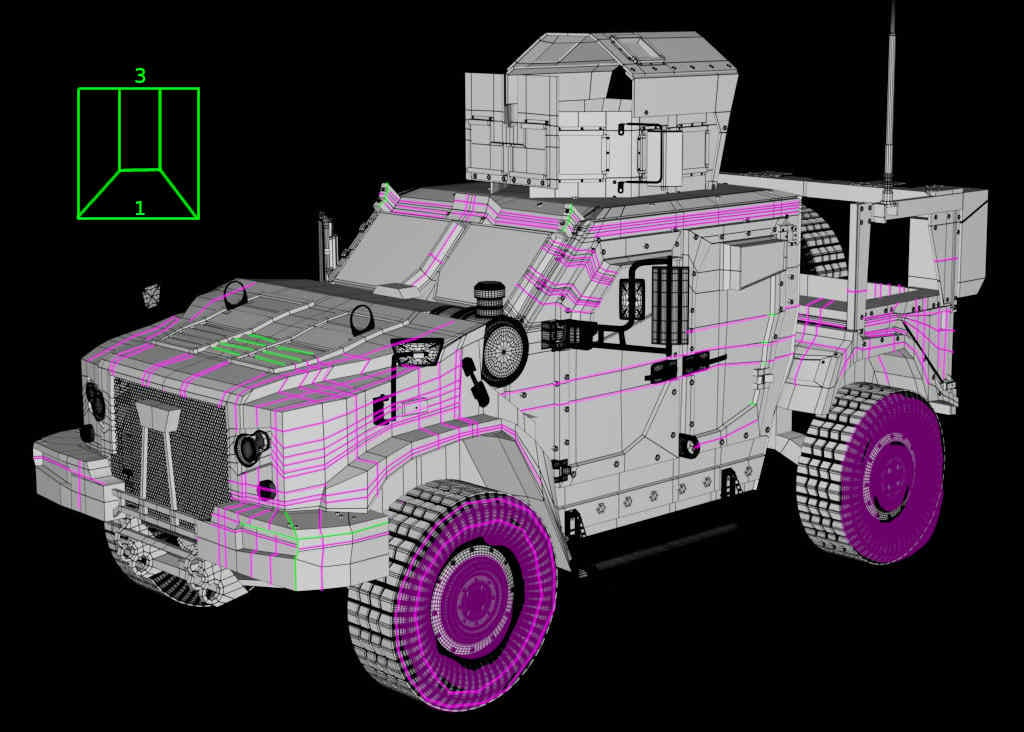 Some of the needed edge cuts seems to be distibuted all over the model ? Maybe good for concepting but this may should be optimized (for example showing the 3 to 1 quad transition) especially when there are so many planar areas (then even triangles are no problem).. the hood seems to need some of that details (green).…
 -
Detecting Edges in Normal maps in the Unreal material editor
 I need to make an edge detector for normal maps in the material editor. I’ve figured out how it would do it in theory. It would look at the Red channel and it will look at each pixel and then it’s neighboring 8 pixels. If one of them is significantly brighter or darker from a certain range that I can set, it will be turned…
 -
Re: Sketchbook: Celosia

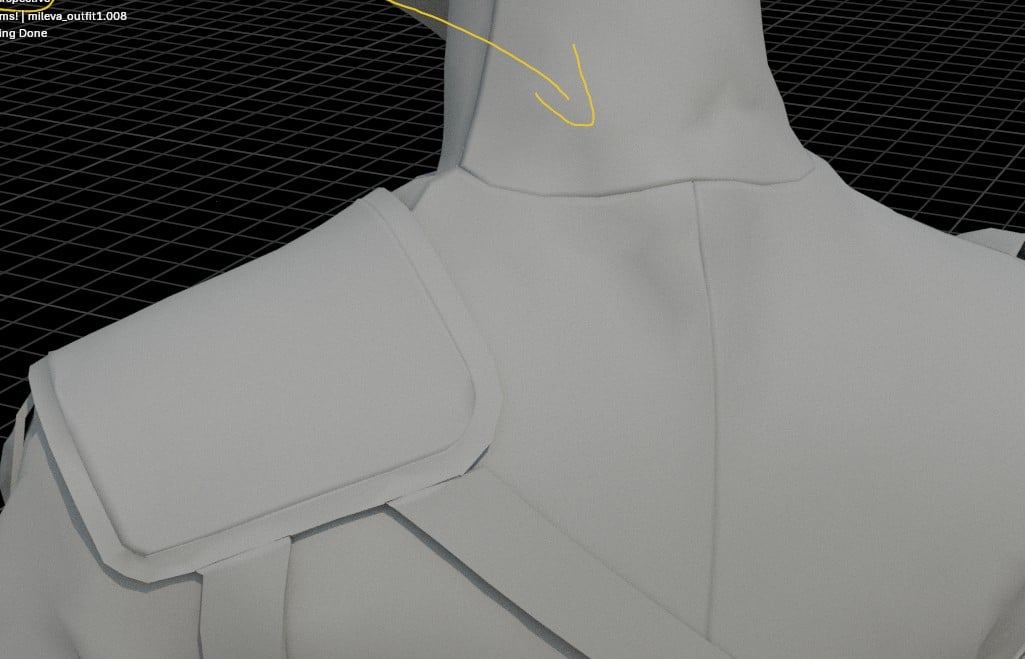 I had a sudden thought this weekend and solved three unrelated workflow annoyances. 😄 First one: Sometimes I sink edge loops of clothing to create the appearance of invisible seams. My usual approach involved manually prepping the mesh in Marvelous Designer with extra edge loops, exporting an unwelded mesh and manually…
 -
Re: How to solve this baking issue?
Eric Chadwick, Thank you for your response. The cyan edges in the image represent the hard edges and UV seams. I baked the texture using Marmoset Toolbag, and the issue appears both in Marmoset Toolbag and Substance Painter. As Neox mentioned, I tried it, and it is indeed due to the texture space being too small. -
Re: How do people get so much resolution in their textures on low poly models?
 The artist will create only one section of the helmet. Then make UVs for it. Then duplicate those UV'd triangles to make the whole helmet. The duplicated sections of the helmet all use the same initial UV space. So then when you paint the single helmet-section of texture, it shows across the whole helmet. You can try this…
 -
Re: Артефакты в unity
 Hi! Did you create manual lightmap UVs? Doing so, you could add another loop in the flat area and then lightmap UV the whole opening as a straightened strip. You could probably ditch the bevel and let the baked lighting do the edge smoothing. The other way would be to simply increase lightmap resolution. Share the mesh if…
>24979 results