Search
-
Re: Can you give a feedback of my portfolio please?
 Yeah sure! - I'm not digging the white lines over your art in your ArtStation banner. In Dragon Fortress, your textures all look flat (the floor and the wall/rail material. Maybe try some tesselation and/or increasing the normal intensity. I don't really think the textures in this piece are up to professional level. Maybe…
 -
Re: 3D Modeling Bow & Arrow *WAYWO Offshoot*
 i would recommend to change the verts a little to have a nicer flow of the shape also i wrote a little tutorial on mirroring objects: with this technique you can then select the lines and remove them (with the remove button). also check the remaining verts and remove them aswell.
 -
Re: Best ways for creating Albedo Maps?
 I understand the removal of shadows, using color range and to some extent content aware fill. What if your image is not from something you shot, rather you downloaded and you must remove the highlights ? I've attached my removal of not only shadows but highlights for this texture.
 -
Re: [WIP] Aircraft altimeter
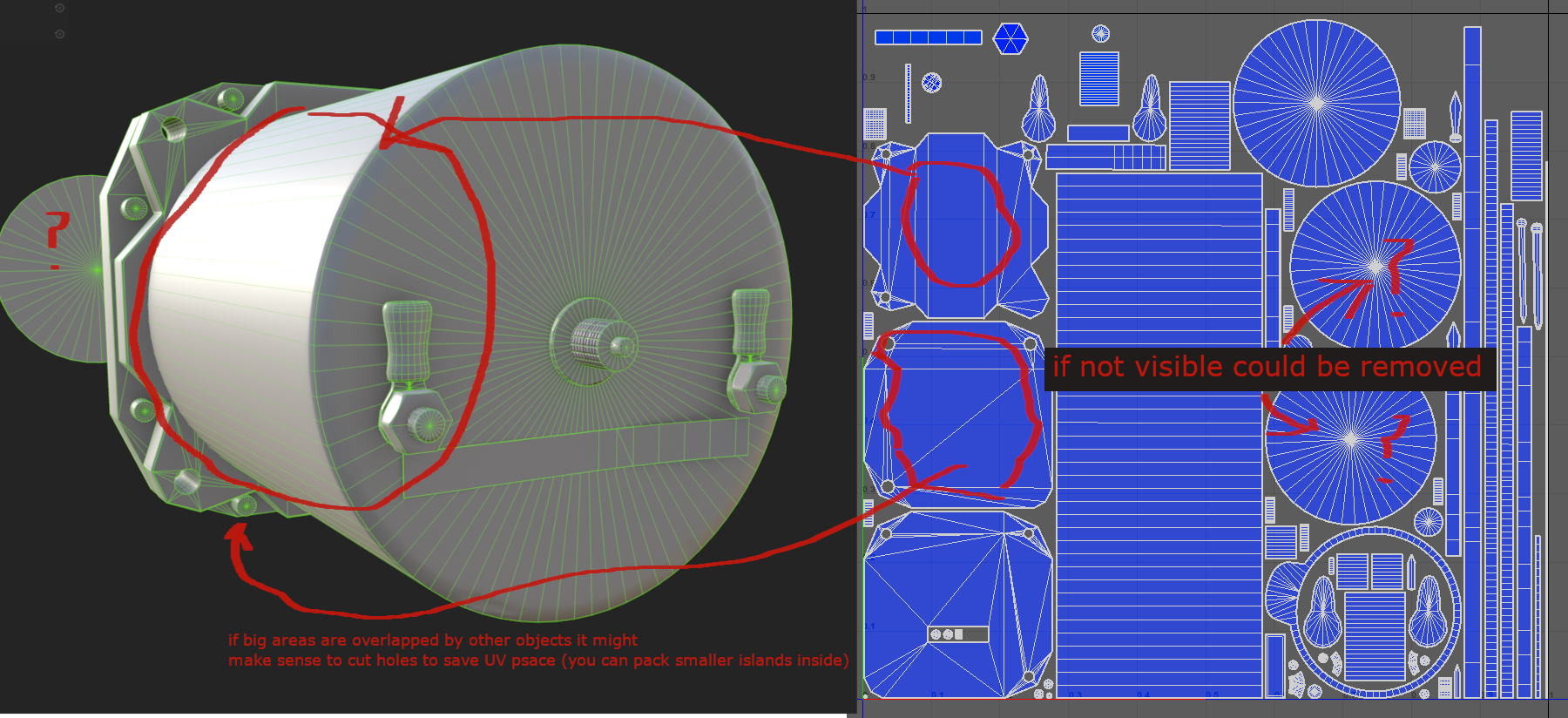 looks solid, I wonder why are there 3 big round islands on the uv layout though, looks like you need only one of them. Also you might consider removing geometry that is overalpped by another piece of geometry to save some uv space inside the big islands (at cost of higher vertex count due to new cuts) although I'm not sure…
 -
Re: terrain polycount in cryengine 2
 ahh found the remove water button ;p edit: Hmm nope it shows up again when i press generate surface texture edit2: the skybox is like 20k tris and the oceans is ~100k :0 can remove the ocean but i guess it would be a bad idea to remove the skybox.
 -
Re: Intuos Pro - Stroke delay/Snap lag
There is also a reg fix called FixMyWacom that allows quick and fast removal of annoying W7 pen features that can affect performance. I had removed most of those by hand but the fix removed the last remnants of microsoft garbage for me. Depending on your configuration you might want to google that up. -
Re: polygon reduction
 When using the remove tool on verts, it's wise to remove the edges surrounding it or just have 2 visible edges attached to it i.e. if it's on a uv seam- when you remove it, there should be no probs with uvs moving around, unless that vert was part of a corner or curve been using it a lot lately, works a treat
 -
Re: Tutorial AK
During the low poly process. How does he remove the edge and vertices in one click? What tool is that.. I can do it by removing the whole edge than removing each vertices individualy.. but he is doing it soo quickly.. If anyone can give me a quick reply i would apreciate:P. Thx -
macroscripts
 i tried to remove primitives from 3ds max today. didn't work. in the macroscript folder theres a file named Macro_ObjectsPrimitives.mcr, and it seems to have listings of all the primitives in max. i removed the whole file, and restarted max. primitives worked perfectly. so where are the primitives, and how can i remove…
 -
Re: Virus/Trojan help?
 Snag a copy of Adaware, Spybot, and HijackThis! from your work PC/friend's PC. Get those on a CD (with the definition updates). Hit F8 on boot, get into safe mode Run HijackThis! and check anything that's obvious (or check the online forums for recommendations.) Reboot back into Safe mode, Start > Cmd > MSconfig > Startup…
>16103 results