Search
-
Re: Learning Blender and Texturing

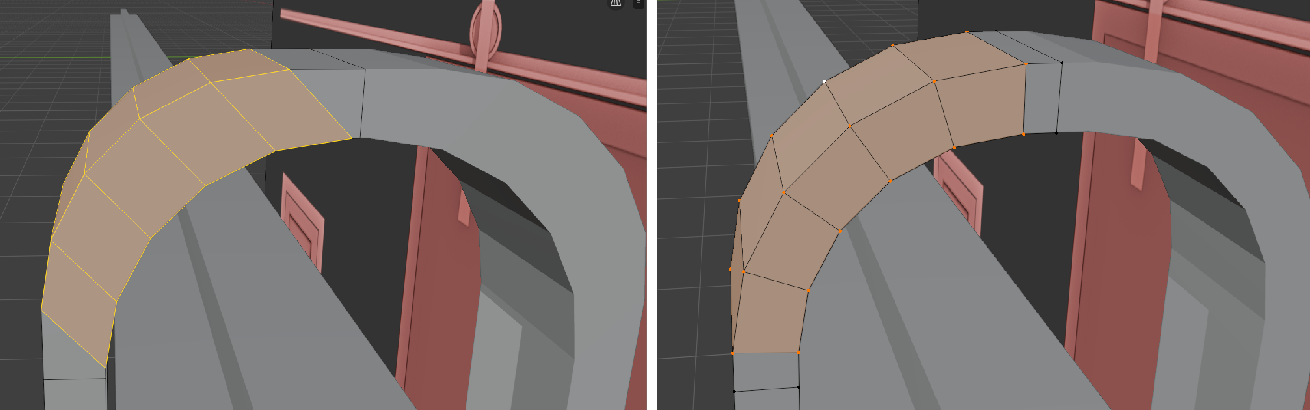 If I bevel an Edge Loop I get the result on the left image, but I would like for bevel to give me the one on the right, like Max would. How do you do that? Also after applying the Mirror, why I cannot bevel the central edge? https://youtu.be/2YkEoSzQMBE
 -
Learning Blender and Texturing
Hi everyone, I need your help to hopefully find the tools and learning material I'm looking for. So, despite I already know how to use 3ds Max, given its exorbitant cost and mine being simply an hobby with 0 income, I've decided I should learn Blender instead. The problem is two-fold because I also need a free or one-time… -
Re: Learning Blender and Texturing
Percent does what I was looking for, thanks :) That other mesh didn't had geometry inside, and somehow got fixed by just deleting one face and then Fill to close the hole. Oh well, if it happens enough times I'll find out eventually. -
Re: Learning Blender and Texturing
Another thing I'm struggling with is: how do you slide a vertex on a face? (Max equivalent is Face Constraint) G+G only slide the vertex over edges, and Snap to Face only snap to other faces that are not the ones confining with the vertex... I can do it using Transform Orientation > Normal and then the move Gizmo, but I… -
Re: Learning Blender and Texturing
 Hi, The problematic part here is that you want a professional course where you'll use tools that aren't professional. I think you shouldn't focus on the tools. It's not about learning Blender and texturing, but about understanding two things: how 3D graphics works and how visual art in general works. That way, you'll…
 -
Re: Learning Blender and Texturing
Aside from the software itself, also the confirmation you could compete with someone professional in a better known tool while using Blender, even from a productivity point of view. For example, I've barely started a tutorial today, and the usual transform gizmos we call in 3ds max and similar softwares by doing W/E/R, in…
6 results