Search
-
Witcher 3 Architectural Material in Unreal 4

 I spent two days trying to re-create this method in Unreal. https://polycount.com/discussion/174377/witcher-3-blood-and-wine-architectural-material/p1 First I used an elaborate IF node tree and then I discovered the 2D Array Lookup node. I thought it would take the texture's UVs, split it into a given number, and then…
 -
Re: Witcher 3 Architectural Material in Unreal 4
 I’ve managed to create a texture array and make it work, unfortunately Unreal4 doesn’t stream such type of textures, so basically no mipmaps. What Eric Zimmer did is different from what CD project has done in The Witcher 3. A good example is what Arvin Villapando did, which is pretty much mine same approach.…
 -
Re: Witcher 3 Architectural Material in Unreal 4

 Hmm.. tried using mipmaps with 2d texture array: Ignore the texture, just a placeholder. Tweaking the mipmap value with a scalar parameter in a material instance. Seems to work. I am using ue5 btw. Changed the 2d array texture settings- Mip Gen settings to - From No mipmap to Texture Group and it is streamed.
 -
Re: Witcher 3 Architectural Material in Unreal 4
Do you mean texture arrays in one texture like The Witcher workflow? lele83 said: Is this the one you are talking about: https://80.lv/articles/ue4-gradient-array-mask-material/ Would be nice to have like 8 or even 16 materials in one. Is there a reason why ue4 or ue5 hasn't implemented this fully in the last 5 years? -
Re: Witcher 3 Architectural Material in Unreal 4
I came across that video as well. I haven't changed anything since the material function I posted. I'm probably going to wait to improve/tweak it until I'm done with my current project. It works well enough for what I need it to right now even if it's a little unwieldy. I have some ideas to make it better but I just need… -
Re: Witcher 3 Architectural Material in Unreal 4
 texture arrays can be enabled on newer versions of the engine - you have to put some words in a config file or something iirc
 -
Re: Witcher 3 Architectural Material in Unreal 4
@lele83 How about having two array textures and have a distance blend between them? use a smaller and blurred version at a distance and the higher and full size upclose? -
Re: Witcher 3 Architectural Material in Unreal 4
I still think there should be a way to do this in unreal engine especially with an array. The previous possibilities have been with modifications of the engine. I am curious why the Epic devs haven't looked into implementing it. Doing it in ue4 I think makes things faster and smoother. -
Re: Witcher 3 Architectural Material in Unreal 4
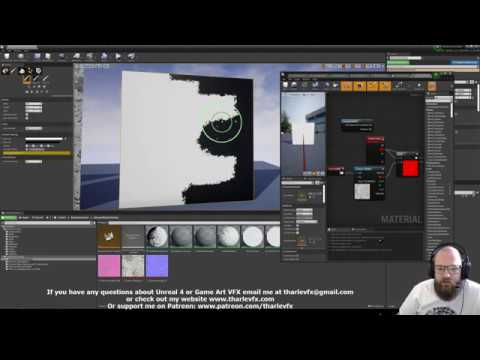 @A_B Sorry for taking so long to respond. If haven't messed with this in some time because I was doing other things. As far as purely getting better vertex painting results (minus everything else I did here) there's this video which walks you through everything pretty well: https://www.youtube.com/watch?v=OPHnxGb6KHA That…
 -
Re: Witcher 3 Architectural Material in Unreal 4
@lele83 Thats good to know. The one on github: https://github.com/fracturedbyte/UE4-T2DA I understand this was a modified version of ue4. I am guessing it supported mipmaps. Without mipmaps, it is going to have a bad look in the distance and might affect performance since its using the full texture size so I think I get…
12 results