Search
-
Re: Trying to fake DOF in scene, not game (help!)

 If you downloaded my scene, then you saw that I already had a camera set up with the objects in much the same way that should have done something similar and they did NOT show DOF at ALL when the layers and settings said they should (both camera DOF and post process). I had screenshots included as well for what I was…
 -
Re: Trying to fake DOF in scene, not game (help!)
Thanks for replying! Like I said, though, that doesn't work. All of my visuals are max quality, all Epic settings and I've made sure every option is checked for high quality relating specifically to DOF outside those settings. It's not showing up in renders or high quality screenshots, either, so it's definitely not… -
Re: Trying to fake DOF in scene, not game (help!)
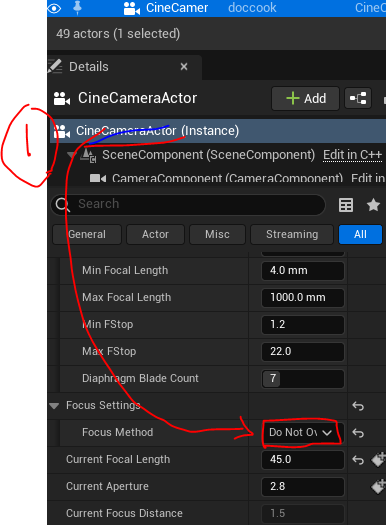 hi jod13 hope you are still hanging there :) tried whatever u tried checked all tutorial nothing worked .. finally something clicked, not sure if it works for you but worth a try. first override cine camera it will take PPV as sources adjust PPV
 -
Re: Trying to fake DOF in scene, not game (help!)
 The cinematic camera has a really good dof. Have you tried looking at some youtube tutorials about it? It has a focus distance parameter and an aperture parameter. These 2 are enough to make nice dof. The smaller the aperture value is, the more blur you get. If these parameters are not working for you, you may be at low or…
 -
Re: Trying to fake DOF in scene, not game (help!)
I think it should all be packaged in here; the file was too big for polycount, so it's google drive. https://drive.google.com/file/d/1aoBVVTg8rm0QzUtKPQON3lB9LRKUTeQK/view?usp=sharing I used this file to copy a few tutorials and mess around a bit, but it's not big, just two objects and a floor plane to try and get DOF… -
Re: Trying to fake DOF in scene, not game (help!)

 Okay, well, this is your project set up exactly, I just adjusted the existing camera a little (what you sent wasn't doing anything, just for context). Settings (HUGE grain of salt, haven't actually used this before and I have no idea what I'm doing and you can probably tell): At first I was having trouble, but I think I…
 -
Trying to fake DOF in scene, not game (help!)
No matter what I do, I can't get DOF to work with any camera type, any scene, even in the ones I download from Unreal's learning section. I can make the entire screen blurry or the entire screen clear, but absolutely no deviation between a foreground and background, where some things are clear and others are blurred. I… -
Re: Trying to fake DOF in scene, not game (help!)
As far as I've been able to see, the minimum focal length is 0, which can allow the f stop to drop from 1.2 to 0. The focal length seems to cap at 999999984306749440.0 mm, with the f stop max capping at 9999999980506447872.0 (default being 2.8). Those numbers change the Lens Settings to Custom. Diaphragm Blade doesn't seem…
8 results