Search
-
Re: How to texture a wall using two materials for the inner and otter side?

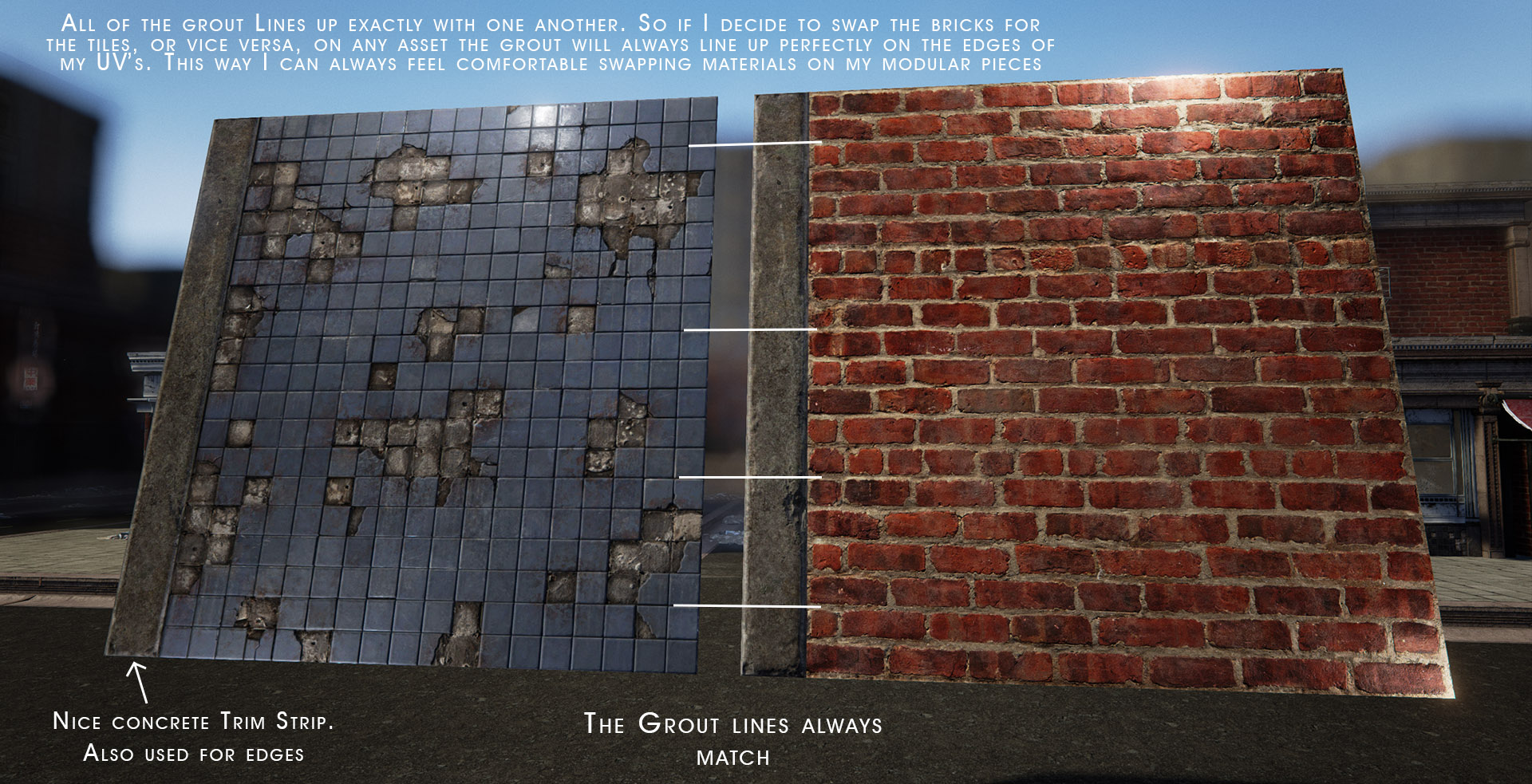 You can take one wall modular mesh, assign two materials to it as srsface said, and get two slots in unreal. You can UV that mesh once and use a tiling textures within your separate materials. You don't have to UV map the same wall for 10 different materials if your textures are made correctly. You can just slap them on as…
 -
How to texture a wall using two materials for the inner and otter side?

 I'm making elements for a modular scene for Unreal Engine and I would like to texture the walls using two different materials, one for the inner side and another one for the outter side. So, I have added a different material ID to every side. The problem is... what's the best way to make the uv mapping and textures for…
 -
Re: How to texture a wall using two materials for the inner and otter side?
Go with number 3. Sounds like the best for your purposes. It’s totally fine and common to have overlapping UVs in a mesh, especially if they are going to use a different material. I think for exporting to Unreal you’ll want to have two separate materials already assigned to the mesh in Max. Then the model will end up in… -
Re: How to texture a wall using two materials for the inner and otter side?
Thanks for the tips! I forgot that sometimes I overlap UVs when doing symmetry (making both identical clusters/isles overlapped). My idea is to make several materials for the same wall and then assign them during the level design to make different type of walls with a single model.
4 results