Search
-
Re: Trying to bake very seemingly simple Normals in SP2, weird notches and lines on edges appearing??

 As Till mentioned: there's other factors that are causing problems with the last two cubes in the example image. These could be mismatched tangent spaces, flipped triangulation, strong horizon occlusion or some combination of issues. The first two cubes in the example image are sufficient to illustrate the point. The last…
 -
Re: Trying to bake very seemingly simple Normals in SP2, weird notches and lines on edges appearing??
 You can of course do what ever you like with your own assets. 50% more vertices is what you get from this specific worst-case cube-example.. So if not all assets in your game are worst-case-cube-examples... also 40-60% wasted uv-space seems also bit.. much? Not sure how you came to this value but uv-splits don't need that…
 -
Re: Trying to bake very seemingly simple Normals in SP2, weird notches and lines on edges appearing??
I would argue there is not one preferred cube. The example is just a 2 by 2 matrix of all relevant possible combinations Of course you can argue that, to make it 'more complete', the example could be extended by a half-hard / half-smooth cube -
Re: Trying to bake very seemingly simple Normals in SP2, weird notches and lines on edges appearing??
 You're getting a huge hit in less TD because of the enormous amount of tilted/angled UV's in the split uv example... Gotta straighten them out, and I guarantee a much better TD result at the least. :grin: Idk man, I think vert count in engine an extremely negligible factor in performance nowadays, especially when you weigh…
 -
Re: Trying to bake very seemingly simple Normals in SP2, weird notches and lines on edges appearing??
 (Just to be sure you mean the 24 verts example right) So you are just exploding everything by angle? With "Few extra vertices" you mean 50% more vertices than the perfectly baking 16 verts one and 70% more vertices than the 14 verts one Not to forget the insane waste of UV space (must be easily 40-60% less texel density at…
 -
Re: Trying to bake very seemingly simple Normals in SP2, weird notches and lines on edges appearing??
I surely dont know all but the claim of the list being a 2x2 matrix of all relevant combinations needed to corrected because none of the combinations were good. The first has really poor UVs and performance although looks right, the rest has (intentionally) shading issues or seams. It just comes down to the smoothing… -
Re: Trying to bake very seemingly simple Normals in SP2, weird notches and lines on edges appearing??
C, you get some additional vertices but not 50% more. If you want to spend them is something we have decide from case to case. If it's worth it then.. well it's worth it. If not then not. About the (I guess automatic) unwrap example you posted: I can't perfectly see what's going on there because of the amount of pieces but… -
Re: Trying to bake very seemingly simple Normals in SP2, weird notches and lines on edges appearing??
@Shrike "Now thinking about it, Max only has smoothing groups but no smoothing splits right? So can you split this properly at all in max?" Yeah absolutely, you could split it with a single button click in Max. Also, I do remember seeing your previous thread. Regardless of syncing tangents and having it shade correctly… -
Re: Trying to bake very seemingly simple Normals in SP2, weird notches and lines on edges appearing??
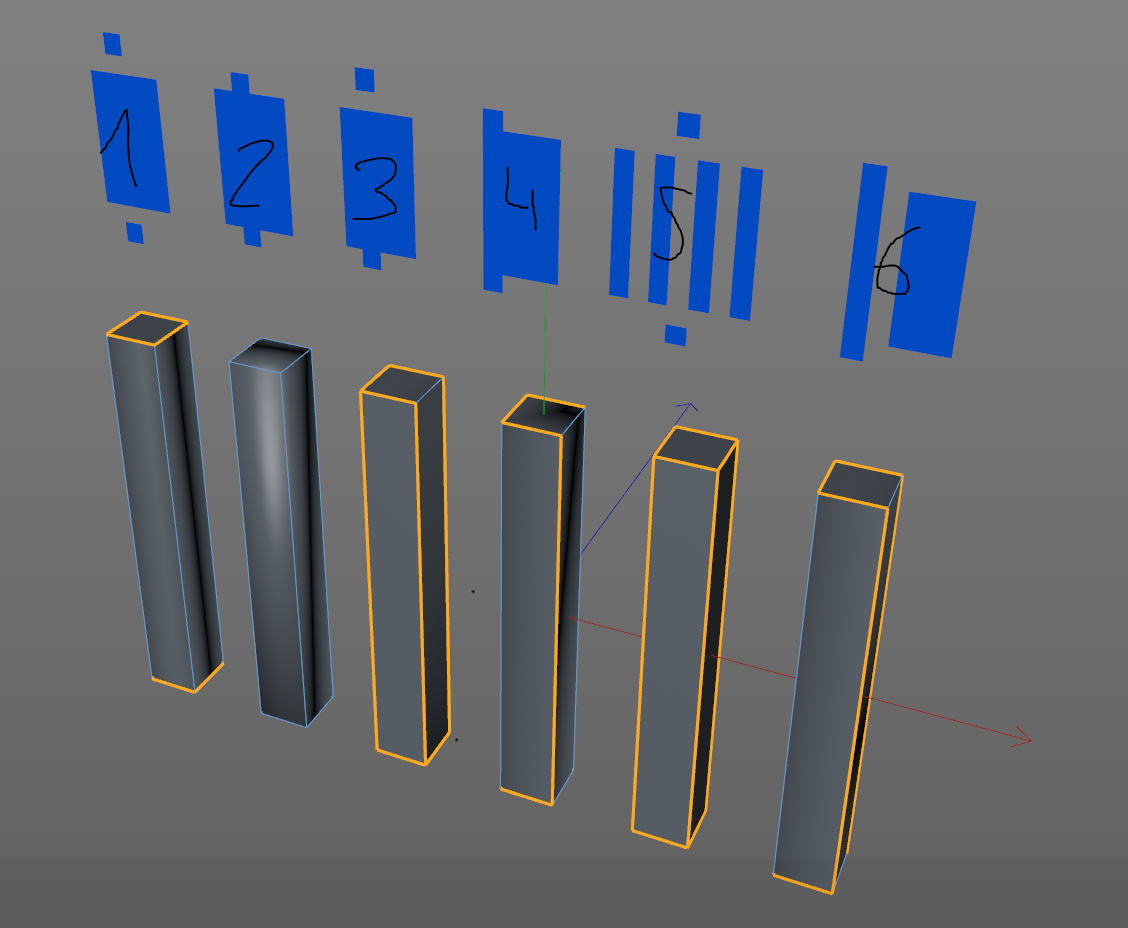 There is not one preferred cube but all these examples are not part of any of the preferred cubes as these are all bad (which I learned recently) Only one shades correctly but thats still a bad unwrap Now thinking about it, Max only has smoothing groups but no smoothing splits right? So can you split this properly at all…
9 results