Search
-
Re: normal map seams become visible when mesh is deformed/animated
 what is your vert order direction? ( quad split ) Have u locked it down to right or left? Otherwise it will flip inside quads to the shortest distance during animation/deformation. been awhile since I had similar issues but I think as much was helpful in consistently viewing seam issues that might not be obvious otherwise.…
 -
Re: normal map seams become visible when mesh is deformed/animated
 Might have to do with the order of operations that your realtime renderer uses. The normal map does smooth out the mesh for specific surface normals, after all. If you animate your mesh, those normals change. But sharp edges like that should only appear if your vertex normals were previously split (or maybe made explicit…
 -
normal map seams become visible when mesh is deformed/animated
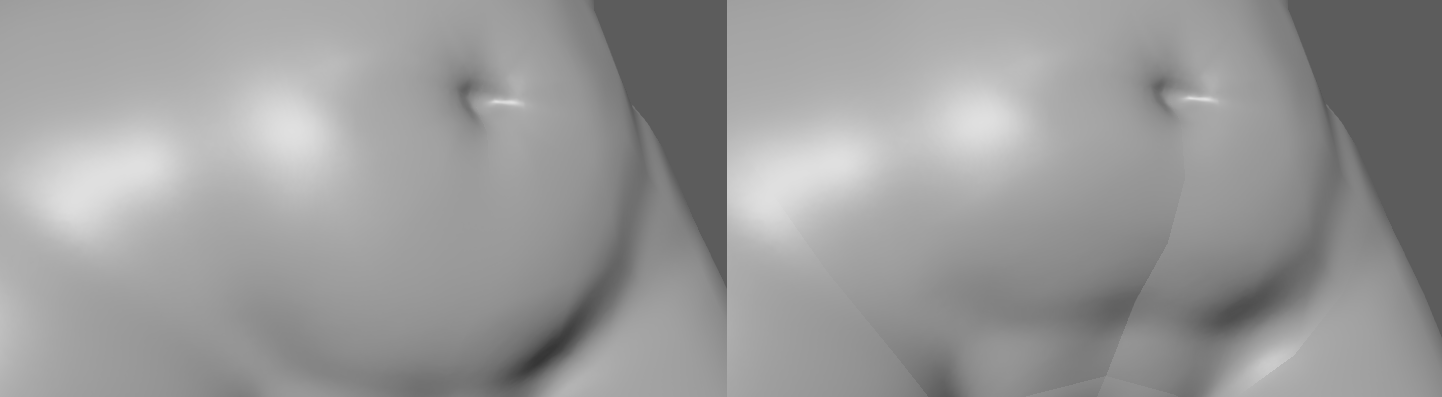 Sorry to come asking for help yet again, but I'm having some issues with my normal map. It looks fine as long as the character is in the pose it was baked in, but as soon as I start to animate it or deform the mesh in general, the UV seams become painfully obvious (as seen in the picture). What could be causing this?
 -
Re: normal map seams become visible when mesh is deformed/animated
 I fixed the issue in some of the areas by smoothing all the mesh's normals before baking, but this area is still refusing to work properly. I've tried baking it with hard edges around the UV seam as well as smooth edges. Both produce pretty much the same result. left image is in bind pose, right image is slightly deformed.…
 -
Re: normal map seams become visible when mesh is deformed/animated
 Here's another problem area where the seams become obvious when the model is deformed. I still have no idea how to solve it. A friend said I should increase the padding in the texture, but that did absolutely nothing. Does anyone have any helpful ideas?
 -
Re: normal map seams become visible when mesh is deformed/animated
Here's the scene for anyone willing to take a closer look. I included the .mb file as well as the normal map. It's not rigged, but you can easily see the problem by selecting a few vertices around the problem areas and deform is a bit using soft-select. WARNING: NSFW… -
Re: normal map seams become visible when mesh is deformed/animated
Made a webm of the problem in motion. Not sure if it will make things a little clearer or not. Note that there is a 3D breast visible in the webm, so... NSFW warning. https://www.dropbox.com/s/aobt1fdwbyfrc9k/normalissue_edit_0.webm?dl=0 -
Re: normal map seams become visible when mesh is deformed/animated
As I mentioned earlier, I've tried baking with smooth edges as well has hard edges along the UV seams. Smooth edges do produce slightly better results, although the seams are still very much visible. I've tried rendering the model in Maya as well as Unity. The problem is visible in both programs. I used Maya to create the… -
Re: normal map seams become visible when mesh is deformed/animated
Hadn't thought of that, so I tried triangulating the mesh, but the problem still persisted. Nice idea though... Too bad it didn't work. :( -
Re: normal map seams become visible when mesh is deformed/animated
 Just did another test. I imported my highpoly into a brand new scene and made a whole new mesh around one of the problem areas (the armpit) using the quad-draw tool. I UV-mapped my new test mesh and baked it. As soon as I stretched the area around the UV seams, the seams became visible, as before. This rules out starting…
10 results