Search
-
Re: Bend Of Brothers Discussion (3DsMaxTool)
 hi lex, thanks for reply, yes i made a new folder in 3ds max scripts folder and in the toolbar tab i made a new toolbar and dragged the script there from the list and it gives me this when i click the button. If i open the script and do again the evaluate all the script works, but i have to do this all the time i open max.
 -
Re: Bend Of Brothers Discussion (3DsMaxTool)
 Thanks guys for all the downloads, comments, support, art and a BIG thank you to everyone who has contributed generously. You guys are the best! Feel free to share your awesome creations and be featured in the top post. Hannes d: thank you for the info, I wasn't aware that this was possible. This adds the advantage of not…
 -
Re: Bend Of Brothers Discussion (3DsMaxTool)
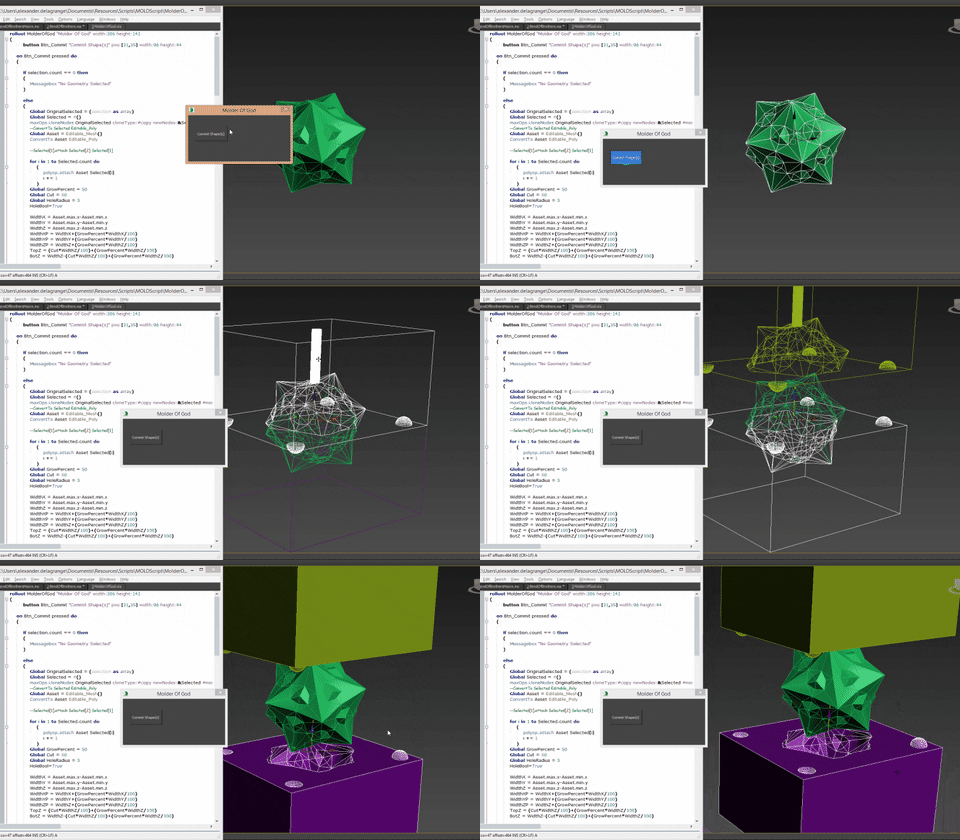 Next week I am releasing a new script that creates molds for 3D printing. This is an old wip gif (It does so much more now): After I have finished this one I will revisit the BOB script and release V2.0! Happy to see people are still interested
 -
Re: Bend Of Brothers Discussion (3DsMaxTool)
hi man, awesome tool but i have a problem, everytime i open max i need to open the script and do the evaluate/all thing to make the script work again, i`m using max 2012 x64. How can i fix this ? -
Re: Bend Of Brothers Discussion (3DsMaxTool)
Revel: you are right about the script messing up the naming conventions. this was me being bit sloppy with the script figuring i dont really use naming conventions until the model is 90% done assuming everybody works the same way I do :'D. But indeed, you are 100% right, this will be fixed in a future release, thank you… -
Re: Bend Of Brothers Discussion (3DsMaxTool)
s1dK: Sorry for the delay but I ran into trouble trying to reactivate my max 2012 license. apparently the 2012 version removes the script from your local folder giving it the error when launched. Go to C: \Users\"your user name"\AppData\Local\Autodesk\3dsMax\2012 - 64bit\enu\UI\usermacros and drop the BendOfBrothers.mse… -
Re: Bend Of Brothers Discussion (3DsMaxTool)
 and so it does work. awesome, thanks for the info and script :)
 -
Re: Bend Of Brothers Discussion (3DsMaxTool)
 Nice script, thx. Would be nice if it welded the edges together. A toggle to weld edges.
 -
Re: Bend Of Brothers Discussion (3DsMaxTool)
 Here, BlvdNights: http://shonmitchell.blogspot.com/2014/12/updated-script-now-available-for.html
 -
Re: Bend Of Brothers Discussion (3DsMaxTool)
Outstanding script you have. Please can you make a bend along a given path?
13 results