Search
-
Re: Jet Design WIP
 The air intakes can sometimes be positioned on the top (think of the modern B-2 flying wing bomber), but like I said they'll just starve when the aircraft pulls up. Bombers and other larger, less-manoeuvrable aircraft can get away with it because their main defence is going to be running away at full speed, and flares, not…
 -
Re: Viktor's character scribbles
 Hey Viktor, really great progress going on here, the Cranston sculpt is particularly awesome. There's a few things that are bugging me about this Jennifer Lawrence bust that are bugging me though. Mostly it's due to the hard(ish) lines around the nose, the lower lip and the lower eyelids. Some of it is also due to the…
 -
Re: Help with Unity
 Putting a collider on the door also did not work it seems like. :( This is the script I have for my "Activate Trigger" public class ActivateTrigger : MonoBehaviour { public enum Mode { Trigger = 0, // Just broadcast the action on to the target Replace = 1, // replace target with source Activate = 2, // Activate the target…
 -
Re: SketchBook: cholden
 To contradict a previous post about not posting step till I'm awesome, here's my steps! I don't suggest following these too much for learning. Ref photo, again, searched for a cityscape in Oakland, California. The result was simple enough that at my current level I felt confident in. 1. I start with the most background of…
 -
Re: Maya Preference/Settings manager
 This can be done via MEL script but it is highly specific to the hotkeys you want to switch around. The easiest way to do this would probably be to have a few shelf buttons, each with a hotkey configuration for the desired work flow (modeling, animation, UV mapping, etc.) that you can click once to switch between. If you…
 -
Re: Tiling Texture - Maya > UDK ?
 You want to unwrap the UVs so they tile like this: Obviously your tree might be longer, but this demonstrates the concept. If you want it to tile more, you can alter the texture2d node to affect the amount in tiling. To do this in UDK you want to multiply some number before it goes into a texture coordinate node.
 -
Re: Maya Normal Map Material question?
You could use a Layered Texture node to put the detail map on top of your base normal map to achieve the effect but this will shift your hue slightly but it's good enough for a preview. You may be able to use the Layered Shader node to properly combine normal mpas but I haven't tried that much. -
Re: Help with 3 way blend material
 You can import vertex painted mesh as preview one instead primitive shapes and debug your shader. If you right click on node (eg on any Lerp) you can select "Start Previewing ..." this will temporary make output of that node final output of your shader in preview viewport. Hope this helps.
 -
Re: XSI Lava shader
 Nice tutorial. I'm too busy with DW3 to run through this and convert it to XSI terms, but I don't see why you couldn't use similar nodes to get close to the same result. Maybe I'll try this sometime during the week, it would be a good exercise in nodes I don't use often.
 -
Epic Brutalism

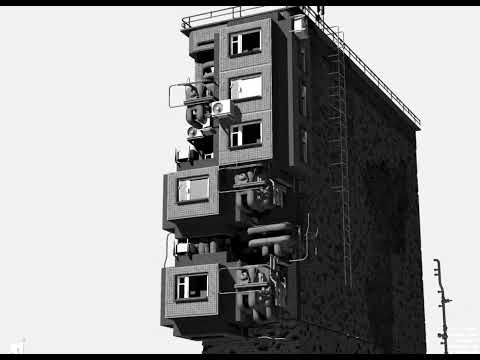 Epic procedural My love for panel houses and for the brutalist style was reflected in my project. Collected procedural generation, through a node system, it turned out not the most simple node tree. It assembles houses from a set of small parts. With a large number of changeable parameters. finally mastered procedural…
>37262 results