Search
-
Re: (MAYA) Selection issue with near objects
 This is a super annoying problem. Other ways you can get around it is by freezing transforms, which also sucks. Changing to DirectX or OpenGL may help, or trying a newer or older video card driver. I mostly get this on large scenes where I have large transform values, what I usually do is a small box select around a vertex…
 -
Re: Nifty... MayaLT on Steam
 I've used Blender since about version 2.48. I decided to give Maya a try, since people around here seem to have good things to say about it. But then I tried to pan the viewport and the cylinder I put down started moving around, and then I tried to place the 3D cursor and I got a weird box that always selects vertices on…
 -
Re: [Art Dump] Champions of Anteria - Casper Wermuth
 @lotet Thanks a lot, lotet! @Dethling @kohg lol at the boner! Thanks for your comments, and im glad you ask! The bottom part of some of these assets were extended and blended into the terrain using vertex colors. The terrain's diffuse, normal and spec would then be projected on to this geometry depending on the value of R,…
 -
Re: Melissa Roux: martial artist- progress thread

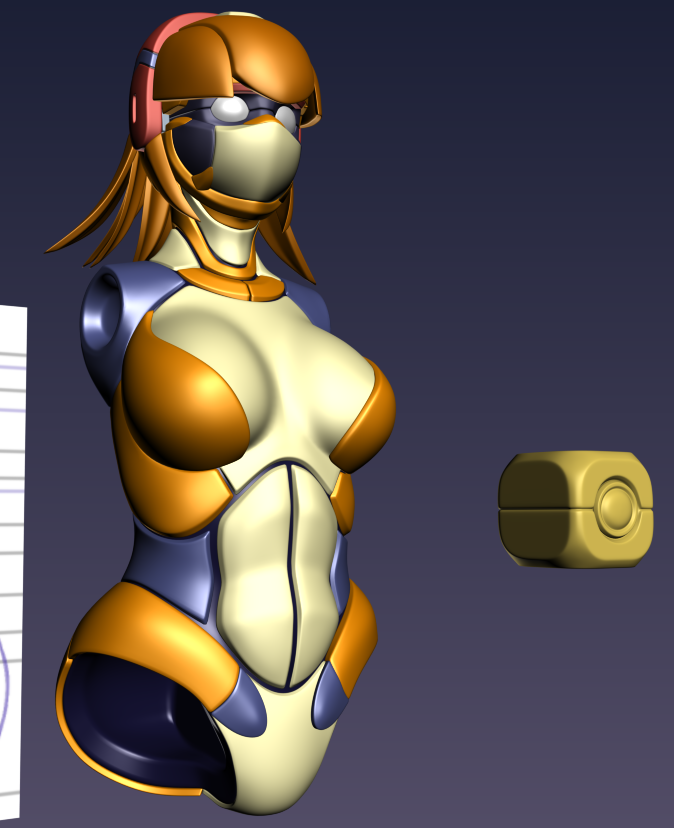 Day 5's work. felt i should wait until daytime to post my work instead of exactly when I stopped. didn't get a whole lot done yesterday. spent most of the day experimenting with vertex deforms. I also decided to try and make a robot heart for her based on a dream I had. Perhaps I can hollow out the chesk cavity behind the…
 -
Re: Female Character Work Thread - Modern Celtic Hero

 Beginning Marvelous Designer tailoring. I used the pattern drafting method Andrei Cristea outlined in Vertex 3 to derive the pattern from a blockin sculpt I extracted from the body sculpt. Tonight I'm going to pull a Pinterest board of fold and seam reference of denim shorts so I can start authoring the fabric's landmarks.…
 -
Re: Protecting SmoothFace history
 In addition to what the others have said, you can also select the history node tab from the Attribute Editor, click Select at the bottom of that same panel, and press Delete on your keyboard. Much faster than opening up the Hypershade if you just need to get rid of one or two history nodes. If you delete history nodes out…
 -
Re: Is it possible to show vert count in Maya the same way Unreal does?
That covers UV splits but not hard edge splits like eltarbos mentions. It's been a long day and I'm having trouble thinking this one through fully. Also, what maya version? Looks like polyEvaluate got buffed in 2018. -uvEdgePairs(uep) would be handy here at least. (how do i escape this textual hell?) I think a script for… -
Re: Same material/texture, different base color.
I was more-so just worried about the draw calls doing that and found it hard to get a lower saturated color due to the atlas being so widely used. Now I am not sure about having as many nodes as I do in my material being a major drawback or not as I have 3 parameters for each base-color texture… -
Re: Autodesk Maya 2016
 What the heck is wrong with 2016! FFS, they just about broke everything which worked really well ! Extrude they broke, ok I can live with. What happened to the ability to tweak verts etc without having to select every single one of them? Like in this gif I found to illustrate the issue.? They also broke target weld, when…
 -
Re: Texture Loopable (Seamless) High Quality Repeat Problem
 vertex painting, decals, mesh objects scattered around to break up the tiling, even lighting can play a part in breaking up tiling textures if you have interesting shadows casting on it and also using colored lights creating different hues and contrast across a surface. Scale of the texture can also play a part in noticing…
>9919 results