Search
-
Re: BRAWL2 [Character] R&M, iam717
 edit:// okay fixed the "issues" and can write out the description. Watched all my "fav" or interesting parts of the show and comics and picked which elements i thought to include into the design that i felt would add some "flavor", to it all. Redesigned the "Portal Gun", a little bit, it wasn't 100% afaik some angles had…
 -
Re: Maya Tilling Setup Issue, the Duplicated plane does not show in UV Editor?!
 For the tiling UV thing, I don't think I've seen Maya automatically offset UVs the way you describe. The typical way to move shells is in the UV toolkit; there are buttons in the UI to move them. Setting the value there to 1.0 is what you want. For your grid snapping problem, your scene grid is fine, but the pivot handle…
 -
Re: Tropes in Videogames
 Are you saying you don't think that? You do know that Wikipedia is just edited by people, right? *edit* not meaning to sound dickish here - my full thought is it's edited by anyone, and any statement on Wikipedia could be one person or one groups opinion. No, not me. but if you understood what a straw man is, and what the…
 -
2D or 3D Visuals / Animation / Rigging / Unreal Engine Assets & More / Designer Searching For Work

 If you are looking for a designer / assistant for your project or business, please message me or leave a comment and I will reply as soon as possible. I have 5-star client testimonials and experience relating to the following: • 2D and 3D asset creation and editing • Animations • Video rendering and editing • Unreal Engine…
 -
The Elite | Desert Eagle

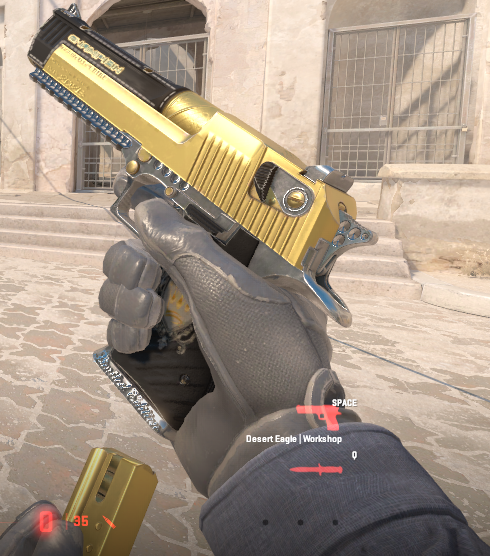 https://steamcommunity.com/sharedfiles/filedetails/?id=3484845989
 -
Re: 3ds Max Key binding confusion
 In the main menu there is a Keyboard Shortcut Override button. Try turning that on and see if they start working again. It looks like a key with an up arrow on it. Or on older versions of Max it has a T. This turns on sub menu shortcuts and overrides the main shortcut. You might need to unbind it from another spot so its…
 -
Re: Fallout 4 retextures [WIP & REL]
 Ya, I tested it and you're right. They are reversed when using DXT1. With 3Dc/ATI2/BC5, red channel is gloss and green channel is spec. With DXT1, red channel is spec and green channel is gloss. See EDIT2 below As for whether to use DXT1 or 3Dc/ATI2/BC5, I think Bethesda may have downscaled textures and…
 -
3ds max UI settings disappeared
 I use 3ds Max 2014 and ive been getting weird glitches in my scene (vertices exploding off screen when I apply a turbosmooth modifier, and crashes when I use some edit poly functions) I just restarted for like the 5th time, and suddenly all my UI settings are gone. Keybinds, modifier sets, Utilities menu all reset to…
 -
Re: Character Practice – Personal Training Project
Well time to strip! Hi there. I'd like to believe this is a great resource for anatomy things if your covered up model needs it at all: https://www.artstation.com/anatomy4sculptors "focusing on anatomy" Clothing: (random but informative find) youtube link. Armor: (people find these useful) YT link. C&c: Looks alright, img… -
Re: 3ds max >> motion capture and freeform animation
While in mixer mode (little egg beater in biped menu) there are no curves or keys to edit, at least none that relate to what you see in the motion mixer. You'll have to create a mixdown and apply that to the biped, then exit mixer mode before you can edit the keys and curves on mixer animation. There could be keys already…
>35069 results