Search
-
Re: Koivis Dodge Viper project

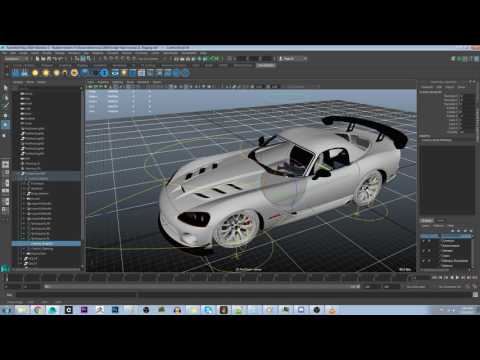 I did a custom mel script to rig the wheels on my vehicle. Finding the algorithm was easy, the struggle was applying the mathematical formula to mel script and then get it working on all 3 X,Y,Z Axis. I may do a vlog going into detail about the problems the other youtube tutorials gave. But here is a demo of what my rig is…
 -
Re: Buy 3DSMax 2016 or rent it?
 I think it's great that there is a good free alternative and hope it also gives some downward pressure on the prices of the commercial packages. I would probably not learn 3DSMax now either. But I have so much time invested in it, and in custom scripting, that for me it's not worth it to switch now. I will probably…
 -
Re: Need Maya 2008 workflow advice urgently
 oh, using shift and ctrl when adjusting values was a new one for me :D one thing that i use very often is that i isolate objects, here's a nice script that isolate the selected objects, i've put this script on the i button, and it's toggles isolate select on and off. saves me a lot of time $currentPanel = `getPanel…
 -
Re: blender questions
 Just type 50 after loop cut. Also in object mode select the object, press n and try changing the Dim x/y/z. Not sure about the redo last command. Btw, I'm trying to make a script that will position the cursor at an Empty just in front of the view-port to make greasepencil sketching easier. I've basically done the script…
 -
Re: Dead Rising lightmaps?
 Ninjas: In my experience, mental ray renders much faster than the Max skylight using the standard renderer, so that option might be even worse. You could try the E-Light script for an effect similar to the standard skylight. Its just a dome of directional spots that are generated via a script. Pretty handy, and it renders…
 -
Re: Shimmers Maya Questions
 http://www.highend3d.com/maya/downloads/mel_scripts/texturing/3552.html That is probably what you want. Next time check the plugin sites before asking a question, I found that in literally 2 minutes just by going to highend3d.com and browsing the plugins and MEL scripts. I know it's easy to just ask "is there a script for…
 -
Re: [3dsMax] Smoothing Groups to IDs
 It's easy enough to write a script that converts a smoothing group to the same number material, but how do you want to deal with faces that have multiple smoothing groups (since a face can only have one material ID)? I ask because I already wrote a script for this but it just takes the first smoothing group (in numerical…
 -
Re: Benefits of Maya (Modeling)

 1) Use the marking menus ctrl+right click and shift+right click 2) Use the hotbox ( quick menu ) by holding down spacebar, you'll have all the top menus directly in the viewport 3) Use context menu for every tool to quickly change settings ex. press d key+right mouse button and move the mouse down = reset pivot another…
 -
Re: Max Creation Graph modifier - accessing graph values

 Hi, Thank you for taking the time to reply. What I have: I'm using the AVoxelizer.maxtool from the Max Creation Graph (MCG) Sample Pack 1 (I have attached the mcg package). I've written a MAXscript that does all sorts of things with this: exporting obj and parsing different files - all through it's own UI. As I am…
 -
Re: Development: When does the Game become "Fun"?
I often thought on this a lot before, not so much anymore. Mostly because the word or idea of "fun" doesn't apply to a lot of today's experiences. For example I've just recently got to play through some of the Walking Dead by TellTale. Those games definitely aren't pure "fun" but they are for sure entertaining. Now I think…
>11555 results