Search
-
Re: Maya 2009 polycount wishlist
 That would be sweet. :D edit: Then they should give you the possibility to use the same full screen tab system on secondary monitors as well. I forgot, maya still needs camera mattes to mask everything outside the camera's renderable area.
 -
Re: Blending of textures in PS2

 Might even be just floating geometries with vertex/map alpha on some of those screenshots. It was already used for sure on N64. (I was so impressed back then xD) Note that we still use this approach, for "breaking" 90 degrees angles on walls for instance. Maybe splatting was a bit heavy for those platforms as it requires…
 -
3ds Max 2016 and a white viewport
 I recently upgraded to 3ds Max 2016 and the past few days if I maximize a viewport, it turns white and there is nothing to view. When I revert back to four screens, I can see what I was working on. The grid, models, etc. Possible glitch?
 -
holes in mesh
 Hi All, I am trying to figure out if I can make holes in my mesh inside painter? For example, check out the enclosed picture and a screen shot of my model inside painter. Is this possible if so can someone point me in the right direction. Thanks! Alex
 -
[UE4] El Capitán - The captain's cabin on a wealthy merchant ship - Level Design

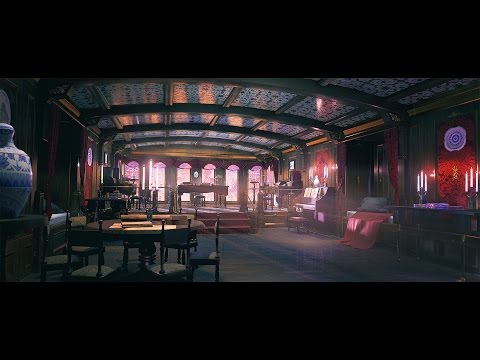 Finished this piece recently: https://www.youtube.com/watch?v=bEhS0J_-V2w I tried focusing on really capturing the essence of my gathered reference images and the historical setting. Screens: Let me know what you think!
 -
Stone Floor texture - first post!
 hey Polycount, here is a little something i have been working on in my spare time. I did 2 zbrush sculpts, so I can alternate the floor a bit. below is a screen grab of the shader, and the diffuse, normal, and spec. Crits/comments welcome!
 -
Re: Gridline guide showing in viewport in zbrush 2021...please HELP!
 Interesting, never saw this before. Do they move with the model like "textured onto the model" or are they screen-space. Maybe you have enabled some overlay / mode / tool somehow? Do you see it with a new document or reverted default settings as well?
 -
Re: AO Multiply vs AO Overlay
 Multiply versus overlay are methods for blending. I make an assumption the calculation is same in Unreal as photoshop. You can read how they work and intended uses here: Multiply, Screen, and Overlay Blending Modes in Photoshop - dgrin (smugmug.com)
 -
Re: New to 3D modeling, could someone help or maybe point me in the right direction with this project.
Move the verticies that you need to move? It's hard to help without a reference model, and it's bad form etiquette to ask for modeling advice without posting screen captures. If you're not going to show us anything, lurk more and watch tutorials. -
Re: [WIP] Murloc

 I made an Idle animation :smiley: (I'm very new to animating) so please any feedback on this will be great! I want to try a running one next ^^. Screen to gif doesn't seem to like the colours on the leg lol.
>24173 results