Search
-
Re: I am lost with the topology
 As far as I know or understand rigging you can't alter the mesh after you've placed your skinning modifier, I was using 3Ds MAX but many suggest MAYA for rigging/animations. Someone more knowledgeable that is already a rigging/skinning/animation artist might come in and speak more about that though.
 -
Re: OBJ into ZBrush, the model in Zbrush has no UVs
 maybe try exporting an fbx from max? zbrush now has fbx import under the plugins section. never tried it myself though. also maybe zoom out in the uvwunwrap modifier in max to make sure you don't have some crazy scaled up uvs you didn't notice.
 -
Re: What are you working on? 2018

 I created another quick tutorial for everyone. In this tutorial we'll cover how to make really nice naturalistic foliage wind and as a bonus I'll show you all how to modify vertex normals through a material in ue4. You can check out the tutorial here: https://www.artstation.com/artwork/ngQa9
 -
Re: Jack's Improvement Thread
 I created another quick tutorial for everyone. In this tutorial we'll cover how to make really nice naturalistic foliage wind and as a bonus I'll show you all how to modify vertex normals through a material in ue4. You can check out the tutorial here: https://www.artstation.com/artwork/ngQa9
 -
Re: LeRhone Engine

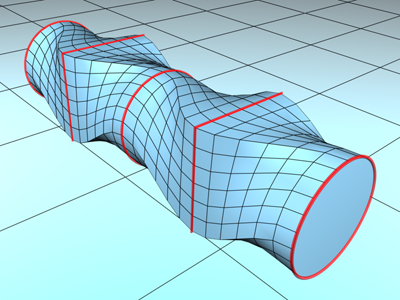 Yes, it is hipoly. The mesh here is subdivided and, actually, is based on low polygons. But the curved pipes look significantly better when subdivided. They are the only parts that I have done in Max, since I did not find a way to make a pipe from different shapes. I used the 'Loft' modifier that does this thing:
 -
Re: 3ds max circle grate, ideas for soloution?
 I think the FFD modifier is a better option, because its non-destructive and if he change the size of the circle, he can easy adjust it to the new size. And its possible to use it for something else, without having to redo some of the mesh. But of course, it does depend if the vertical and horizontal meshes are merges…
 -
Re: [Mixamo Contest] Necromancer W.I.P
I've modified the face, added the eyes, the hair are just for fun (I don't want to see her bald anymore)the final hair will be different Thank you Mixamo for the observation I've added the muscle between the shoulder and the breast next I want change her staff to suit more with her style -
Re: Skyline5gtr Journey to get a JOB !
 I changed my mind, i do not want to give up so i spend more time today really paying attention to the cris-cross pattern of the hilt fabric and the weaving in and out. I also added a very slight shell modifier to give the cloth some depth like recommended
 -
Re: [3dsmax2011]Weighting verts to a bone - Verts jumping to a new location
I found out what the problem was and I'll share for anyone who may stumble on this one day. under the "Advanced Parameters" tab in the "Skin" modifier I unchecked "Always Deform" and it worked fine, although I heard it was best to recheck that box once you've done weighting those specific vertices. -
Re: How can I improve my baking in SD6? my normal/height maps come out blurry.
 It's not blurry, it's misaligned because the rays didn't go perfectly perpendicular to the surface. This could be fixed by modifying the vertex normals of your mesh (or smoothing groups) or by using a cage. More details here…
>11681 results