Search
-
[UNITY LOVECRAFTIAN HORROR - WIP] Grim Realms

 Hi All, We are a team of 3 people (writer and two artists) who have been working on an H.P. Lovecraft game since Christmas time. We have been doing this on our spare time. We wanted to show our progress with everyone. This is a horror FPS game inspired by Resident Evil, Silent Hill, Bioshock, Half Life and more with a mix…
 -
Maya hotkey issue.
 Hello everyone, really hope some maya user can help me out, apologies in advance for the long post! here's my current situation: I want INSERT EDGE LOOP's hotkey to be SHIFT + x, now the probelm is that once that hotkey is assigned whenever I press SHIFT + x I get INSERT EDGE LOOP and SNAP TO GRID as well. The weird thing…
 -
Re: Cinema 4D for Game Art / Game Development Resources - (C4D vs Blender or Max?)
 Sounds like Maxon just implemented multi UV edit and even more UV improvements for S23 which was the biggest issue, big rejoice. Edit: You still cant multi unwrap, but multi edit. So the issue is that you can not make your auto unwrap fit them ideally in scale to one UV. This is still a shame. The best workaround in my…
 -
Re: 3DS Max, Shift dragging offsets the mesh
 It seems to work if you use an orthographic view (top, left, ect). It seems to work if you turn off snaps. I think I see what's going on... Even if you create your object with grid snap turned on your pivot might not land on the grid. It's probably a bug since it works in ortho view just fine so either do that operation in…
 -
Re: Modo Modeling
Concentrate on the Right side Menü under Model Tab and use Modo Layout with Top and Front View and 3D. Top and Front View is good for correct placing and Grid Snapping aka correct measurements. 3D View more for Selecting and Overview. IN your picture you see the left Menü, its not relevant in the following process because… -
Re: Workflows for Level Blockouts?
 some great information here :) I think that in the new MODO you can create entire levels and export it directly into Unreal/Unity. I haven't tried this yet but I am going to once I figure out the fastest way to get collisions/lightmaps to export into UE4 from MODO. Regarding level design I have seen 2 popular methods: 1 is…
 -
Re: Hand Held Lantern Game Asset

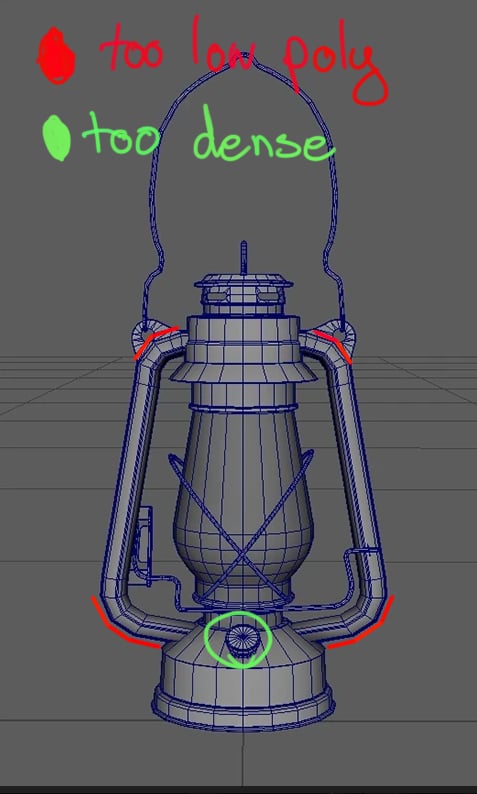 Very nice. Definitely better than any student work I ever produced :+1: Agreed with illumisanic. Something I notice in grad work is that its common to spend a lot of triangles in small fine detail areas while neglecting the larger silhouette. If you take some of the triangles out of the high density areas and spend them in…
 -
Re: (Finished) Research Outpost - Unreal Engine 5 Environment
 Hey, this is a great start! Really like what you are going for! I agree with @Fabi_G feedback. It will help to really nail the blockout so we can see function, purpose and design at a first glance. It will also help you a lot further down the line as you don't have to think about the general structure anymore (so you avoid…
 -
Re: Legend of Grimrock
 Can anyone confirm if you can change the distance you can view in the map? I looked at the options, and couldn't see such parameters to change. Some of the puzzles are ridiculous (such as the Light Pillar one, with the teleporation spam-o-rama segment) because I couldn't see the block I had to throw a rock at across the…
 -
Re: Best workflow for cleaning up a mesh that has been exported from Rhino into Zbrush
 Hello, - Step 1 shows the manual cleanup to patch holes, using regular polygon modeling techniques. - Step 2 shows the individual thin chunks of terrain being extruded down to create thick slabs. The box under them was just used as a negative Boolean to even/flatten their bottom side, but this could be done with just…
>18188 results