Search
-
Re: High vs Low poly construction
 Normalmap-lighting looks strange too where the two meshes intersect, and in older engines (depends on the precision of the z-buffer) you will get z-fighting in those areas too.
 -
Re: Decals in Max
 Best bet would be to get ShaderFX and play with the Z Read and Z Write options, making your own shaders to control this.
 -
Re: SUITE 2.0 status update!
 This is a bit stupid question but does DDO Painter support UNDO? I'm pressing ctrl-z and alt ctrl z to no effect.
 -
Re: Silo any good?
 alt + z for undo selection alt + shift + z for redo selection I have it bound to alt + mouse wheel myself for going up and down levels. pretty slick really.
 -
Re: A question about low poly modeling.

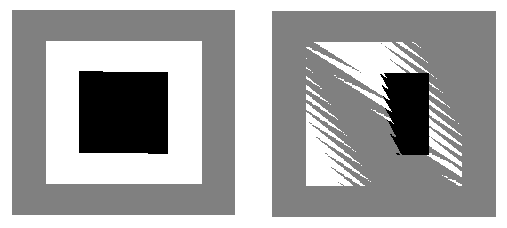 Some Z fighting/Z-buffer errors will occur too, not to this degree but something to be aware of, and it only gets worse as distance to the object increases.
 -
Re: Dragon Ball Garbage!!!
 Yeah Dragonball (not z) is really quite good, and has been said, pretty comedic. Z got weird due to production issues. ... as in the animation studio was getting ahead of the writer's licensed content.
 -
Re: Quick Wacom Question
 The main ones are D, shift, and alt Those three alone allow me to shift up and down subdivision levels, smooth, switch between z-add/z-sub, and control the camera.
 -
Re: Big cube map pack
Yep, go to the source. +X -X +Y -Y +Z -Z in 3ds Max terms is: RT, LF, UP, DN, BK, FR -
Re: 3ds Max vs Unity Camera Perspective

 @monster Just wanted to give you and everyone else a quick update. I managed to match Unity about 98% on a 1:1 in camera views. So while the physical camera did not allow me to shift to vertical, the Free Camera did. So kudos to you Monster. I even managed to match the position values from max and unity and the camera…
 -
Re: Symmetry in Modo
 Scaling to 0% is easy with Seneca's Stretch Snap to Zero script. To make planar to the world axis: 1. Set you Action Center to Element and your Action Axis to Auto. 2. Select whatever you want to be planar. 3a. Place your Action Center on a vertex that you wish to make the "plane" at. 3b. If you are uncertain of your…
>45472 results