Search
-
Re: Maya Preference/Settings manager
 This can be done via MEL script but it is highly specific to the hotkeys you want to switch around. The easiest way to do this would probably be to have a few shelf buttons, each with a hotkey configuration for the desired work flow (modeling, animation, UV mapping, etc.) that you can click once to switch between. If you…
 -
Re: Tiling Texture - Maya > UDK ?
 You want to unwrap the UVs so they tile like this: Obviously your tree might be longer, but this demonstrates the concept. If you want it to tile more, you can alter the texture2d node to affect the amount in tiling. To do this in UDK you want to multiply some number before it goes into a texture coordinate node.
 -
Re: Maya Normal Map Material question?
 You could use a Layered Texture node to put the detail map on top of your base normal map to achieve the effect but this will shift your hue slightly but it's good enough for a preview. You may be able to use the Layered Shader node to properly combine normal mpas but I haven't tried that much.
 -
Re: Help with 3 way blend material
 You can import vertex painted mesh as preview one instead primitive shapes and debug your shader. If you right click on node (eg on any Lerp) you can select "Start Previewing ..." this will temporary make output of that node final output of your shader in preview viewport. Hope this helps.
 -
Re: XSI Lava shader
 Nice tutorial. I'm too busy with DW3 to run through this and convert it to XSI terms, but I don't see why you couldn't use similar nodes to get close to the same result. Maybe I'll try this sometime during the week, it would be a good exercise in nodes I don't use often.
 -
Re: Objects vanishes in Maya.
with Maya it's usually either the material or something getting disconnected / bent out of shape in the history and causing the link between a shape node and material to get borked. Sacrificing your first-born (or deleting history every third operation) generally helps to avoid this sort of bullshit. -
Epic Brutalism

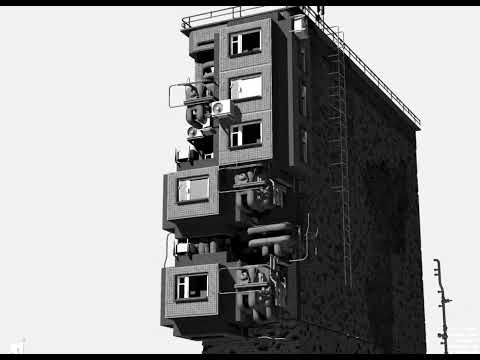 Epic procedural My love for panel houses and for the brutalist style was reflected in my project. Collected procedural generation, through a node system, it turned out not the most simple node tree. It assembles houses from a set of small parts. With a large number of changeable parameters. finally mastered procedural…
 -
Re: [UE4] Dark Souls 3 Environment (Finished)
 You can't make parameters for speedtree nodes so you could make a master material as long as all the materials share the same speed tree settings like you could have a master for grass maybe but would need a different one for trees etc(vertex colour node would be the same anyway)
 -
Re: UDK - Transparency problem Help
 what you could do that would be less expensive as far as materials. it would use 2 material IDs. the upper parts that are intended to be solid sand will be a basic sand shader without the use of any nodes for opacity.. then the ends will use a 2nd material and have the transparency nodes plugged in, making them fade out.
 -
Re: How to make a Displacement/Normal Map tileable
 I would use Substance Designer. You can make a custom node that combines Make it Tile for all your maps simultanously and to go a step further you can tweak the Make it Tile node itself to work with a mask generated from your source so you get better looking transitions.
>37268 results