Search
-
Re: ZBrush 4
 It always defaulted to XYZ. And the option to change it to y axis orbiting is in the shelf to the right of the document window, same place as the last version.
 -
Re: Suffer Gimbal lock ?

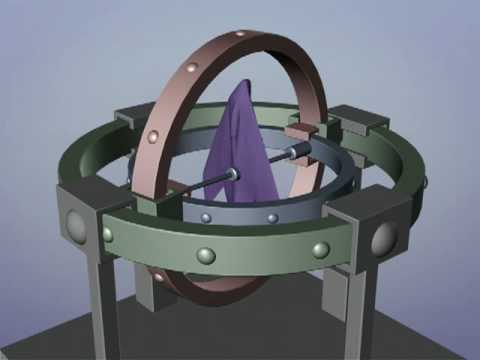 The second axis of a joint is what you need to pay attention to, on all joints. So, if your axis order is XYZ then the Y axis is going to be the one that you want to be doing the least rotation on. In Max, you can change a joints axis order via motion tab > PRS Parameters: Rotation > Euler parameters: Axis order In Maya,…
 -
Re: Where Mechs are Built
 Hi everyone! Another element for the environment done in Highpoly. This time a XYZ Energy generator. Somehow, I've been told by the Poly-god that this thing will output 1GW, and the entire warehouse consumes about 3GW...so I will chain them in 3 and fence the thing as soon as possible. The 4 pipes that are pointing…
 -
Re: Problem with baking Normal Maps - Direction seems to switch on every UV-Shell

 We're only seeing a cropped view of the full texture, and there is padding. That's the orange outline. It could perhaps use more, though. I don't know what you're getting at with curves, and Max can display normal maps just fine if you load the texture with the right gamma, though it will not be the correct tangent basis…
 -
Re: [3DS Max] Custom bones won't reset to default positions like bipeds
 MAke a controller for the bone(just a dummy object for example and Link the bone to this controller.) make another controller, position it at 0,0,0. Now Alt+Right click on the first controller and click on Freeze Transformation.Do the same for the other controller. Now right click on one of the controllers click "Wire…
 -
Re: Normal map issue
 The gist of it: You details are not beveled. Normal maps needs beveled details so they're able to read the XYZ information. For more info, check out the Polycount Wiki on Normal Maps.
 -
Re: Maya Scripts Thread
Nice one Bugo. About time we had one of these. Anyway, here's a few more : FileTextureManager - For fixing texture paths. Also can automatically copy/paste textures into new locations. Consolidate all those outsourced models and textures into your file structure with a single button click :D… -
Re: How to animate bone with rotation in maya

 It sounds like the joint or an object controlling the joint is encountering "gimbal lock", the bane of animators and riggers. What is gimbal lock? https://www.youtube.com/watch?v=N5PDboNJwks You can visualize gimbal on your object in Maya by selecting the rotate tool, holding ctrl-shift, right click and pick Gimbal. As you…
 -
Re: Studying machinery for hard surface art
 In my opinion these go hand in hand, if you practice hard surface art it's going to entail things like finding out what XYZ part is called, looking at schematics, noticing patterns in construction as you make different incarnations of the same "type" of product Almost everything I know about guns I learned from modeling…
 -
Re: Retopologizing, shrinkwrapping sculpted heads in Maya
there is a script for maya floating around the interwebs that can shrinkwrap a mesh onto another. its called xy_shrinkwrap or something like that. works just like you described. you can make a cylinder and shrinkwrap it onto a characters arm or something. found a link…
>1034 results