Search
-
Re: UV Map + baked texture looks good but.. doesn't work?
 Select your material and in the top toolbar of the material editor you will see a checkerboard button with a yellow circle in the corner. It's grayed out if the material or a bitmap isn't selected. Click to "Show Standard Map in Viewport". Also go into your diffuse bitmap node and set alpha source to none.
 -
Re: General Maya issues
 Bake-sets are only for mental-ray batch bake, so it won't help you with the transfer maps :( Envelopes are stored as an extra (hidden) shape node under the objects transform node... in case you need to find it. Any animation in a transform node will only affect the shapes that are contained in it. That's why the smooth…
 -
Re: softimage XSI vertex blending?
 [ame] http://www.youtube.com/watch?v=7nDlV9pJFkg&feature=player_embedded[/ame] Heres something similar that Noesis made that follows some of the same steps. On a second note, where has the 'Vertex_RGBA' node gone in 2011, have they renamed it to something else, because i cant seem to find it.
 -
Export mesh/map type size difference (TIFF, JPEG, ASCII, Binary)

 As i was trying to export mesh to texture it on Substance Painter. First i used obj. format file size, it was around 45 mb, after that when i exported it as fbx it came out as 14 mb; and i could not see any difference with the export in terms of result. Am i doing something wrong here, i dont understand how come such a…
 -
Re: animate .cgfx shader
 this is what we suspected. we really wanted all maya nodes to be animateable and viewable in realtime. as you decribed, the only way to get this is by coding everything in the cgfx shader. plus we need to add this feature to our game engine exporter. bad luck for now, but thanks for your input.
 -
Seeking an Artist Partner for a Survival RPG – Own Your Work, Share the Success!
Looking for an Artist Partner for a Survival RPG (3D/UI/Sound) – Revenue Sharing I am looking for an artist partner for my open-world survival RPG project. I have been developing this game alone for a long time, but to take it to the next level, I need someone who can completely take over the artistic side. This includes… -
Re: UDK blocky terrain painting
 I'm wondering if you may be experiencing the side effects of using multiple LB_HeightBlend nodes without having one layer set to LB_AlphaBlend. That will happen when all layers have alpha of 0. (UDN Article: http://udn.epicgames.com/Three/LandscapeMaterials.html goto "Note about multiple LB_HeightBlend layers")
 -
Super Adventure Box tribute - Unity/Substance

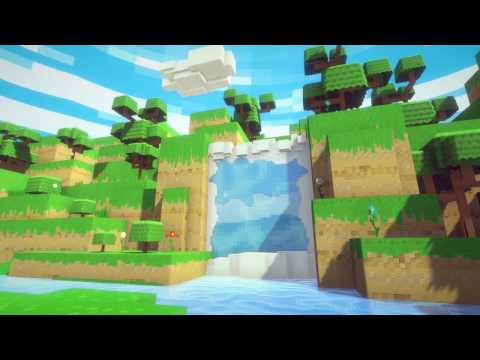 https://www.youtube.com/watch?v=nev5ip6-Dx0 Last weekend I took some time out to practise some asset production. I often find myself creating or learning something useful along the way when I do. What started out as a curiosity about using Substance Designer to create pixel art, ended up as a homage to Guild Wars 2's April…
 -
Re: Physically based rendering in games
@almighty_gir if your using the cubemap blur technequne that was posted in post #154 did you change the custom code to point to lod instead of bias? in the custom node changereturn texCUBEbias(PixelTextureCube_0,float4(BiasInput, rough)); toreturn texCUBElod(PixelTextureCube_0,float4(BiasInput, rough)); that seemed to have… -
Re: Autodesk Stingray game engine
http://help.autodesk.com/view/Stingray/ENU/ You might be able to dig up a couple of things from the help files. There are references for the Lua API and for the flow nodes. IDK if you can get a C++ engine plugin working without source code access, but it might be worth the old college try.
>37259 results