Search
-
Re: WIP - Terry Crews Likeness Study - and more?
 The model overall feels like it's in the ballpark but not quite there yet. Doomfist's body is thicker. The metal arm should have more variation in it's thickness. Good job so far. Also GREAT idea in the head turnaround thing at the beginning. Ill be copying that in the future.
 -
Re: Maya Inset - Is it possible in 2016(7)?

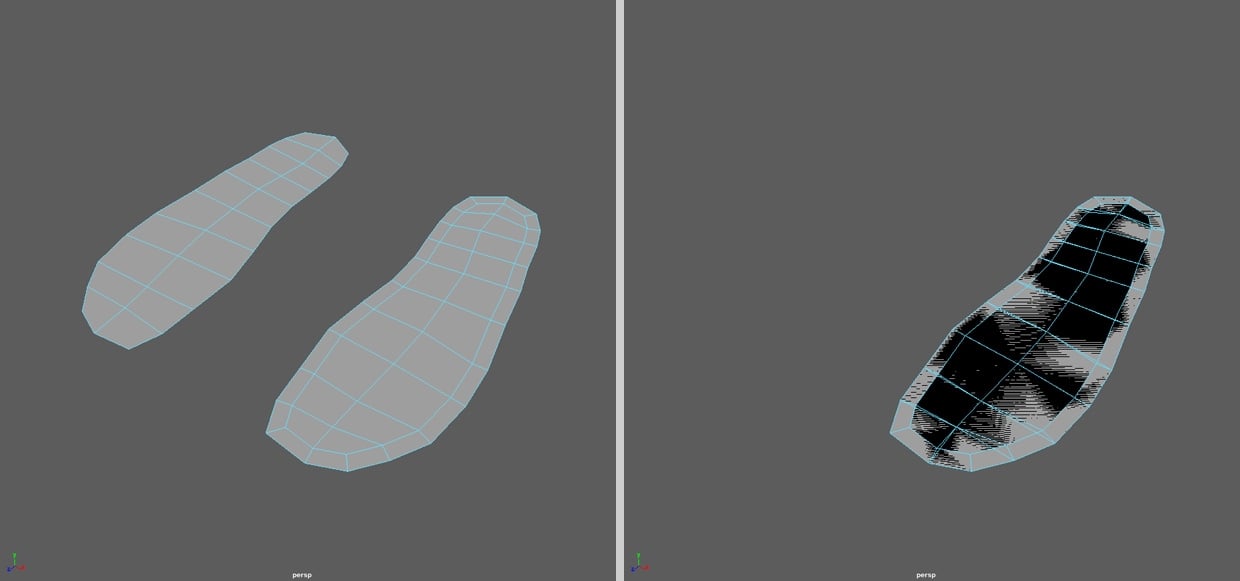 Okay, to sum it up - it isn't really possible in the newest Maya version - just with a workaround and for me it is a bug. What is the logic behind this? For the future I will use your workaround, but I hope Autodesk will fix it some time... Anyway. Thanks for your help!
 -
Re: Romantic Ruins enviro [UDK]
![[HP]](https://us.v-cdn.net/5021068/uploads/userpics/PW2278Q17H7M/nK9DV1HH4CBZK.jpg) God damn! Btw, what kind of workshop was this exactly? is it like pay-to-watch over the internet workshop, or was this for a school? And will you do it again in the future? Moar info plz! :D As for the scene... Well, you pretty much nailed everything, so yeah! :)
God damn! Btw, what kind of workshop was this exactly? is it like pay-to-watch over the internet workshop, or was this for a school? And will you do it again in the future? Moar info plz! :D As for the scene... Well, you pretty much nailed everything, so yeah! :) -
Re: Need help with low poly modelling
 For future reference, it's better to print screen or save out a quick render of your prop. Offscreen pics make it harder to see what you're doing, especially as from what I can see, your lamp post is heavily cropped out.
 -
Re: [SOLVED] Normal Map artifacts-Help!
 Go to the mesh object properties and change the tangent space to Mikkt, this should match the results you're seeing in Painter. You can go to Edit -> Preferences and set a default tangent space as well, which will apply to any meshes you import in the future.
 -
Re: trash tutorial
 I hope they feature this in the recap. Will you be doing more tuts in the future? This tut has taught me so much about design and color theory, I can't begin to thank you enough. Thank you for bestowing your wisdom on me!
 -
Re: Panzer 3 TIII Finished
 Hey Bubba, thanks for the links def going to post this on the other forum as well. :D I'm afraid I used Maya for this so the tutorial is not good for now, as I am still slowly learning Max I'm sure it will come in handy in the future.
 -
Re: Indirect instancing [3ds max]
 I always wanted to write this for UV shells, but its very hard to read a unique topology that can be turn or axis symmetrical and not perfectly aligned in the scene or with a different scale. A relative topology so to speak, I might have another attempt at it in the future.
 -
Re: New monitor for real-time 3D art
 Quadro 6000 supports up to 2- 2560x1600 monitors on DVI and DisplayPort, no G-Sync support though. If you want 2 matching monitors in the future, make sure the monitor you pick has display port support, most monitors should.
 -
Re: Duke Nukem Pistol
 Sorry, I'm just used to modelling in Ortho. I'll perspectiv-ise my future shots! I thought the radial stuff at the front wouldn't matter too much on the low poly (it's a BIIIIGGGG no-no in sub-d). If it's going to cause problems, I'll change it.
>15939 results