Search
-
Re: Digimon models! (ut2004)
 Bull. If he uses the default anims and just links them the models will work fine in 2004. All of my models were done for 2003 but the anim data is dynamically linked and they will use the 2004 animsets when used in 2004. Only real difference is they won't crash 2003 when you try to load them there.
 -
Re: NEED HELP FAST!
You've not explained at all what it is that you want to achieve here. I can only wildly guess that the default UV's upon primitive creation aren't what you need, and you'll need to make your own. Either that or this texture doesn't look like you intended . Either way, more info required -
Re: *SOLVED* 3ds Max - Duplicate Layer with the same content inside
I added some modification - now it removes new indexes from new objects and saves names in original objects, but this script still doesn`t save hierarchy. All new layers are in default 0 layer. Strange. Sometimes it works, sometimes not. I restarted max and all layer structure in copied layers saved -
Re: [Ego Predator] 3D Art WIP ( Face Modelling Phase )

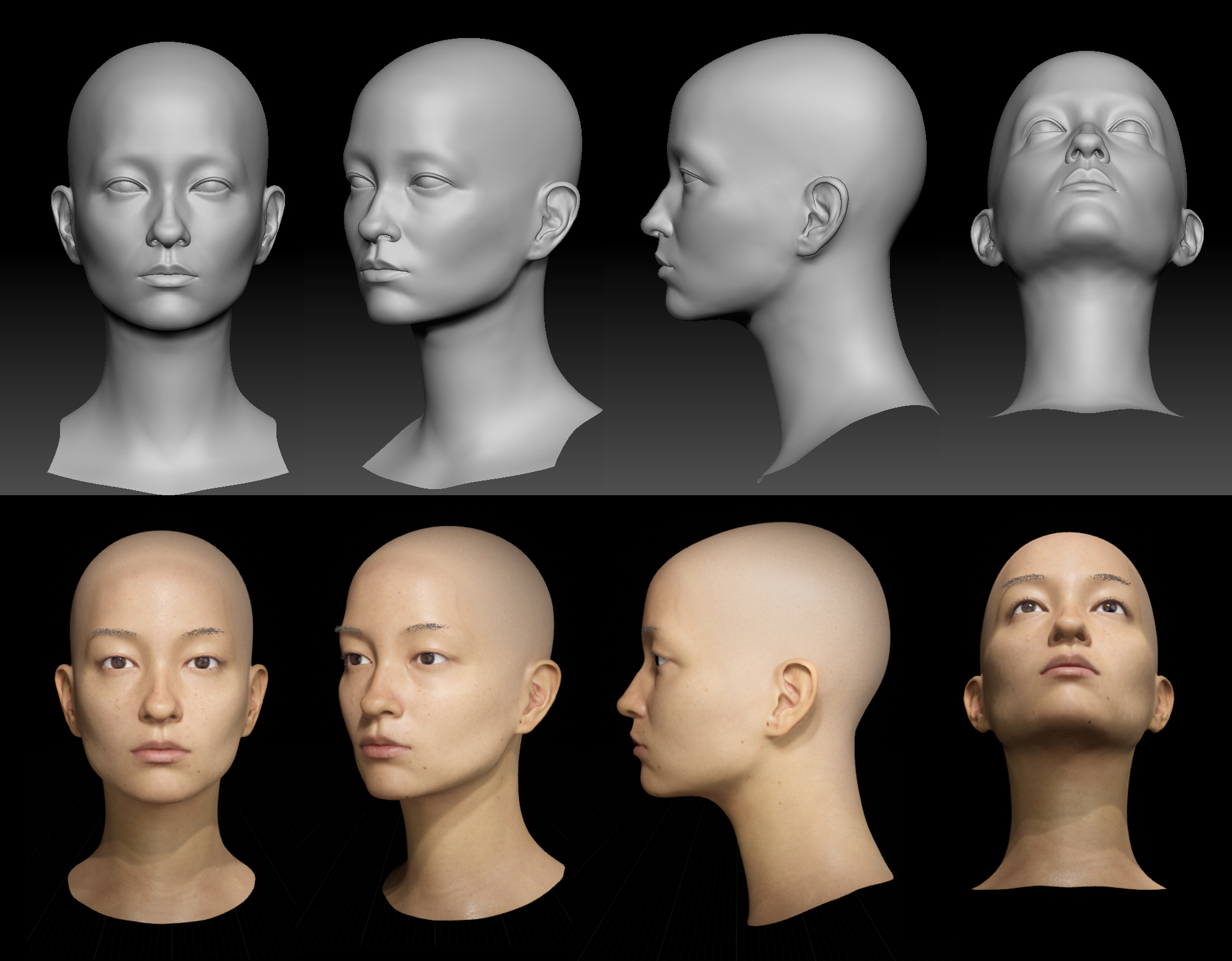 2/5/2022 -I had done some quick lookdev in UE4 for the past 2 month . Finally got the result I am aiming for after numerous trial and error . -Current lookdev uses default lighting setup and shader from Epic Game`s DigitalHuman project. Skin texture are projected from TextureXYZ Vface.
 -
Re: [SOLVED] Substance won't bake my model using a HP mesh
 Thanks to @Fabi_G i understood that the main problem for me was that i didn't apply the scale for both my models before exporting them as fbx files. that way i could bake the textures in SP with default settings and all the baked textures turned out well. There was other problems such as pretty bad UV unwrapping,…
 -
Re: feature idea - smart alignment/size space mode
 It would need to be a toggle, like in the section where you normally manually change it back and forth, you could toggle "smart alignment". i think by default it would be set to on because, like mentioned, why paint on UV's any other way? but of course there is always edge cases where it is good to leave user control.
 -
Re: Big question? I cant get a realistic result in Marmoset.Is it my sculpting or should I use a render?
 I can't speak too much about the texture quality other than the eyebrows look weird, like they're just painted on instead of actual hair, but if you're having issues with SSS you should double check your scene scale and make sure the units are correct, the default settings can mess up the SSS.
 -
Re: This is stupid (i am). Simple rotate in 3ds Max and pivot issues.
 Not sure I understand so bear with me - have you tried changing to Local coordinate system? The default is "View" - see article below for more info. https://knowledge.autodesk.com/support/3ds-max/learn-explore/caas/CloudHelp/cloudhelp/2016/ENU/3DSMax/files/GUID-0F3E2822-9296-42E5-A572-B600884B07E3-htm.html
 -
Re: Why don't big film studios just use Blender?

 Haha I have the mostly the same stuff installed by default when you get Maya/3DS but it's still funny how they put so many crap in there where you really question its utility.. I mean: ''Autodesk Genuine Service'' ?? Lol wth is that. License service? FBX review? Is that all really necessary??
 -
Re: [WIP] Subway Environment
 Hey oraeles77. What i mean by that is rendered real-time in Unity, so yes that's how it would look in game. I just paused the game and took a screen grab. Also all the shaders and lighting are Unity's defaults. I can't make a video but i could answer more questions if you have them.
>10520 results