Search
-
Re: Mobile Optimisation
 Hey Carwash! The best thing you can do to optimize for mobile, for starters, is having as few materials as possible in your scene...unless you're clever about creating one large texture for a large swath of objects at once, you'll likely have to look into a process called "atlasing" to do this (short version...shifting UVs…
 -
Re: Monthly Environment Art Challenge - January & February 2017 (46)

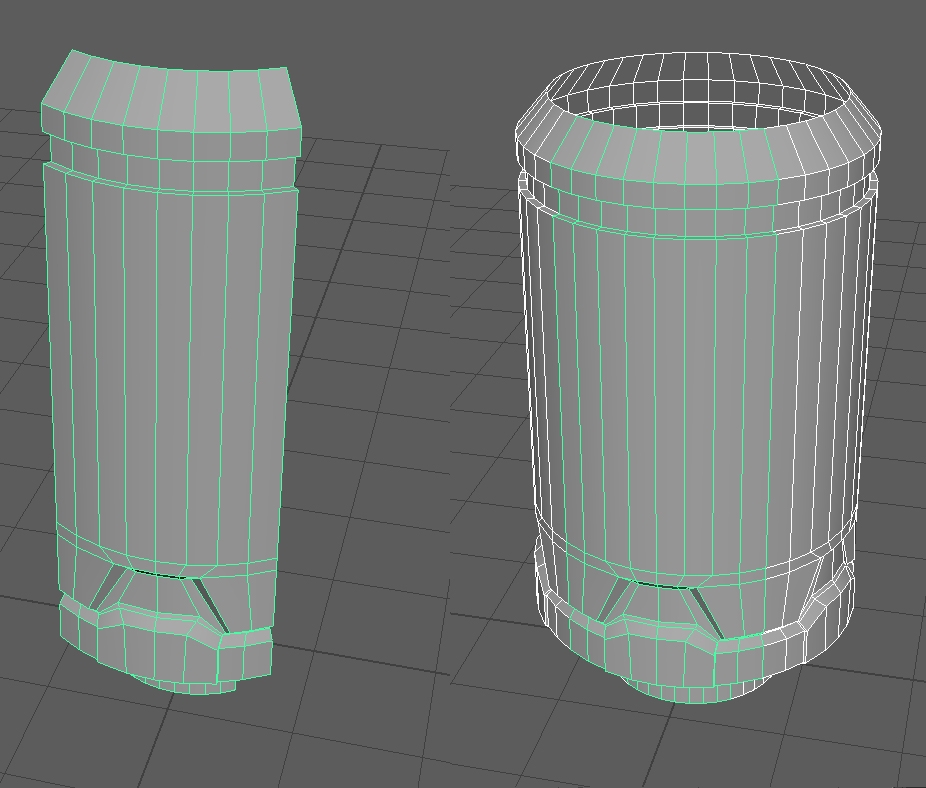 @toxic_h2o - that's a good way to create details for a cylindrical shape and how I would have done it in Max. Hard to tell from your screenshot if this is Max, but I am using Maya and I don't know of a good way to bend things like you can with the modifier in Max. My work flow is to look at the detail of the object and…
 -
Re: I wrote a new maxscript
 -- This script will bake lighting into textures. -- It clones the mesh and breaks it into new objects by materialID -- It loads a lighting rig -- Rick Stirling February 2005 -- Get the model originalObj=$ -- Clone it myclone = copy originalObj --copy the original object -- Hide original select originalObj hide $ -- Load…
 -
Re: Creating a modular bending tunnel for UT
 The wall would snap to the sub grid. Say 75 not 100. Pivots stay on the major grid lines at 100. If you want to keep your straight wall sections snapped to the major grid lines and you want a rounded corner, you extend your corner to include a straight section of the hallway in both directions. Then move the wall into 75…
 -
Re: Wiring Parameters and Custom Attributes
The max wiring dialogue has always left me cold. I also have to do a good deal of wiring of rollbones. Now, depending on how much you like maxscript.... ...I've written a small function that makes wiring much easier when you are just using one object to drive the rotation of another. Even if this isn't exatcly what you… -
Re: [MAXScript] Save/ Load SO Selection
 This is only for creating selection sets of objects. It not works with sub-objects.
 -
Re: What is your preferred UV workflow?
There are tools like Rizom UV that can do all that without having to rotate or arrange the islands manually. Doing the layout by hand might work for simple objects with a handful of UV islands, but good luck packing complex objects with hundreds of islands and multiple UV sets. -
Re: Maya - Simulate cloth thickness goes terribly wrong
 Simulate an extra sim object witout the thickness. And wrap the render object.
 -
3DS Max, reset x-form
So what exactly does the reset x-form do to a mesh? I'm exporting an object here via ASE and it looks bad in my game engine. Yet using a dedicated exporter (which I can't use in this project) and the mesh looks ok in game engine. It looks fine in 3DS Max too. So Max is storing something on the mesh that is important to how… -
Max snaps issue
 Hey guys, Ive been researching this for a few hours and have not found a solution yet, so Im turning to the awesome knowledge of the community at large. My snaps in max 2012 are broke. Now, I know they dramatically changed the way snap works in 2011, and I understand how the new system works... Been using it without issue…
>26403 results