Search
-
Re: How to create low poly of hair and unwrap it???
 Turns high poly to low poly Sort of automatic retopology. From the website: Polygon Cruncher general features 3ds Max modifierPolygon Cruncher is very fast and can handle million of polygons It reduces clerverly the number of faces of your model up to 80% keeping all details Once optimization has been computed, you can…
 -
Re: HK UMP45 WIP
 Sometimes when you reset x form, normals flip, so faces are facing inwards instead of outwards and that would be my first assumption based on your yellow/ green normal map. By default, 3D Max renders both sides of polygons so right click, object properties and check "backface cull." I imagine your model will looks all…
 -
Re: What's the Best Way to to make Filigree and Ornamental 3D Objects?
 I think you might be mixing up what support loops [in-line edges/control loops] actually are. They pertain to sub-divisional modeling(your high-res mesh) and how the smoothing algorithm interprets the surface based on the topology of the polygonal mesh. They are generally used to control how soft/hard an internal/external…
 -
Re: Lightwave10 or Modo ?
 Heh smoothing groups are just like Max but without the GUI... which makes them a bit harder to work with. You just assign faces an "id" and any faces that have the same "id" have a smooth transition between them. Faces can have multiple "id"s for more complex scenarios. Maya smoothing via hard/soft edges would be a bit…
 -
Re: What normal maps work seamless with SP1?
I have to get my end result to workd in Cryengine. The only method of getting a normal map bake to work seamlessly in Cryengine is by first creating a worldspace normalmap and then dragging it through a Cryengine tool to create a tangent space normal map for cryengine without seams. I'm not sure if the worlspace map HAS to… -
Re: [Free Maya Script] Pattern Selection

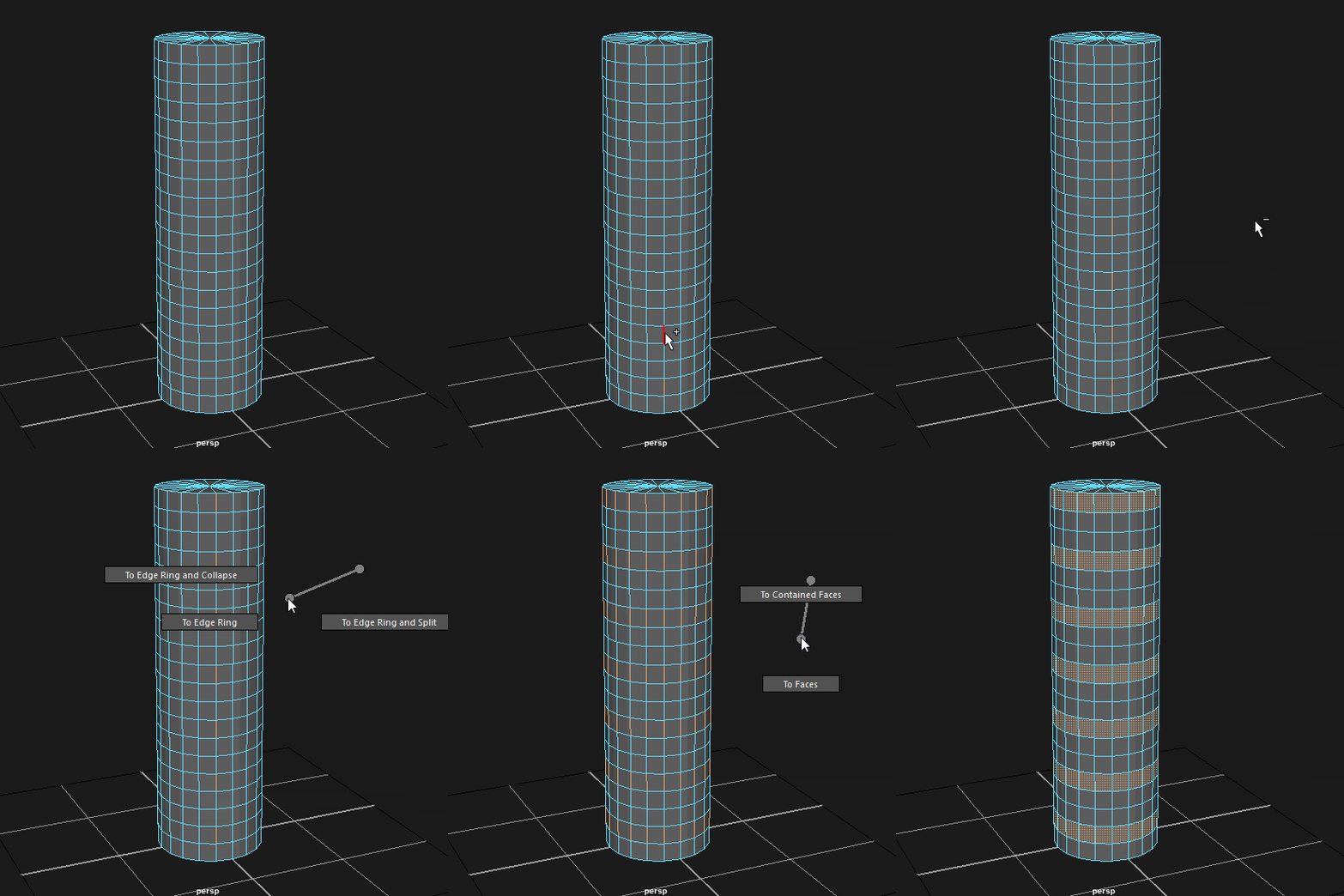 @ilyaivanovart @JDyer Thanksio! @Kert To achieve the selection you're going for I'd first select a few edges along a loop with this script, convert the selection to edge rings ([Ctrl+RMB] Edge Ring Utilities --> To Edge Ring) and then to faces ([Ctrl+RMB] To Faces --> To Faces). Like this: That's pretty unintuitive and…
 -
Re: Unreal Vehicle WIP - Tachikoma
 Perhaps these research images might help: I haven't added some of the finer detail, seeming at the moment I would find it easier to do in zbrush, so sorry if that caused a little confusion. As for the mechanics of movement; I agree the wheels look a bit too small to provide any meaningful traction, the chances are I may…
 -
Re: The SoulEater
 @dGreenberg thx a lot for all the advice ^^ i will definitly try some other design for the horns to see what's the most interesting and i really loved the explanation you made for the 3 choices ^^. I will definitly add more details to his face and the neck area i haven't done it yet because i wasn't sure of which face to…
 -
Re: Frieza
 It definitely has that Frieza feel to it. Right now though I think the anatomy can use some beefing up. Frieza is pretty toned person not so much in muscle mass but he definitely has that very cut feel to him. Right now your Frieza feels more skinny than toned. The face too is also throwing me, I think you gave too much…
 -
Re: WIP Pandaren fanart
 Great work so far! The texture quality in your painting is really great and there seems to be a real confidence in your brush strokes. It also really resonates with the Warcraft art style so well done on that too :) I agree with MykulJaxin, I would actually move the entire character to the right a bit, that way the weapon…
>40187 results