Search
-
Re: [Maya] Storing animation curve as a texture?
 Solved this with a solution suggested by my colleague. 7 rows of python code was all it took. I'm pretty much querying every frame in my range for it's value. Then creating new indexes with colors and positions in a ramp node. I.e. keyframe value = color and frame = position.
 -
Re: [UDK] Stargate scene
 I just have to pop in and say -> WOW !! I love it, top to bottom. I can already imagine the SG team walking around the temple and trying to solve its mysteries. Great work mate and thank you for reminding me of Stargate, it was such a good show.
 -
Re: Maya 2012 slow selections
 Cross posting this thread I started since I eventually found a solution if it's the uv editor problem. I noticed for my Radeon 5850 specifically this problem was solved in newer versions of thier drivers. http://www.polycount.com/forum/showthread.php?t=90002&page=2
 -
Re: Remaking "Call of Cthulu: Dark corners.."
 IIRC, that game used the Gamebryo engine, right? You should be able to use NifTools apps to view the files assuming you can get to them. If you can't, there's a forum out there that specializes in unwinding game archives; someone may have already solved that issue there.
 -
Re: Ideas on adding boundaries for terrain (mudbox)
 Thanks wichenroder I have completely overlooked the masking function in WM, (bangs head off wall). This solves the issue just as you said I can just make a bigger terrain and create natural looking boundaries using masks. Cheers :thumbup: Pete
 -
Re: 'Isolate select' in Viewport 2.0?
 It's still evident in 2012 (the version I'm on). When you go to default quality rendering and isolate an object and then switch back, it renders the entire object. Your workaround was one of the first things I considered, but unfortunately I don't think it's a workaround which solves the issue :( .
 -
Re: A bit of advice? Using Subsurface scattering on only part of a character model?
 Thank you Justo! I will be rendering in Maya using Arnold, apparently arnold doesnt like multimaterials very much? But I guess the only way to work around that is to solve those problems when they appear haha XD Thanks for the advice! super helpful :smile:
 -
Re: maya 8.5: color set editor bug?
 hey, its me from 2007 asking a maya question :D you can solve this by clicking the small x on the left part of the intensity scale graph, and it should pop back to original colours. I've no idea why the default is set to change the colour intensity..
 -
Re: TexTools for Blender

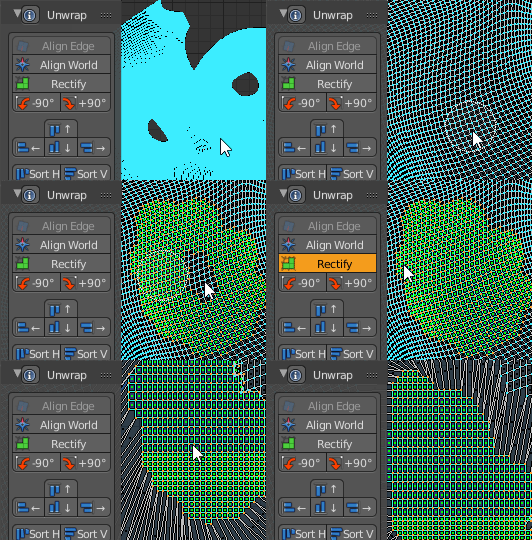 Also ... I think I fixed the rectify bug on high density meshes. I thought this would have been a lot more difficult to solve but I actually managed to improve a few things include restoring selections & modes after rectify. Will be in the next update
 -
Re: 3dsMax: Make Planar coming out crooked
 I may have solved whit with a Reset XForm, I have to jet to dinner and will check when I get back. Fundamentally what does Reset XForm DO? Why is IT the solution for so many things and why does it -get- messed up to begin with?
>14357 results