Search
-
Re: [UE4] High Tech Environment
 Hey Dustinmaertz, I'd say you're off to a good start. Here's some crit: I have no idea where I'm supposed to look. There is no focal point. My eye goes straight to the brightest point, which is the door with the strong blue emissive. If you want that as your focal point, you'd need to shift your camera so that it's in one…
 -
Re: Sketchbook: Willow Paquette

 I am currently in the market for a new Games Industry job as an Environment Artist. One studio that I have applied to has given me an art test with the expression that I could show the work in my portfolio in any way that I want. I am going to post updates on it here as I go. To summarize the test, it is a fully lit sci-fi…
 -
Re: Anime Process + Shader Techniques

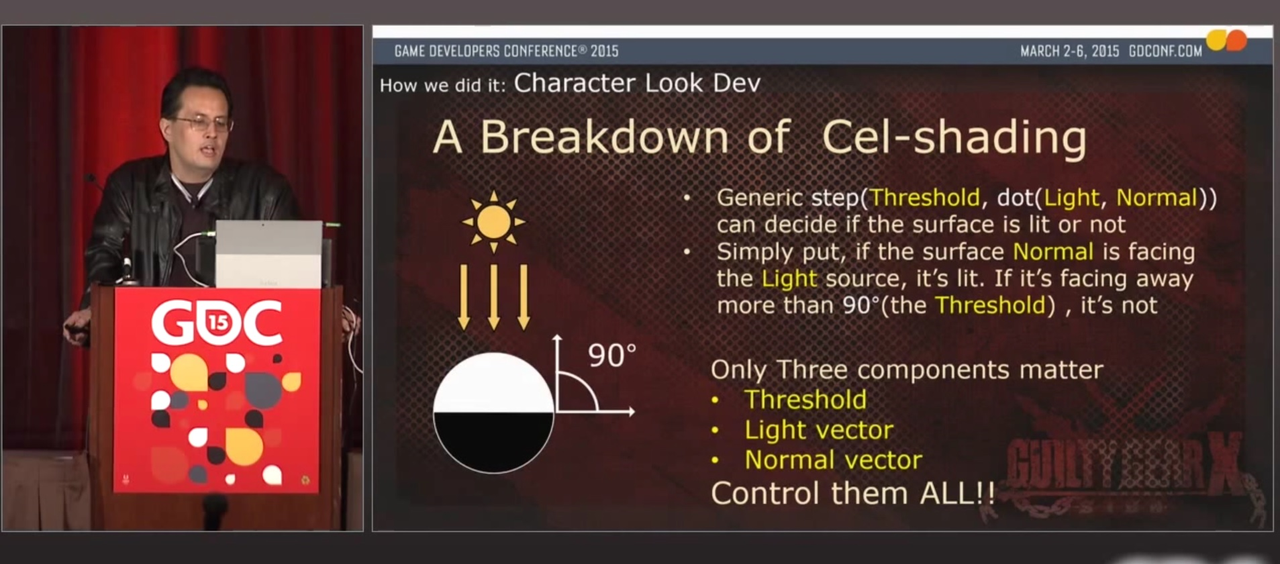 It doesn't look like you're using the step function in your shader, and it's absolutely necessary to make the sharp shadowing. They mention it in the GDC presentation on this slide: So you take the dot product (also called "scalar" product) between the vertex-to-light vector (going from the vertex to the light position)…
 -
Re: [3ds max] how to stack similar UV's?
 There is the copy and paste UV function inside the UV editor. If the shells are the same then you can select the UV you which to stack and hit copy then select the UV you wish to stack it on top of and hit paste. This functionality has gotten better in the later versions of Max particularly 2017 and up. Another method…
 -
Re: Polar Science Facility - UDK
 Adam, the materials on the ground are indeed decals. These are water patterns, blood stains, and footprints with both water/blood in them. They all use the same shader that the tank is using. The shader is highly customizable, and it uses switches to turn functions on and off. This way the shader can be around 200…
 -
Re: Basic Maxscript Questions
 1. I'm not sure we're talking about the same thing. For example, in the posted snippet, if I remove the if state and just have I get the following error when trying to run the script "-- Type error: Call needs function or class, got: undefined". I assume that it is either because i have a syntax error where the function…
 -
Re: Maxscript "walkcycle_Creator" WIP
 Here is a script i went ahead and added a bunch of comments to explain what is being done. I got a little lazy toward the end but i'm sure you can figure out what its for. It is a script which automatically formats a function for you with in the listener that creates a custom spline shape. I used this to create controllers…
 -
Re: Z-Sphere retopology cant make verticies show
 If you click on the background/canvas the junction check marks will disappear. Click on a junction to keep drawing. Press 'A' to see a preview of the new topology to check the integrity of the mesh. Hold shift and click on a junction to draw from that point.
 -
Re: Unity 3d Simple Solve (CODING)
 var SecondaryWeapon = false; var CurrentWeapon = 0; private var LastSelection = 0; function Update (){ if (Input.GetKeyDown ("space")){ CheckValues(); } } function CheckValues(){ if (CurrentWeapon == LastSelection){ CheckSecondaryWeapon(); } if (CurrentWeapon == 65 && SecondaryWeapon == false) { print ("pistol");…
 -
Re: [3DS MAX] PolyUnwrapper 4.0 Released
 I have a couple feature suggestions. In the Render tab, it would be helpful if the W and H fields detected the dimensions of the bitmap currently loaded in the Edit UVWs background, and updated their values accordingly. If non-square, also unlocking the aspect ratio lock button. Is there a way to do this? It would also be…
>13148 results